CHAPTER 10 EXTERNALS/AUXILIARY MECHANISMS
10-32
COPYRIGHT
©
1999 CANON INC. CANON 405/335 REV.0 JAN. 1999 PRINTED IN JAPAN (IMPRIME AU JAPON)
10. Drum Cartridge Cooling Fans
(FM14, FM15, FM16)
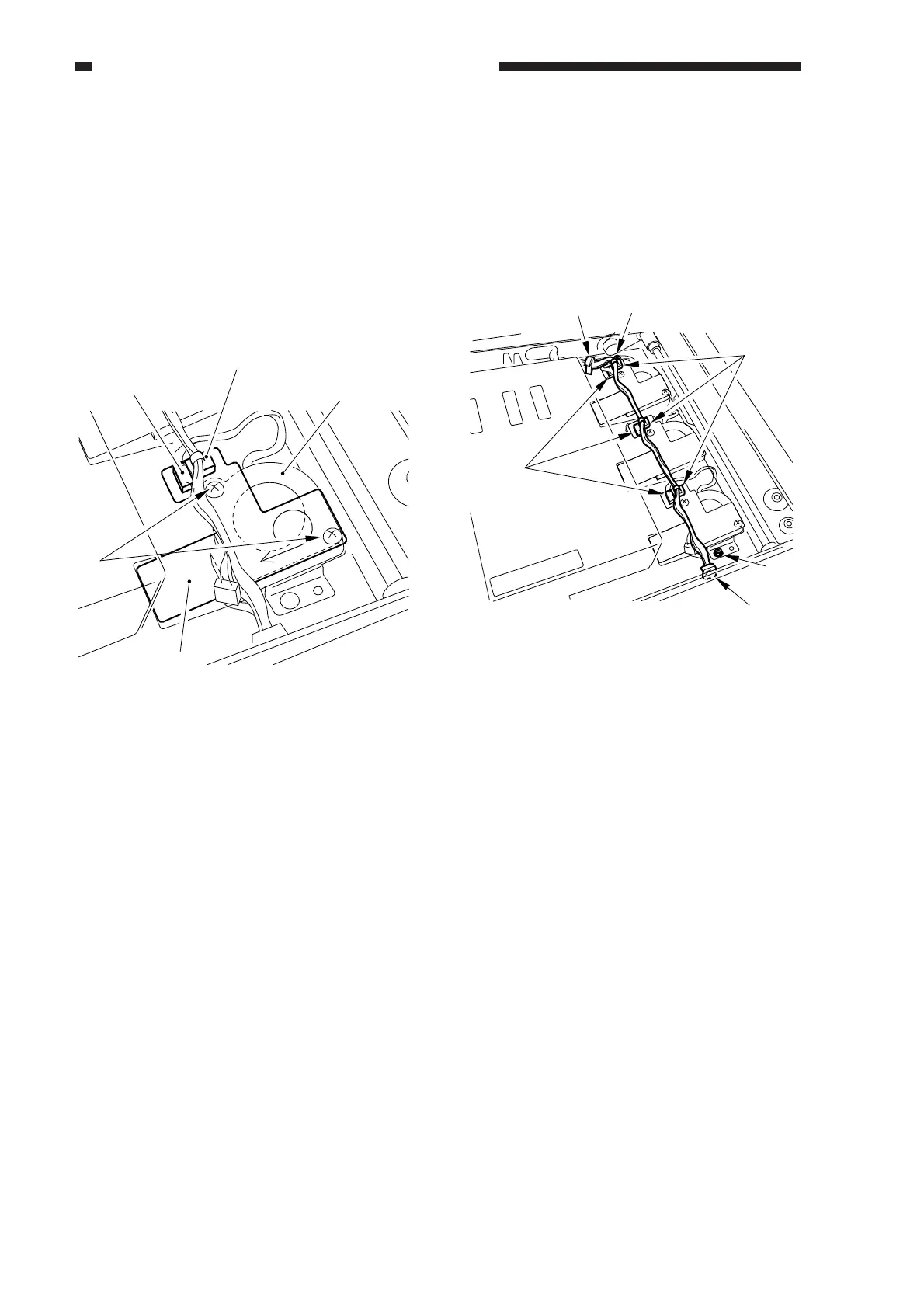
• Removing on Its Own
1) Remove the copyboard glass.
2) Remove the ruse band, and disconnect the
connector.
3) Remove the two screws, and remove the
stay.
4) Remove the fan.
Figure 10-546
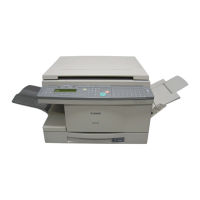
• Removing the Three Fans at the Same
Time
1) Remove the copyboard glass.
2) Remove the wire saddle 1(rear, front).
3) Remove the ruse band [2], and disconnect
the connector [3].
Figure 10-547
4) Remove the two screws 4 (rear, front).
5) Remove the stay, and detach the fan.
[1]
[2]
[3]
[4]
FM14
[1]
[1]
[2]
[3]
[4]
[4]



 To Next Page