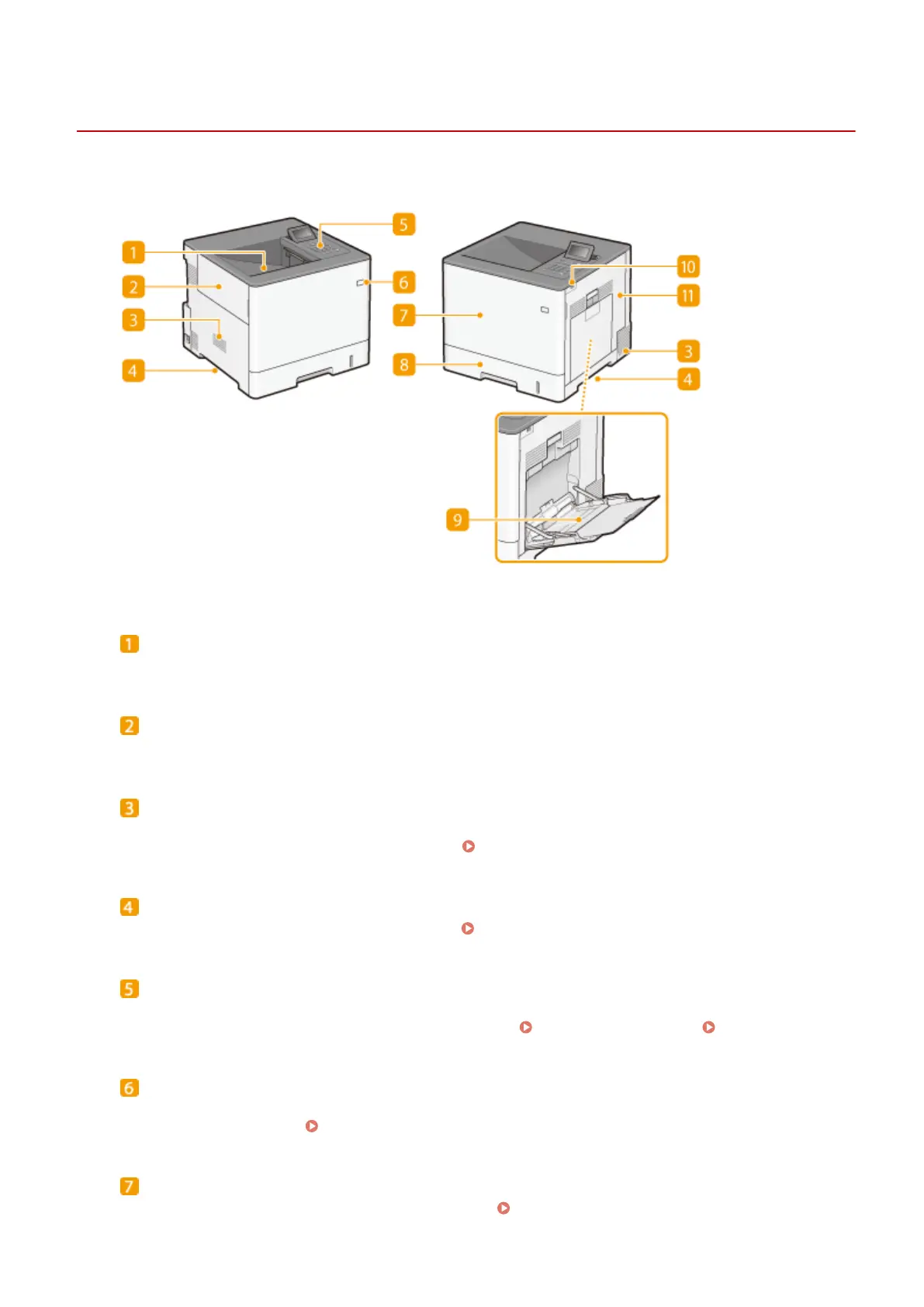
Front Side
0YSF-008
Output tray
Printed paper is output to the output tray.
Left cover
Open the left cover when replacing the waste toner container.
Ventilation slot
Air from inside the machine is vented out to cool down the inside of the machine. Note that placing objects in
front of the ventilation slots prevents ventilation. Installation(P. 3)
Lift handles
Hold the lift handles when carrying the machine. Relocating the Machine(P. 574)
Operation panel
The operation panel consists of numeric keys, a display, status indicators, etc. You can perform all the
operations and specify settings from the operation panel. Operation Panel(P. 24) Display(P. 27)
Power switch
Press the power switch to turn ON the power. When turning OFF the power, do not use this switch, but follow
the procedures shown in
Turning OFF the Power (Performing a Shutdown)(P. 34) .
Front cover
Open the front cover when replacing toner cartridges.
How to Replace Toner Cartridges(P. 569)
Basic Operations
17



 To Next Page