[Report] The history of up to 16 documents printed as setting lists and reports is displayed (up
to 128 documents when the SD card is installed).
[E-Mail Print] The history of up to 16 e-mails printed after received is displayed (up to 128
documents when the SD card is installed).
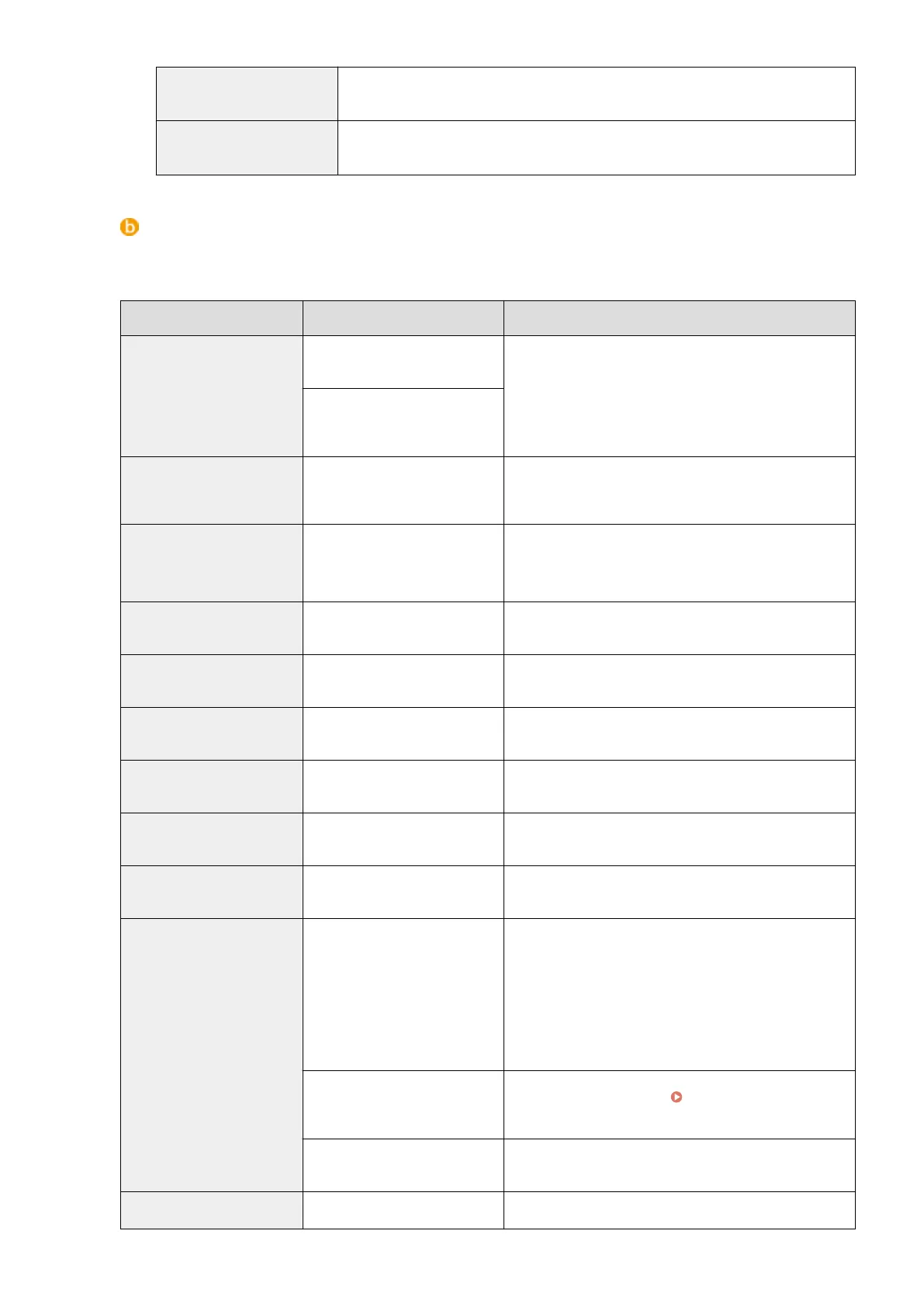
[Job Log] (E-Mail RX)
The e-mail reception history shows up to 96 e-mails. If an error occurs during e-mail reception, the applicable
error code is displayed in [RX Results].
Error Code Cause Action
407
The POP3 mail server was
disconnected.
● Consult your network administrator.
● If the error occurs frequently with the same e-mail
data, check whether the e-mail data is normal.
Data of 1 KB (1024 bytes) could
not be received within 10
minutes during e-mail reception.
408
The "ERR" response was
returned from the POP3 mail
server.
Consult your network administrator.
412
Data of 1 KB (1024 bytes) could
not be received within 10
minutes during e-mail reception.
● Consult your network administrator.
● If the error occurs frequently with the same e-mail
data, check whether the e-mail data is normal.
420
The e-mail data size exceeds 1.5
GB.
If the SD card is installed on the machine, the data size of
an e-mail to send must be 1.5 GB or less.
421
The e-mail message size exceeds
25 MB.
If the SD card is installed on the machine, the message
size of an e-mail to send must be 25 MB or less.
422
The size of an attached le
exceeds 100 MB.
If the SD card is installed on the machine, the size of each
attached le must be 100 MB or less.
423
A received attached le is in an
unsupported format.
Attached les must be in JPEG or TIFF format. Do not
attach any les of other formats to an e-mail to send.
424
More than three les are
attached.
Excessive attached les are not printed.
430
The sender of the received e-
mail is unknown.
Make sure to set a sender before sending e-mails.
431
A divided e-mail has been
received.
Take the following action to prevent e-mails from being
sent as a divided e-mail.
● Reduce the size of an e-mail to send. (Reduce the e-
mail size to be less than the one that causes a divided
e-mail.)
● Congure the application to prevent e-mails from
being divided before sending.
The received e-mail contains
unsupported encoding or
character codes.
For e-mails to send, use the encoding and character codes
supported by the machine. Outline of E-Mail
Print(P. 160)
The received e-mail is in an
unsupported format.
Check the e-mail format. We recommend sending e-mails
in text format.
432
The received data is invalid. Check whether the data of the sent e-mail is normal.
Using Remote UI
347



 To Next Page