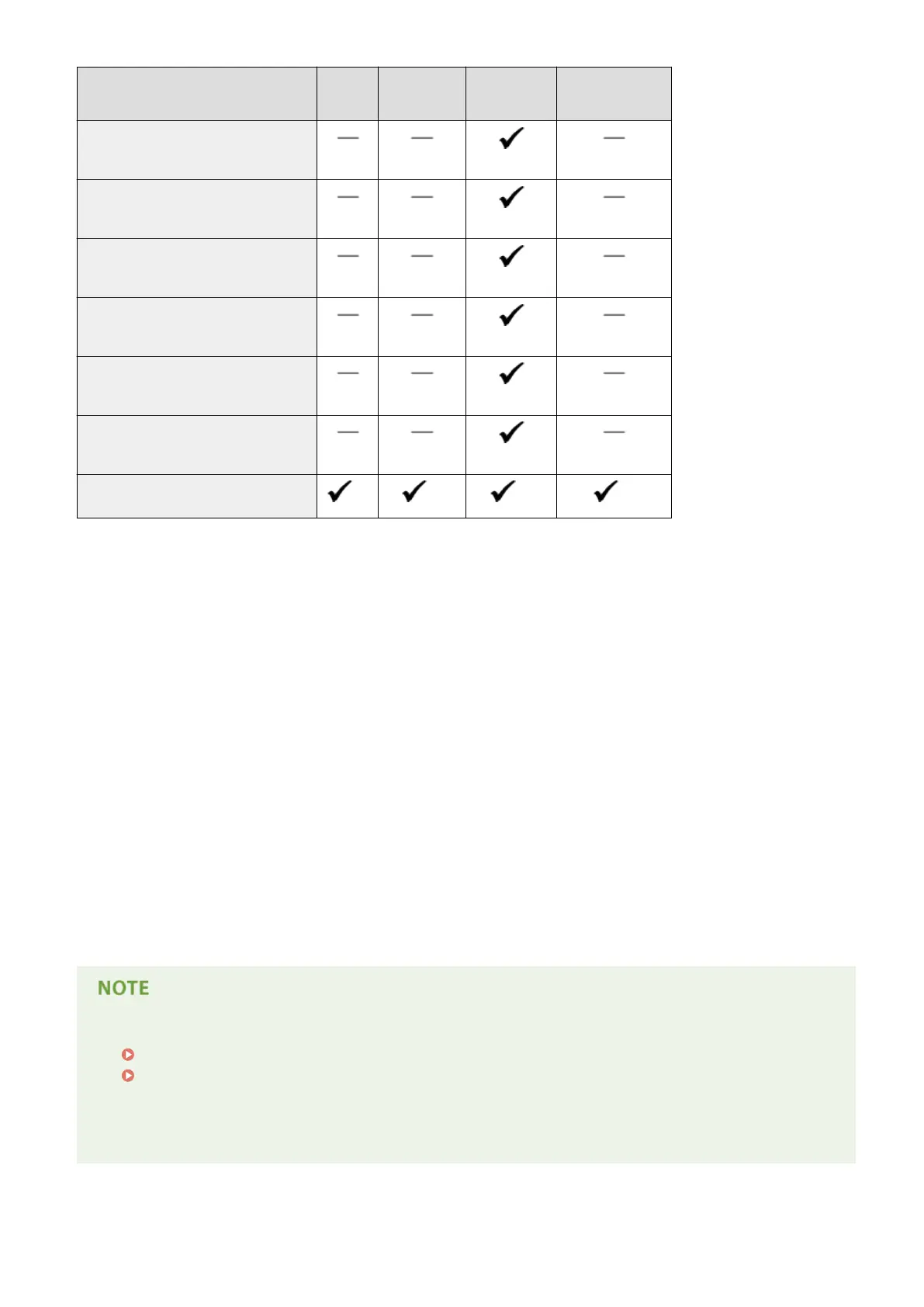
Paper Size Drawer 1 Drawer 2 to 4
(optional)
Multi-Purpose
Tray
Automatic 2-Sided
Printing *1
Envelope NAGAGATA 3
(120.0 x 235.0 mm)
Envelope YOUGATANAGA 3 (Younaga 3)
(235.0 x 120.0 mm)
Envelope No. 10 (COM10)
(104.7 x 241.3 mm)
Envelope Monarch
(98.4 x 190.5 mm)
Envelope C5 (ISO-C5)
(162.0 x 229.0 mm)
Envelope DL
(110.0 x 220.0 mm)
Custom Paper Size
*3
*4
*5
*6
*1
Automatic 2-sided printing is available without replacing paper.
*2
Can be loaded in portrait orientation. Automatic 2-sided printing is only possible when the paper is loaded in
landscape orientation.
*3
The following sizes are available:
● When loaded in portrait orientation (only with the UFR II printer driver used):
148.0 to 215.9 mm, 148.0 to 215.9 mm
● When loaded in landscape orientation:
101.6 to 215.9 mm, 148.0 to 297.0 mm
*4
The following sizes are available:
● When loaded in portrait orientation (only with the UFR II printer driver used):
148.0 to 215.9 mm, 148.0 to 215.9 mm
●
When loaded in landscape orientation:
101.6 to 215.9 mm, 148.0 to 355.6 mm
*5
The following sizes are available:
●
When loaded in portrait orientation (only with the UFR II printer driver used):
127.0 to 215.9 mm, 127.0 to 215.9 mm
●
When loaded in landscape orientation:
76.2 to 215.9 mm, 127.0 to 355.6 mm
*6
The following sizes are available:
● 148.0 to 215.9 mm, 210.0 to 355.6 mm
● The default setting of paper size is <A4>. Change the paper size setting when using a different size of paper.
Specifying Paper Size and Type in the Paper Drawer(P. 58)
Specifying Paper Size and Type in the Multi-Purpose Tray(P. 60)
● Some paper sizes may not be displayed depending on the printer driver. If the paper size that you want to
use is not displayed, download the UFR II / UFRII LT V4 printer driver from the Canon website. If you cannot
download, contact your local authorized Canon dealer or the Canon help line.
Appendix
622



 To Next Page