102
Settings for sending an e-mail notification to a specified recipient when an event is triggered.
E-mail Notification
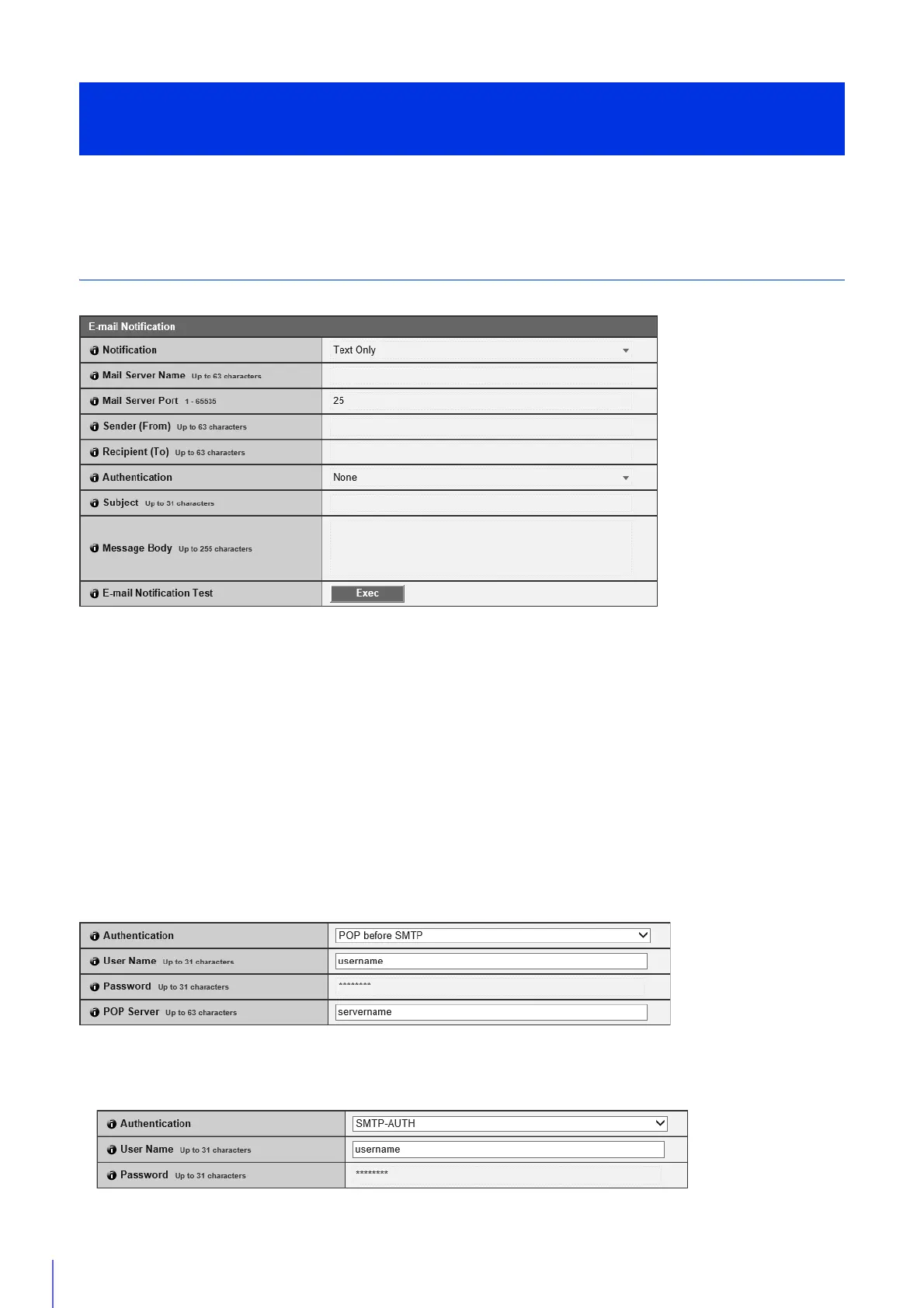
Set the mail server to be used for e-mail notifications and the content of the e-mail to be sent.
[Notification]
[Subject] and [Body] are text.
If you set [Text with Image], an image (JPEG format) captured immediately before the event will be attached.
[Mail Server Name]
Enter the host name or IP address of the SMTP server.
[Mail Server Port]
Enter the port number for the SMTP server.
[Sender (From)]
Enter the e-mail address of the sender.
[Recipient (To)]
Enter the e-mail address of the recipient.
[Authentication]
Select an authentication method suited to the destination SMTP server.
[User Name], [Password], [POP Server]
Enter the user name and password needed for authentication, and the POP server host name or IP address when e-mail
authentication is set to [POP before SMTP].
Set E-mail Notification
[Video Record] > [E-mail Notification]



 To Next Page