Admin Viewer/VB Viewer
181
Tour Route Settings
The number of tour routes you can register and the number of presets that can be toured per route are as follows.
• Maximum 5 routes, maximum 60 presets per route.
• Maximum 1 route, maximum 20 presets per route.
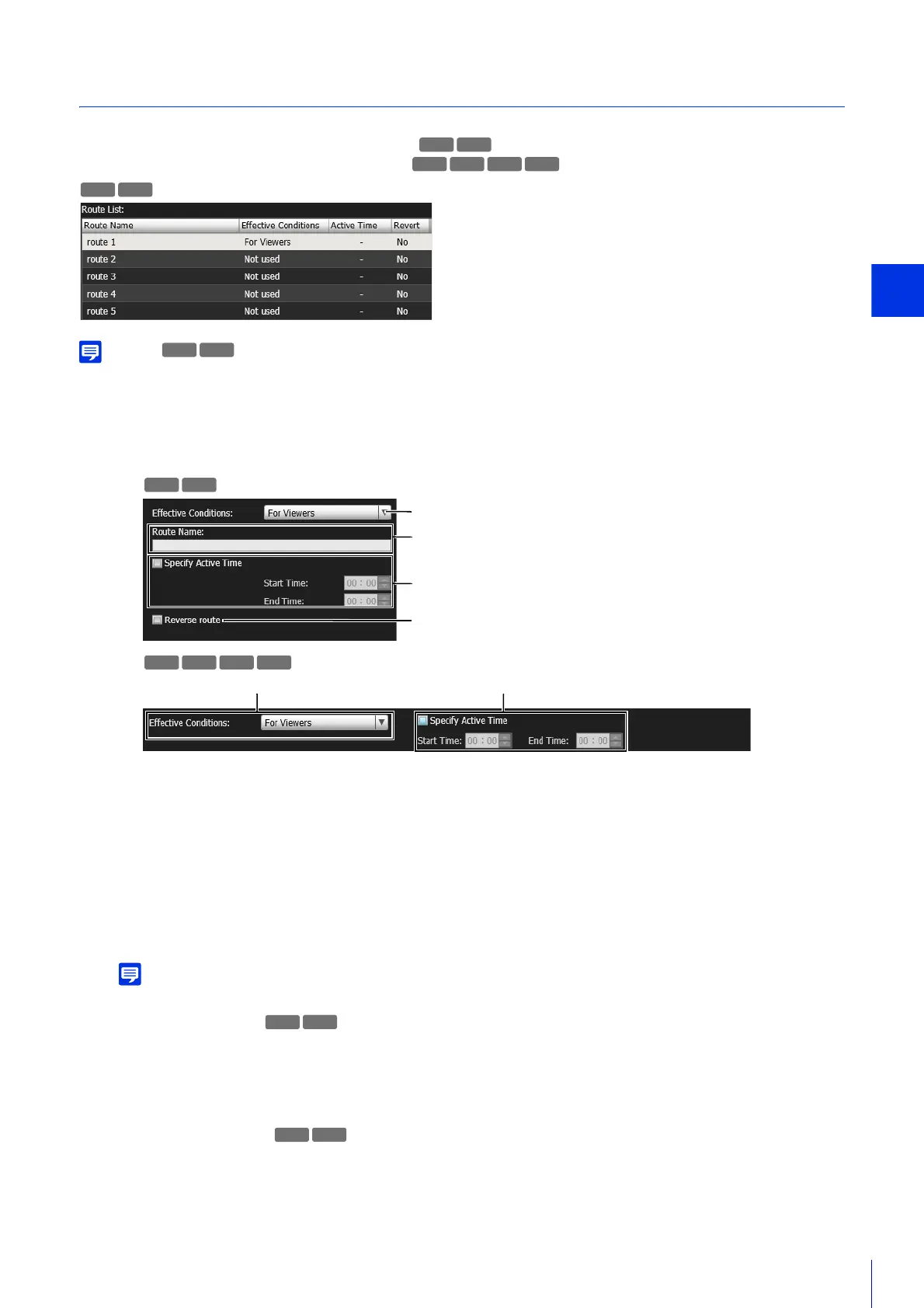
If the effective conditions or active times of the registered tour routes conflict, the routes listed higher in the [Route List] take precedence.
(1) [Effective Conditions]
Select the conditions to preform a preset tour.
[Not used]
Preset tour is not performed.
[For Viewers]
Preset tour is performed when a Viewer is connected to the camera.
[Always]
Preset tour is always performed.
When [Not used] is selected, the subsequent preset tour route settings cannot be configured.
(2) [Route Name]
Enter the tour route name of 64 characters or less.
(3) Active Time Settings
Select [Specify Active Time] to configure a preset tour at a predetermined time, and enter the start time and
end time for the preset tour.
(4) [Reverse route]
If you select this, the preset tour order in [Tour Presets List] will be reversed.
You can select multiple presets.
M640 M741 M740
R11 R10
1
Select the tour route to configure from [Route List].
2
Settings for Tour Route Names and Usage
3
Select a preset to tour from the Select Preset list.
R11 R10
M641 M640 M741



 To Next Page