22
Camera Angle Setting Tool (P. 45)
This tool allows you to adjust the camera angle during installation by viewing video from the camera on the computer
screen via a network.
Installer location: Setup CD-ROM > [Applications] folder > VBToolsInstall.exe
Admin Tools Certificate
This is a digital certificate for using Admin Viewer and Admin Tools.
Installer location: Setup CD-ROM > [Applications] folder > VBToolsInstall.exe
Admin Viewer/Admin Tools with Proxy Authentication Support
Use these when going through a proxy server with proxy authentication.
Software location: Setup CD-ROM > ProxyAuthSupport folder
RM-Lite
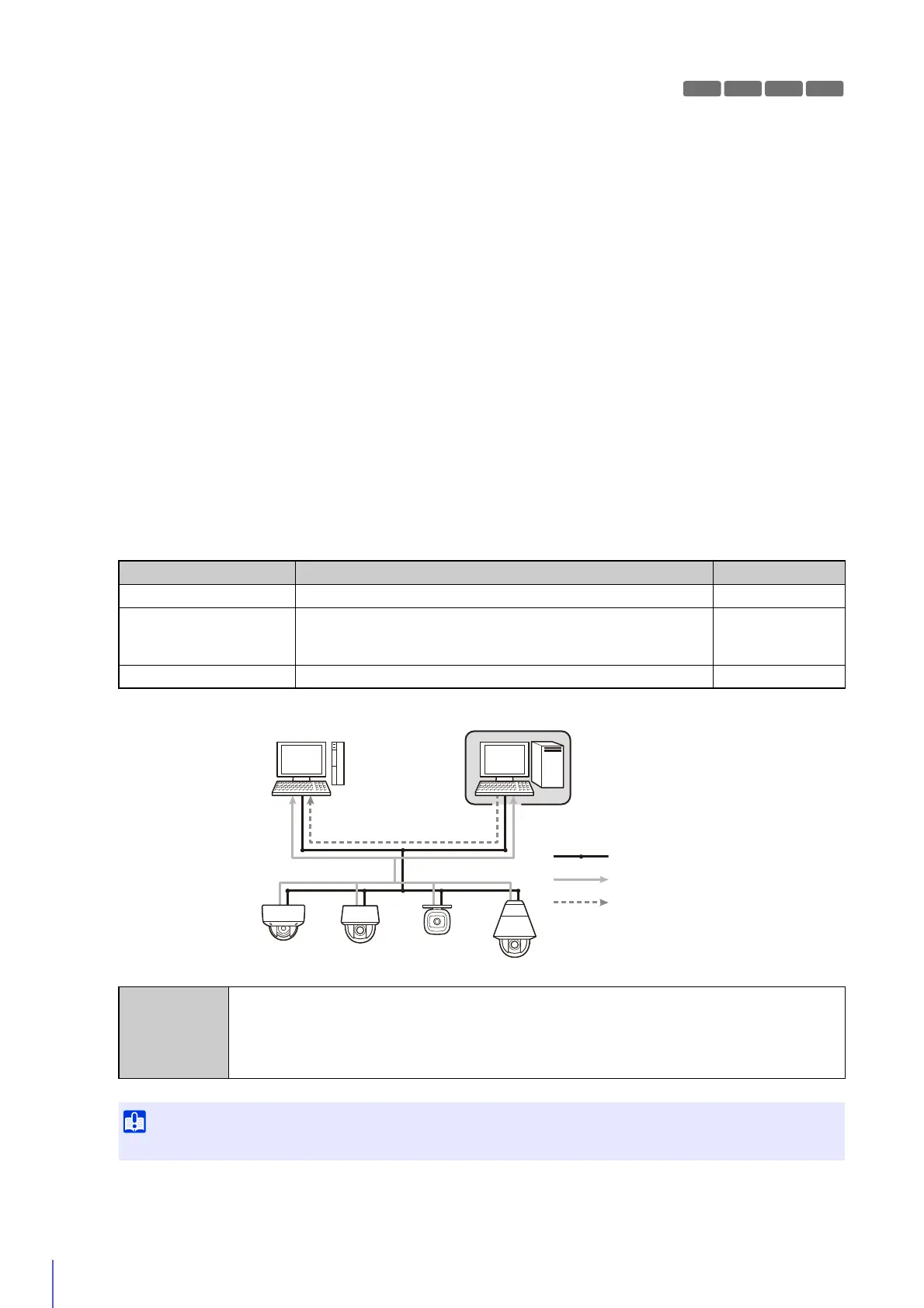
This software displays, records and plays back video from up to four cameras via a network.
Software location: Setup CD-ROM > [Applications] folder > RMLiteInstall.exe
RM-Lite Software
Type Overview License
RM-Lite Storage Server Up to four cameras can be registered to record video (JPEG). 1 license
RM-Lite Viewer
Plays video recorded in the storage server and displays live video
(JPEG/H.264) from the camera.
Up to four cameras can be registered for the viewer.
1 license
RM-Lite Manager Use register cameras and configure recording schedules. 1 license
RM-Lite Viewer RM-Lite Storage Server
Network
Flow of video from the camera
Flow of recorded video
Supported
cameras
VB-R11VE, VB-R11, VB-R10VE, VB-M641VE, VB-M641V, VB-M640VE, VB-M640V, VB-M741LE,
VB-M740E, VB-H43, VB-H630VE, VB-H630D, VB-H730F, VB-M42, VB-M620VE, VB-M620D,
VB-M720F, VB-S30D, VB-S31D, VB-S800D, VB-S900F, VB-S805D, VB-S905F, VB-H41,
VB-H610VE, VB-H610D, VB-H710F, VB-M40, VB-M600VE, VB-M600D, VB-M700F, VB-C60,
VB-C500VD/VB-C500D, VB-C300, VB-C50i/VB-C50iR, VB-C50FSi/VB-C50Fi
To add the RM-Lite Viewer or RM-Lite Manager, you must purchase RM-Lite-V (sold separately).



 To Next Page