Camera Setup
37
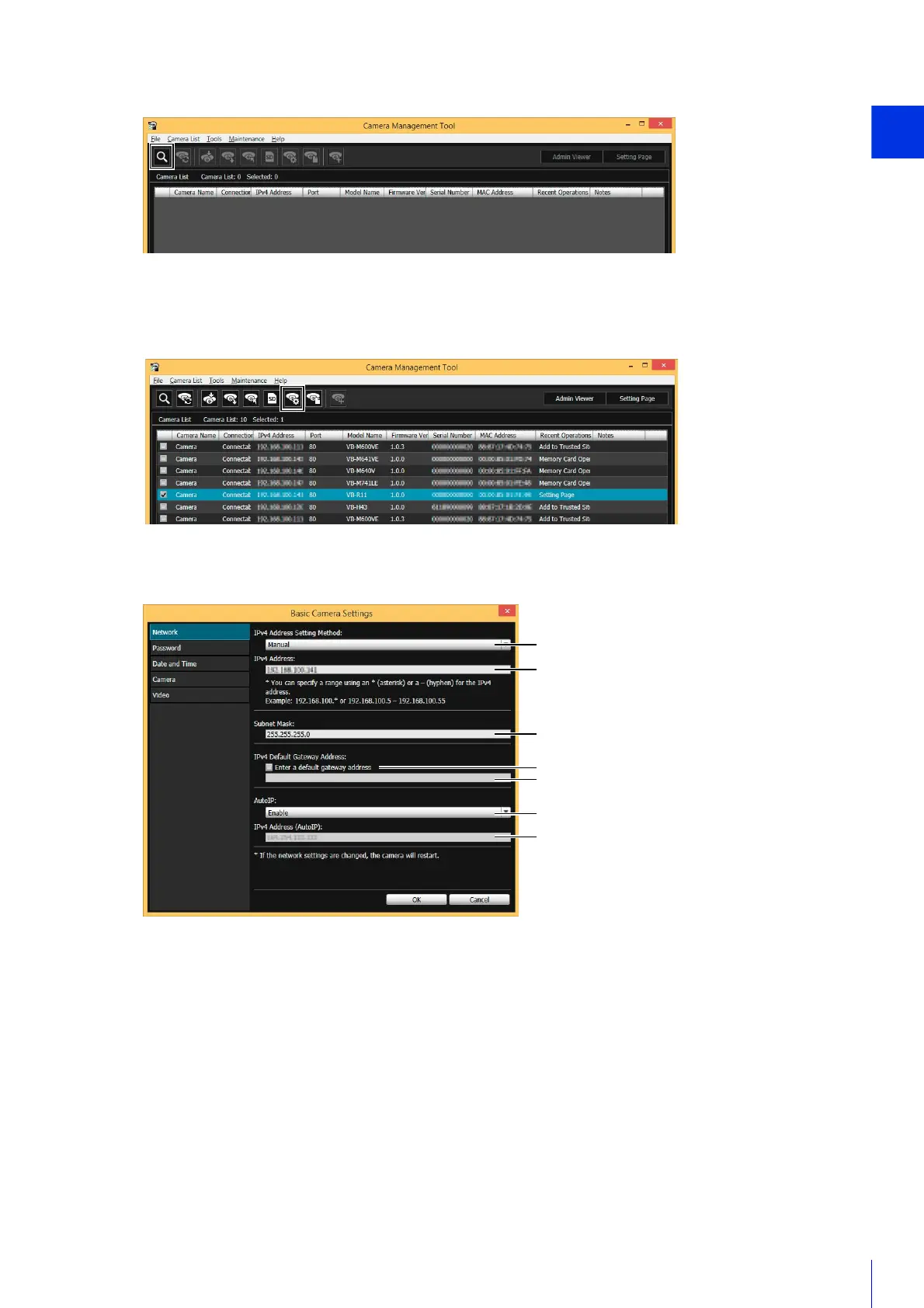
The [Basic Camera Settings] dialog box appears.
(1) [IPv4 Address Setting Method]
Select the method for setting the IPv4 address.
If [Manual] is selected, directly enter values that suit the environment in which the camera is used.
If [Auto (DHCP)] is selected, the value automatically acquired from the DHCP server will be entered in [IPv4
Address], [Subnet Mask] and [IPv4 Default Gateway Address].
(2) [IPv4 Address]
If you selected [IPv4 Address Setting Method] > [Manual], enter a fixed IPv4 address.
(3) [Subnet Mask]
If you selected [IPv4 Address Setting Method] > [Manual], enter the designated subnet mask values for each
network.
(4) [Enter a default gateway address]
Select this to manually set the default gateway address.
1
Click the [Search Camera] icon.
2
Detected cameras will appear in the camera list.
3
Select a camera in the camera list and click the [Basic Camera Settings] icon.
4
Set each of the [Network] items.



 To Next Page