21 CHC i83 User Manual
>
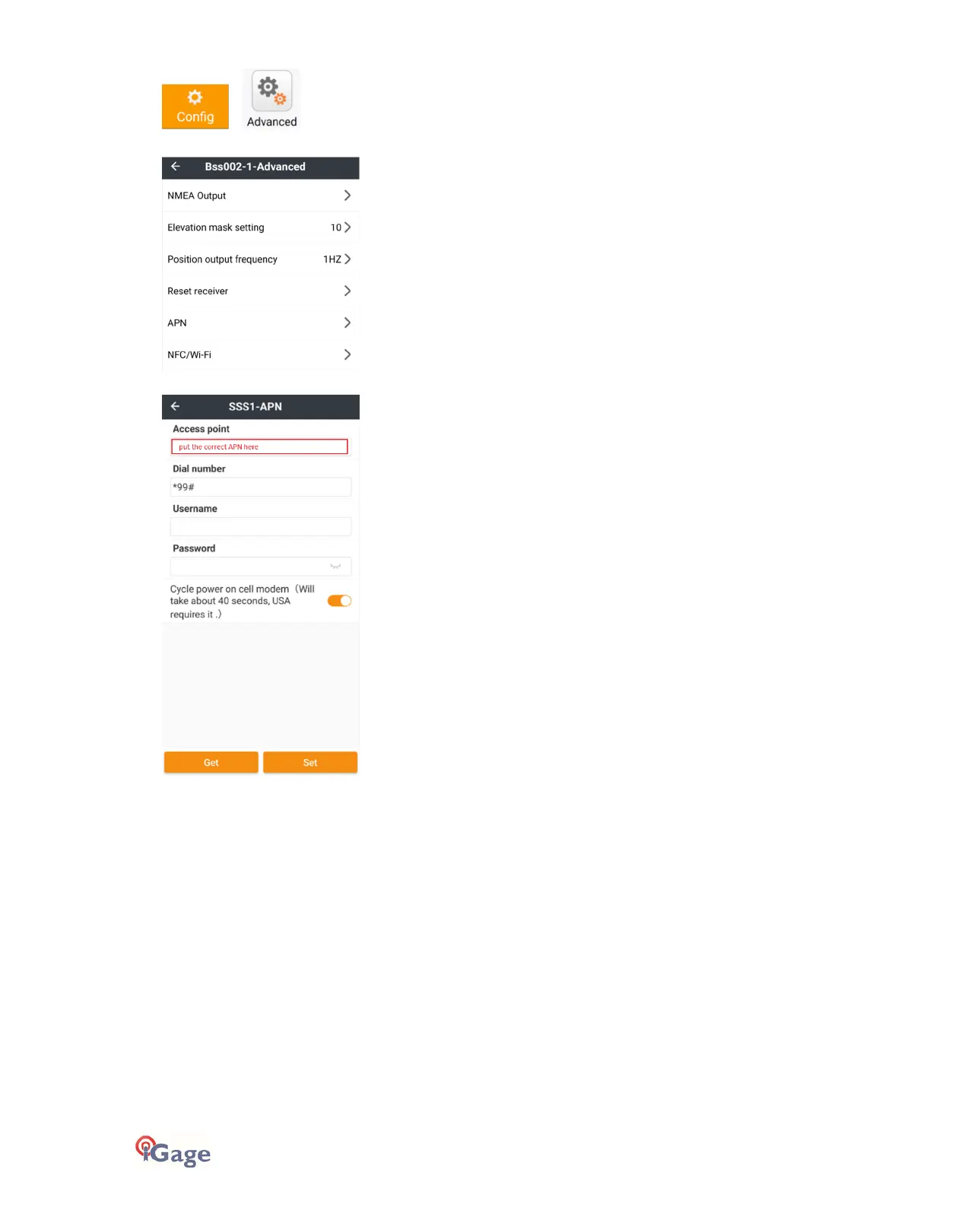
Click the APN selection:
Set the cellular modem
APN
(Access Point Name),
Dialing
number
string, SIM
Username
and SIM
Password
:
If you are using a simbase card, the APN will be
simbase
with all lower-case characters.
In the USA, the
Dial number
normally is
*99#
and both the
Username
and
Password
will be blank.
Important: It is necessary to power off the modem, wait 30 seconds then turn the modem back on after changing the
Access Point Name
(APN). Enable the
Cycle power…
option to automatically turn off the cellular modem, wait 40-
seconds, then turn the modem back on again.
Configuring the APN and Dialing parameters with the Web Interface
Follow the Wi-Fi connection instructions ‘Connecting to a PC or Smartphone via Wi-Fi’ on page 18.
Click on the left bar item
Network Setting
then
Network: Mobile Network Setting
:



 To Next Page