33 CHC i83 User Manual
Use this export button to write
full rate
(not decimated),
full constellation
RINEX files for use in external applications.
RINEX files generated with this export function have the correct User, Agency, HI, Antenna Type loaded into the
headers.
Submitting an Occupation to OPUS
Once the new occupations have downloaded you can submit an occupation to NGS OPUS, NGS OPUS-RS, RTX, AUSPOS.
IBGE or post-process them using other software / services.
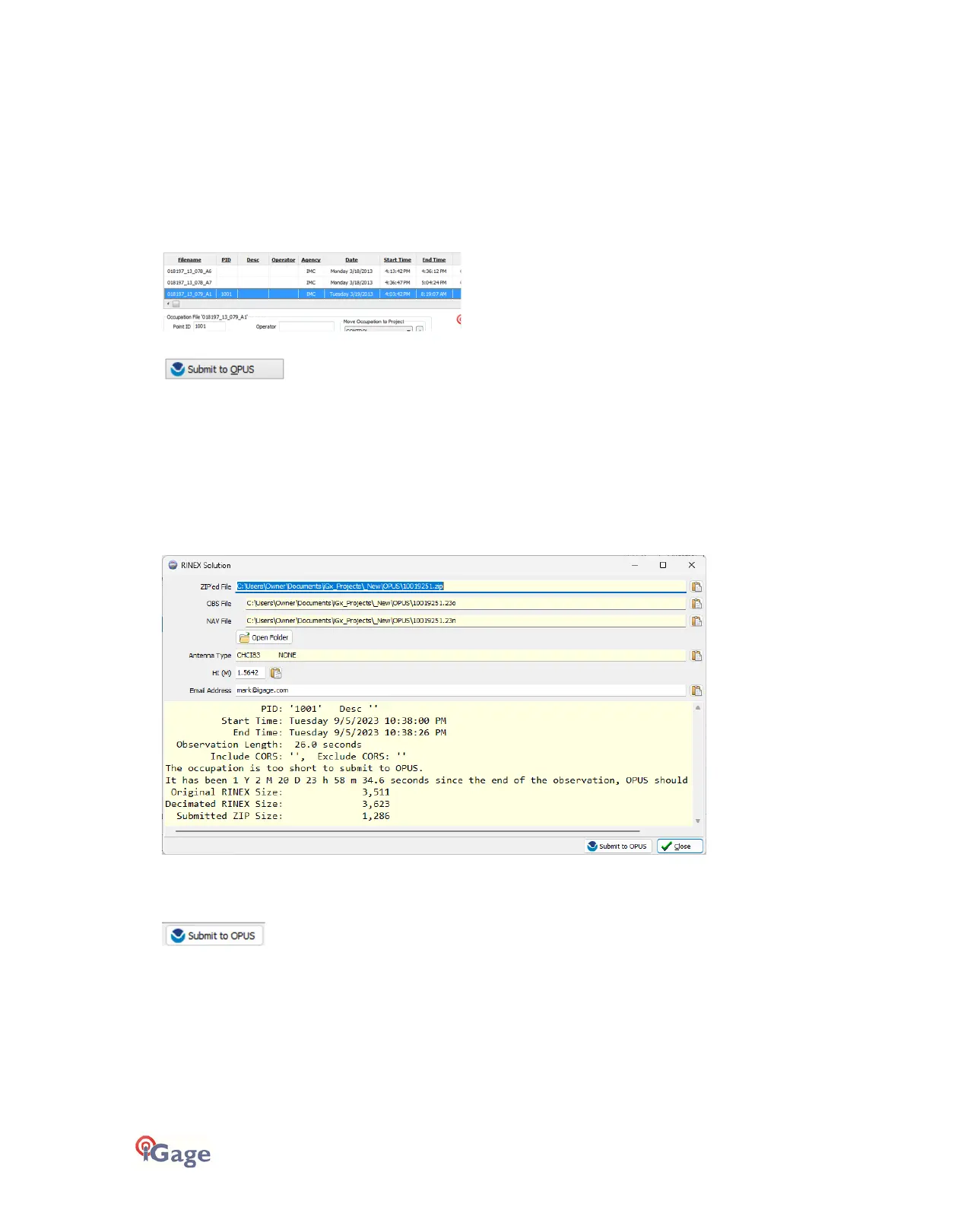
Click on an occupation to select it:
Click on the 'Submit to OPUS' button:
The currently selected occupation will be processed and prepared for upload to OPUS:
1. The file is decimated to 15-second epochs, header information is stuffed.
2. The file is run through TEQC to insure it will be acceptable to OPUS.
3. An Observation file and a Navigation file are generated.
4. The Observation file is compressed into a ZIP file.
If the ‘Show Advanced Settings’ is set to “Simple” then the program will skip directly to the ‘
Verify Filename to Upload’
screen (shown below.) If ‘Show Advanced Settings’ is set to “Normal”, “Support OPUS-Projects” or “Advanced” then this
‘RINEX Solution’ helper screen is shown:
The program will suggest which service (OPUS-Static or OPUS-RS) and list the time since the end of the occupation with
notes about the observation.
You can click the 'Submit to OPUS' button:
to automatically open an internet browser, which will load the NGS OPUS Submission form. After the web page has
loaded, the program will automatically fill in the ‘Antenna Type’, the ‘Antenna Height’ and the ‘Email address.’
Next the program will prompt you with instructions for automatically entering the Zipped observation file name into the
browse dialog:



 To Next Page