CHC i83 User Manual 26
Auto connection Checked (TRUE)
Connection Protocol NTRIP
User Name user
Password user
Port 2101
Mount Point RTCM32
Differential Data: RTCM3.2
Click on Confirm.
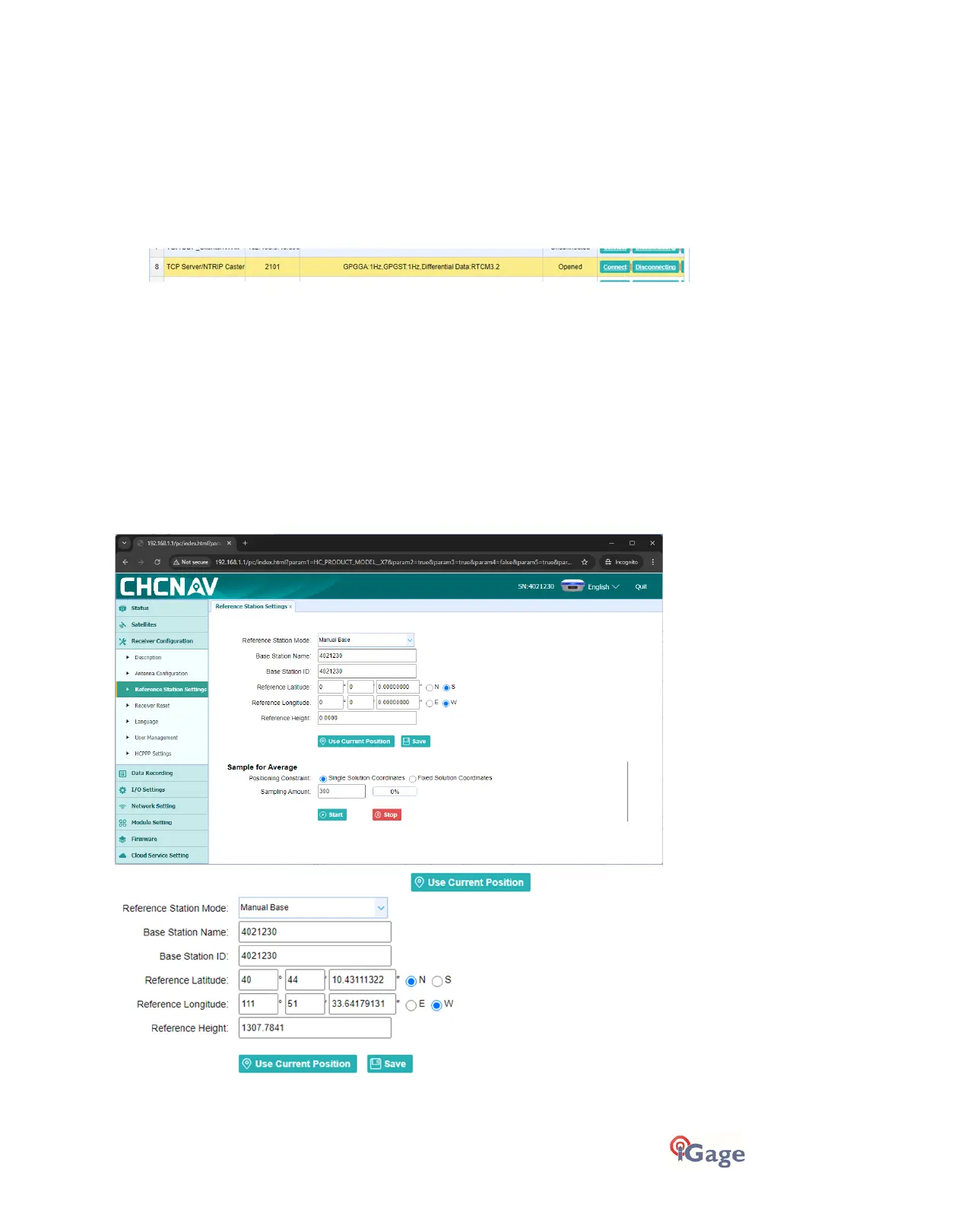
6. The port will now display as ‘opened’:
The NTRIP configuration is complete and will remain available/active until you change it or do a factory reset on the
receiver.
You must setup the receiver as a Base with a location that matches the location.
Configure the Caster Receiver as a Base
Setup the head as a Base using Carlson SurvCE/SurvPC, X-PAD, Field Genius, LandStar or via the Web interface directly
(shown below).
To configure from the web interface
Login to the receiver as shown above.
Click on
Receiver Configuration
, then
Reference Station Settings
:
Set
Reference Station Mode
=
Manual Base
. Click on :
The receiver’s autonomous position will be loaded, click
Save
to start Base operation at the entered coordinate.



 To Next Page