CHC i83 User Manual 28
The selection can be made within LandStar8 when configuring a Base profile, from the Config > GNSS static recording
button and from the Wi-Fi interface.
RINEX2
is no longer viable because the legacy tool TEQC which the NGS and most other tools use to process RINEX2
crashes when BeiDou satellite PRN’s higher than 47 are encountered. This means that if one of the new BeiDou satellites
is in view at any time during your observation, processing will crash. In addition, it is not possible to fully encapsulate all
modern signals within RINEX2 files, so there will also be a loss of signal recording.
RINEX3
is the correct choice for submitting GNSS files to OPUS as it begins to process full GNSS data. However, OPUS will
not accept large observation files so if you collect at higher than 15-second observation rates, you may need to
manually decimate files prior to submission.
HCN
format is compressed, and it is possible to create both RINEX2 and RINEX3 files from HCN files. If you want to use
the iGx Download tool you must set the filetype to ‘.HCN’. iGx_Download always allows you to export full rate data,
however it automatically decimates data to 30-second interval when sending to OPUS. With .HCN files and
iGx_Download, you can have high-rate data and send smaller files to OPUS.
Recording Repeating Observation (RINEX) Files
Observation files are limited to 24 hours (1,440 minutes). If you want longer files, continuous recording allows multiple
end-to-end files to be collected. These files can be concatenated after collection.
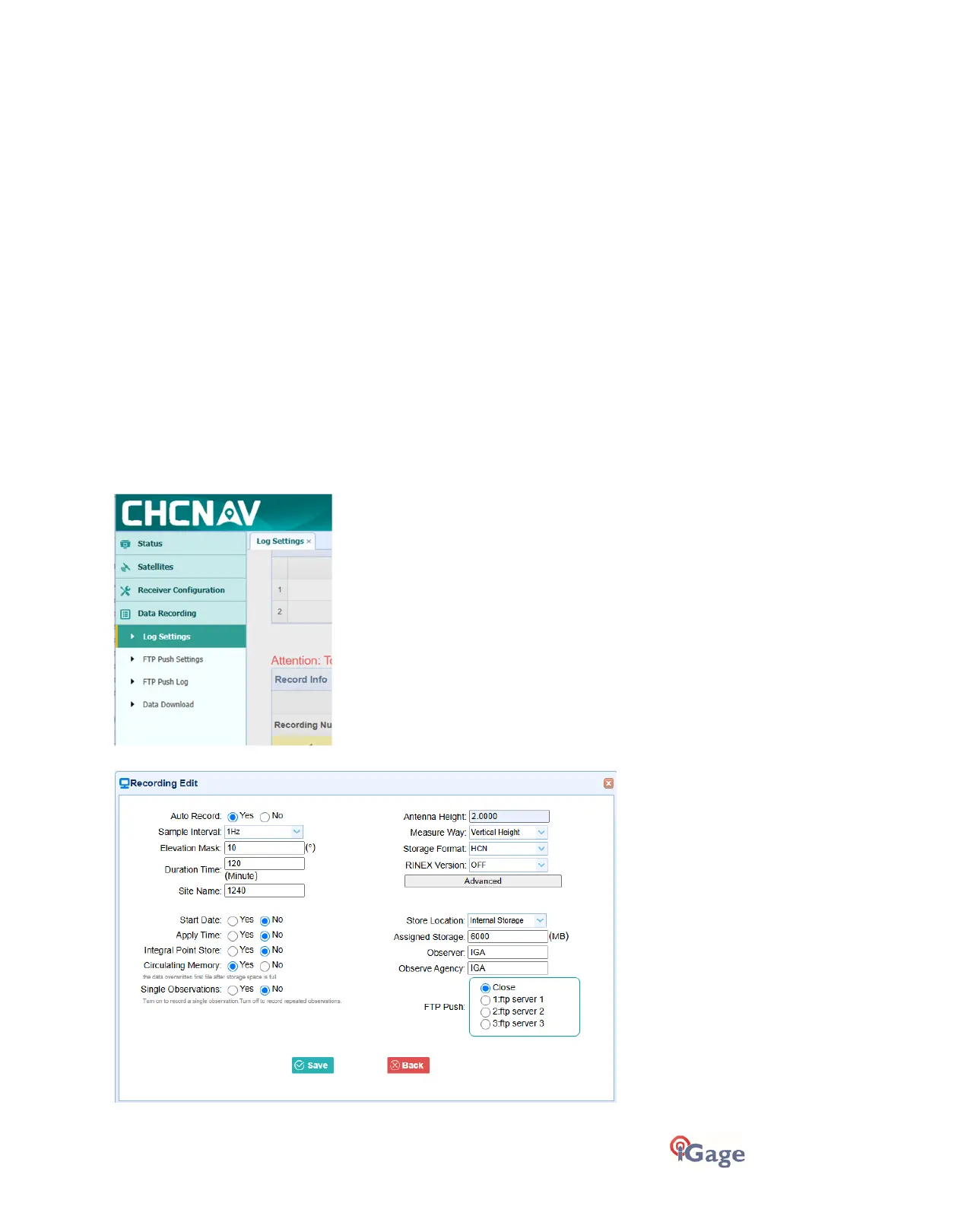
By default, the i83 will record one file and then stop recording. To record continuous files, log into the device web
interface as shown in the section Connecting to a PC or Smartphone via Wi-Fi on page 18.
Click on
Data Recording
, then
Log Settings
:
These are the settings for making multiple 120-minute-(2-hour) files:



 To Next Page