CHC i83 User Manual 34
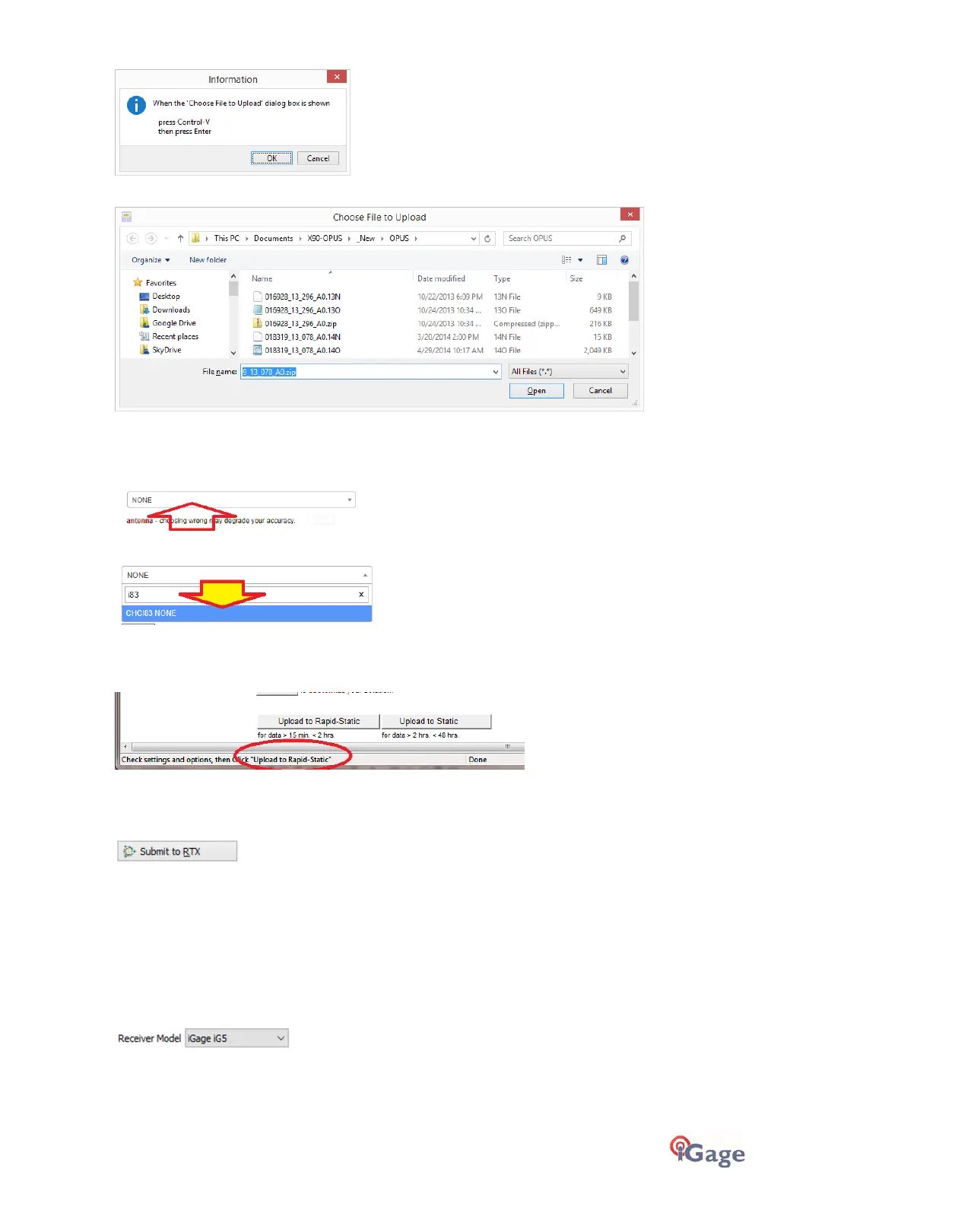
Click OK and then ‘Choose File to Upload’ will be displayed:
Press Control-V, then the ‘Enter’ key on your keyboard. You may also press Control-V, then click the ‘Close’ button with
your mouse.
You will need to manually select the correct antenna type. Click anywhere in the ‘antenna’ selection box:
In the drop-down selection box:
Enter the first few characters of the antenna name and then click on the correct selection to choose the antenna model.
The NGS OPUS Submission form will be ready to submit, check the entries and any extended options that you might
want to use. The status bar will prompt you with the correct submission button:
Press either the ‘Upload to Rapid-Static’ or ‘Upload to Static’ button as directed, and your occupation will be uploaded
to OPUS for processing.
On the configuration tab, you may select the alternative RTX PPP Service provider:
Trimble’s RTX Service
Occupation settings
Setting the Receiver Type
(Hidden when Simple)
When files are downloaded from the receiver, the receiver type is associated with the .HCN file. The ‘Receiver Model’
shows an occupation’s associated hardware type:
If this is consistently incorrect, you can change the device type while the receiver is connected on the ‘Configuration’
tab.



 To Next Page