MDT500 HE - Operator's Manual
Place the unused loader in the proper slot for the fixing,
on the left side of the embosser cover.
To move the embosser somewhere else, when the machine is off remove all electrical
connections and repeat the above-stated operations in the reverse order.
3.4 ELECTRICAL CONNECTIONS
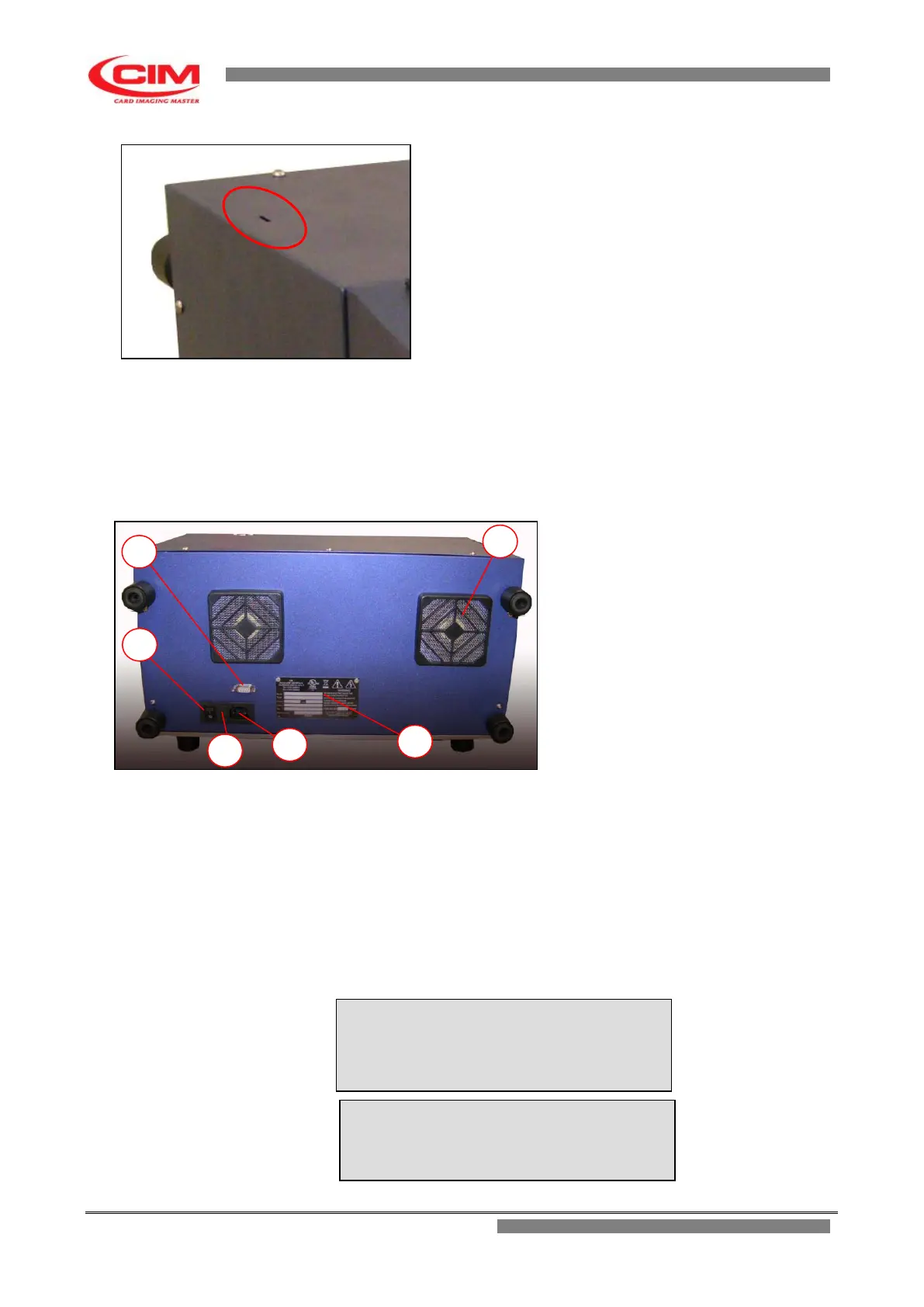
The installation of the embosser MDT500 HE can be easily carried out by accessing the various plugs
for the connections located on the rear panel.
1. SERIAL PLUG FOR PC 9
MALE PIN
2. POWER SWITCH
3. MAINS FILTER AND FUSE
4. SOCKET PA 80 FOR MAINS
CABLE
5. IDENTIFICATION PLATE
6. VENTILATION FILTER GRIDS
Proceed as indicated below:
• Connect the serial cable between the Computer and the Embosser in case
you use the embosser in ON-LINE mode.
• Check that the main AC Voltage corresponds to the value indicated in the
plate.
Before proceeding, note down the information contained in the paragraph
“WARNINGS AND INSTALLATION PRECAUTIONS”
• Connect the power cable.
CAUTION:
Connect only to systems provided with
grounding circuit compliant with the National
System Regulations
CAUTION:
The serial cable must be connected only
when the machine is off.


 To Next Page