MDT500 HE - Operator's Manual
4.4.3. FORMATS
It is one of the key functions to operate a MDT500 HE especially in STAND
ALONE mode.
This function allows to create, modify and remove print formats.
The formats have the same structure and layout of a tag, defining the
position of the required text fields. Each field is provided with specific
settings, such as coordinates, spacing, number and type of characters.
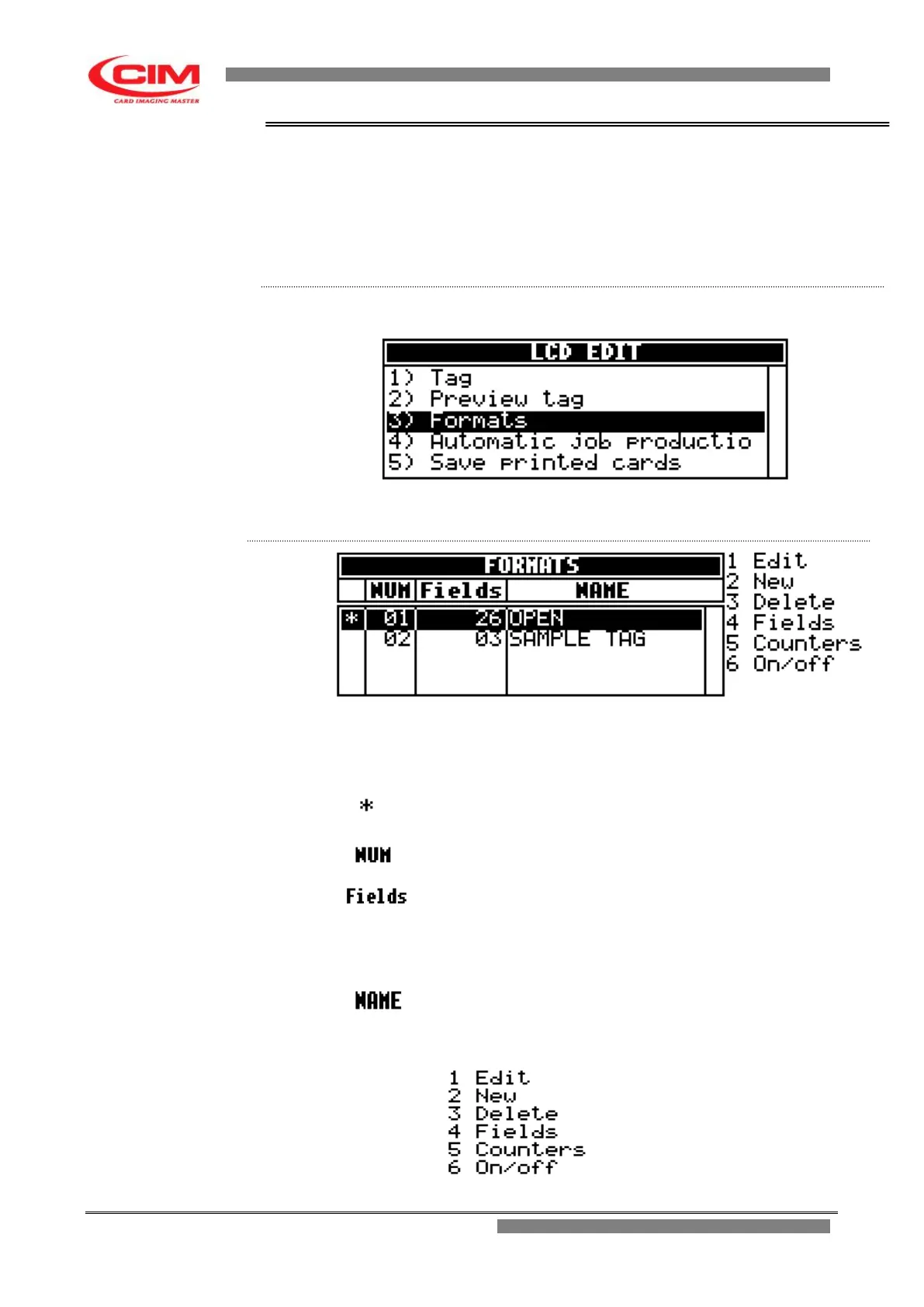
From the “LCD EDIT” menu you can access the Formats function by
pressing the key
3
.
To exit Formats and go back to LCD EDIT press
s
.
Also the main screen of Formats, like the main screen of Tag is displayed
as a chart, made up of 4 columns, each with its own heading.
Each line represents and defines a format previously saved in the machine.
The maximum number of savable formats is 20.
It indicates the active format that will be used to enter data
and to produce the tags.
It identifies the format number.
It identifies the number of fields present in that specific
format.
NOTE:
The maximum number of available fields for each format is
26
It indicates the format name.
Beside the chart and below you can see the list of available utilities that can
be retrieved by pressing the corresponding number on the keyboard.



 To Next Page