MDT500 HE - Operator's Manual
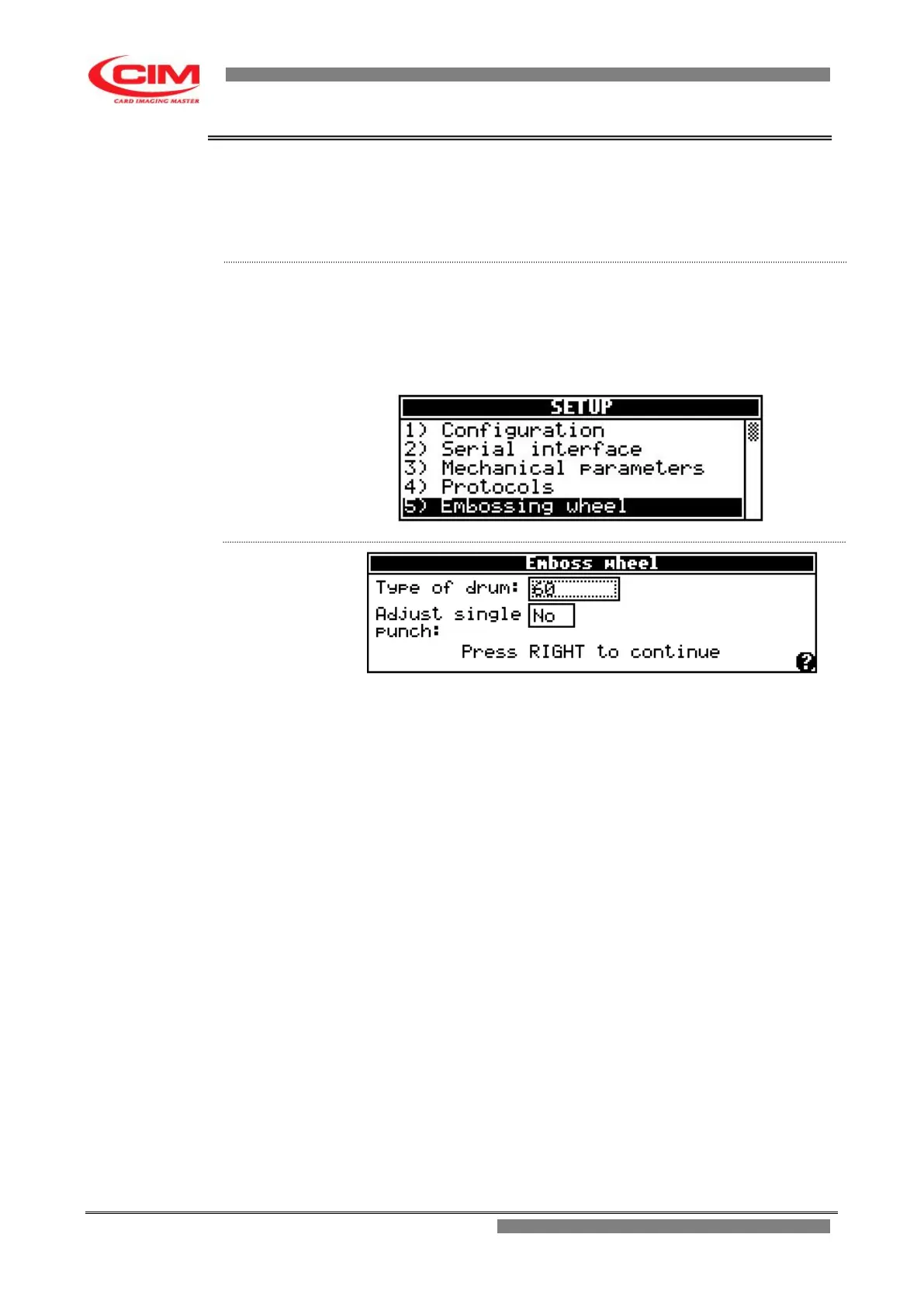
4.5.5. EMBOSSING WHEEL
It indicates which drum configuration and characters layout are installed on
the machine.
The characters listed by the specified drum layout must coincide perfectly
with those really installed on the embosser, as type, font and position.
From the “SETUP” menu you can access the Embossing Wheel function by
pressing key
6
or by moving with the keys
k
or
i
until you reach the
function and then press
b
.
To return to “SETUP” press key
s
.
Type of drum: it specifies which drum configuration exists on the
machine among the defined ones; for example:
60
SPECIAL
*
SERIAL
SPECIAL is the only drum that can be edited in all its
parts while in all the others only the embossing level
can be set in case the "single punch correction" function
is enabled.
With the managing software (optional) and through
serial connection it is possible to load on the machine a
configuration that will be named SERIAL. Such
configuration is overwritten every time a new one is
loaded.
Adjust single The "single punch correction" enables the possibility to
punch adjust the embossing strength specifically for each
character in order to make the relief level as uniform as
possible.



 To Next Page