MDT500 HE - Operator's Manual
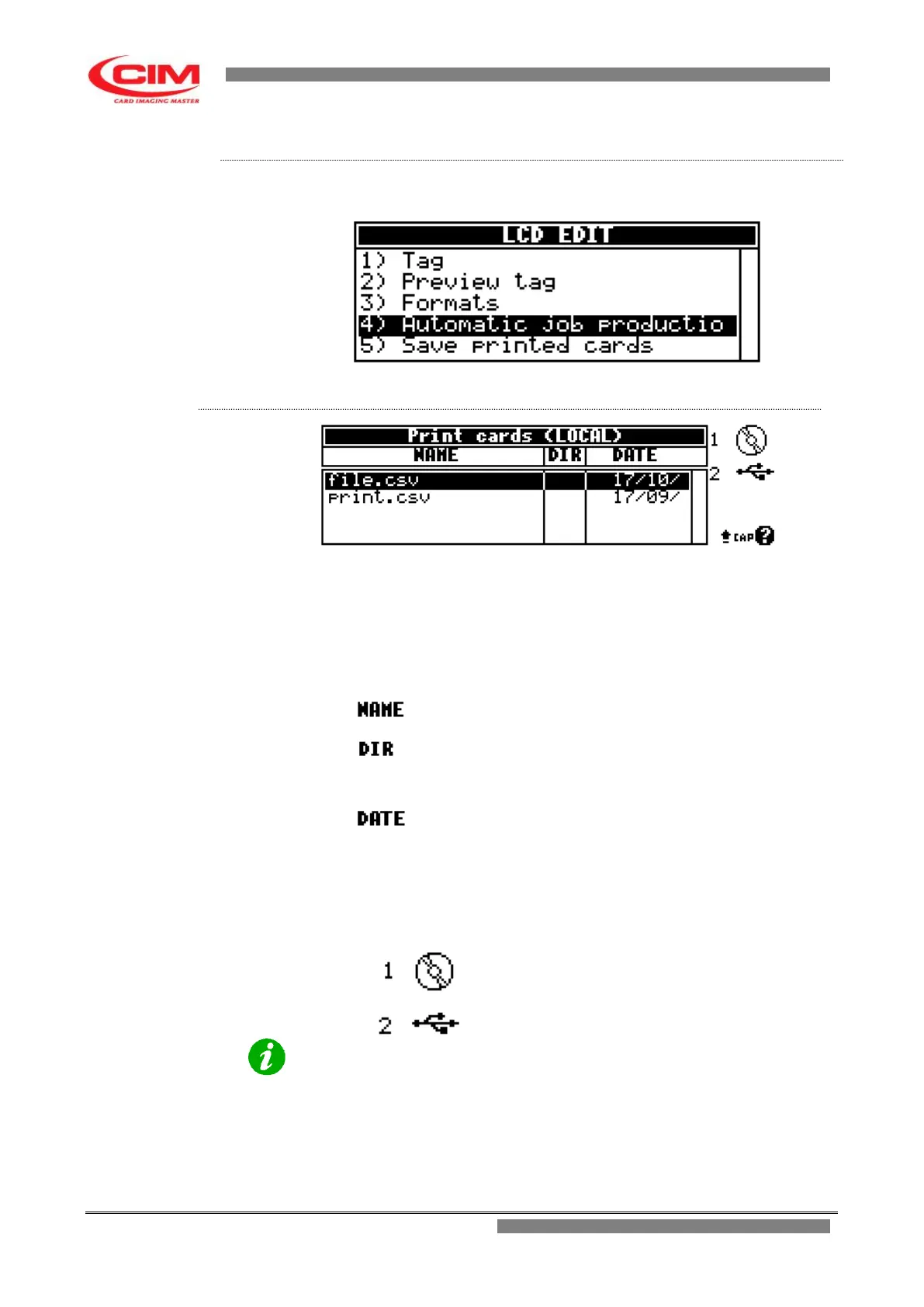
From the “LCD EDIT” menu you can access the "Automatic Job Production
”
function by pressing key
4
.
To exit “Automatic Job Production” and go back to LCD EDIT press
s
.
Also the main screen of "Print cards (Local)" like the main screen of "Tag" for
example, is displayed as a chart, made up of 3 columns, each with its own
heading.
The chart shows the contents of the directory of the selected device.
Each line indicates a data base file with csv extension or a directory.
It is possible to move in the various directories present in the device until you
reach the data base work file.
It indicates the name of the data base file or the directory.
It indicates if the object in “NAME” is a directory.
If it is so, the entry DIR appears in the column.
While if it is a file, nothing is displayed in the column.
It indicates the creation date of the object.
Beside the chart and below you can find the list of the devices you can
connect to in order to access to data base file.
The device can be selected by pressing the corresponding number on the
keyboard. USUALLY N° 2 FOR USB.
The data base file is resident in the machine internal
memory. OPTIONAL
Data base file stored on USB FLASH PEN DRIVE.
NOTE:
The selected data base file will use the active selected format.



 To Next Page