5 - 6
OPERATOR’SMANUAL PRO SERIES
5 RIBBON REPLACEMENT
ND ADJUSTMENTS
1 2 3
4 5
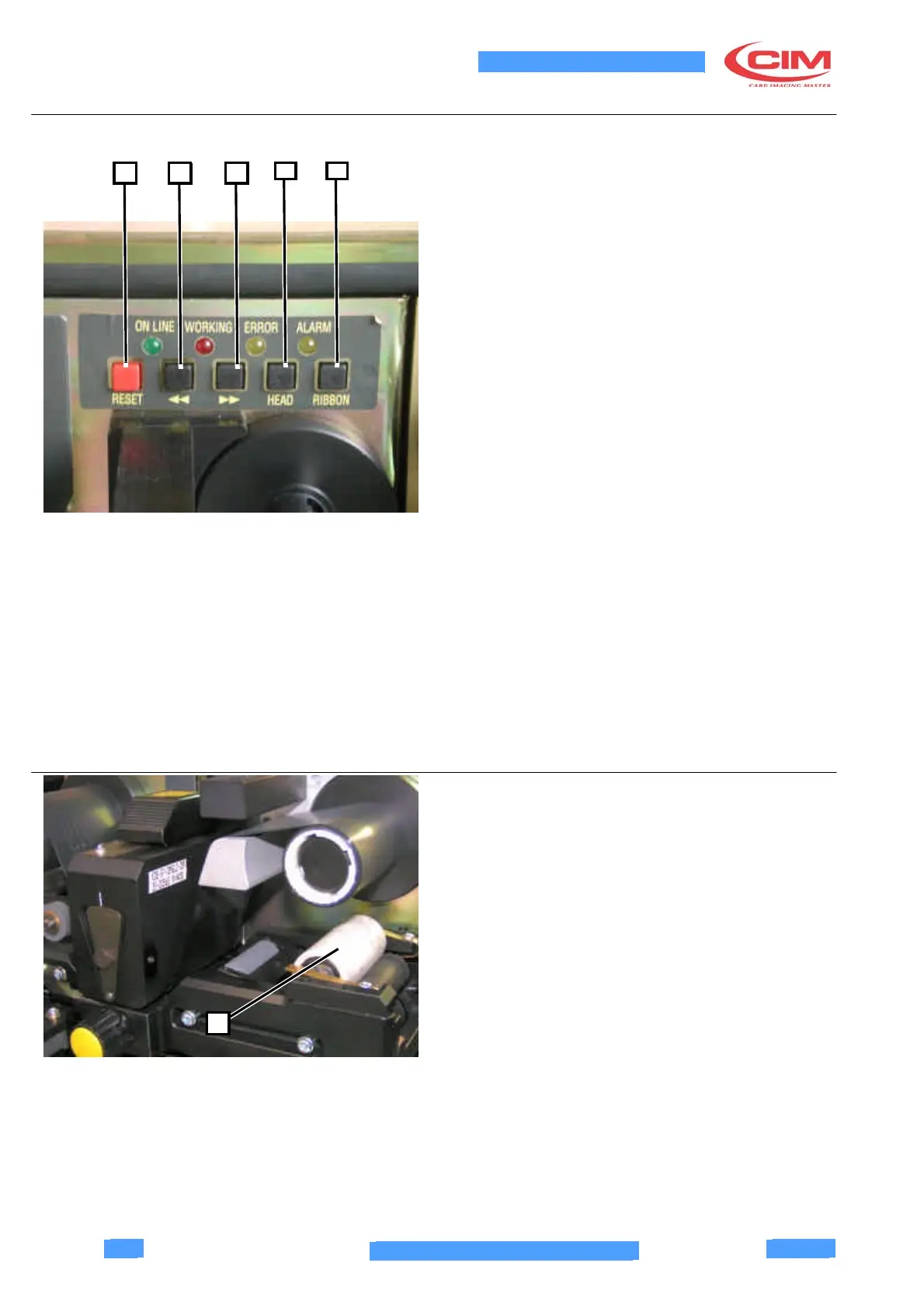
5.3.2 Buttons
RESET (1):
Resets the HW of the module if, for unforeseen reasons,
the processor for controlling the module does not
operate as expected.
CARD FORWARD (2):
Moves the card forward until you release the key; the
head moves up at the same time.
CARD BACK (3):
Moves the card back until you release the key; the head
moves up at the same time.
HEAD (4):
When you press this key, the state of the head is
changed once a second, from the head lowered to the
head raised state and vice versa.
RIBBON (5):
Moves the printing ribbon and the cleaning tape forward
as long as you hold down the key; the head moves up at
the same time.
If you press the card forward key after this key, only the
printing ribbon is moved forward. If you press the card
back key after this key, only the cleaning tape is moved
forward.
5.4 REPLACING THE CLEANING TAPE
Periodically replace the adehesive tape (1) which
covers the cleaning roller of the thermographic unit.
1



 To Next Page