5 - 8
OPERATOR’SMANUAL PRO SERIES
5 RIBBON REPLACEMENT
ND ADJUSTMENTS
5.6 SOSTITUZIONE NASTRO INFILLER
When the message ‘E-18 OUT OF INFILL RIBBON- REPLACE/START’ is displayed it is necessary to change the
Infiller ribbon.
This process is described below:
•
Lift up the front cover of the E 1000 PRO.
•
Unscrew the Right knob and remove the disk.
•
Unscrew the Left knob and remove the disk.
•
Remove the used ribbon reel.
•
Remove the empty reel.
•
Load the new ribbon reel.
•
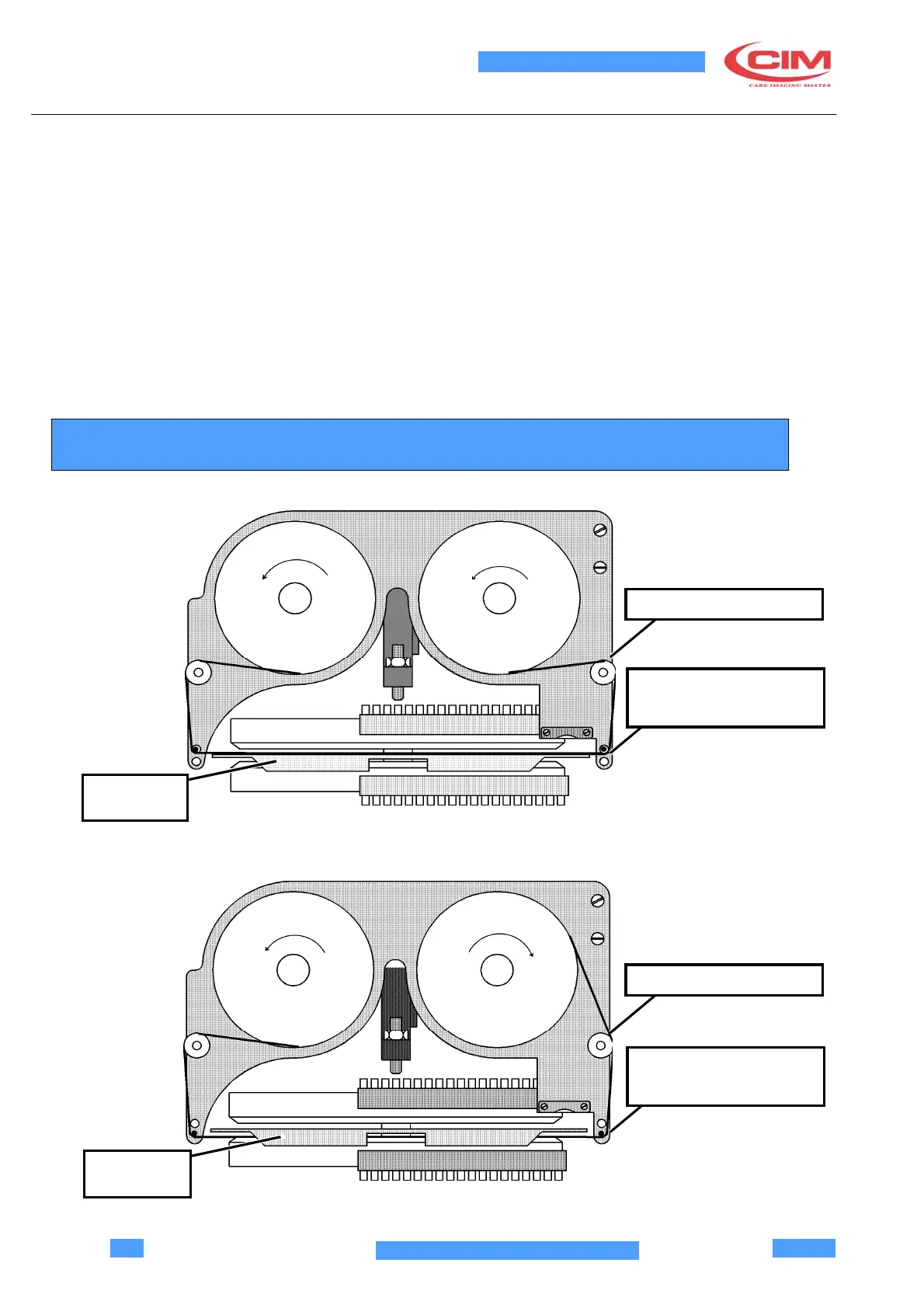
Unwind the ribbon along the guide following the path indicated in the figure and attach it to the left reel.
•
Reassemble the two disks and tighten the knobs
•
For the Top Infiller the ribbon is unwound with the inked part facing downwards.
•
For the Bottom Infiller the ribbon is unwound with the inked part facing upwards.
UPPER
INFILLER
RIBBON OPAQUE SIDE
THE RIBBON RUNS
ABOVE THE BRIDGE
BRIDGE
LOWER
INFILLER
RIBBON SHINING SIDE
THE RIBBON RUNS
BELOW THE BRIDGE
BRIDGE



 To Next Page