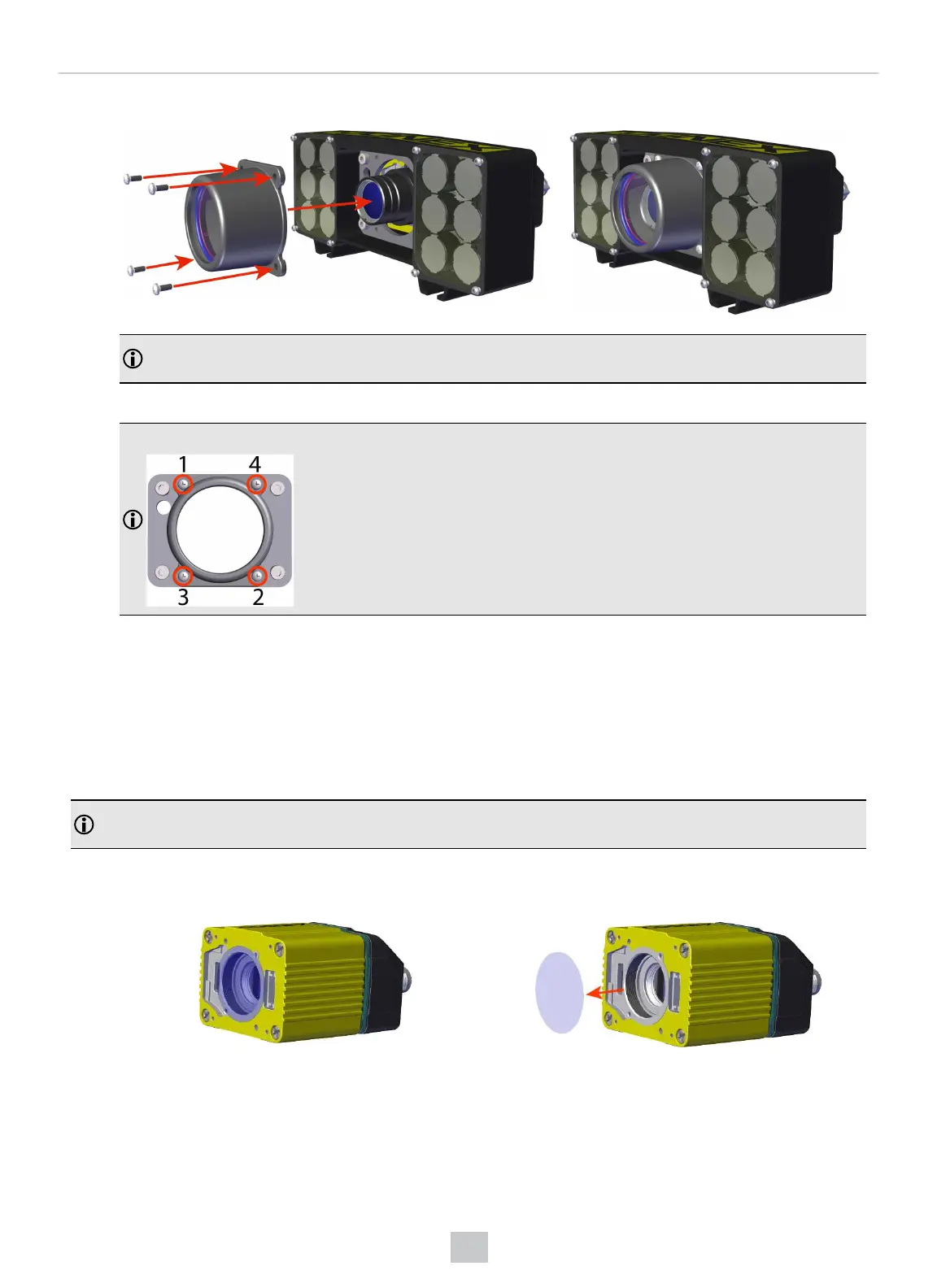
4. Attach the C-mount lens cover to the front of the plate and secure it using the four M2 screws.
Note: For lenses that do not fit under the DM500-CMTLC-000 lens cover, you are required to use the
DM500-LNSEXT-000 lens cover extension.
M2 x 5 mm screws
Note: Use a Phillips Screwdriver (PH0) to torque the screws to 0.09 Nm (0.8 in-lb). Tighten in sequence.
Installing High Power Integrated Torch (HPIT)
For possible hardware configurations using HPIT with a DataMan 370 or 470 series reader, see the DataMan 370 Series
Reference Manual and the DataMan 470 Series Reference Manual, respectively.
Tools needed:
l 2 mm Allen wrench
l Phillips screwdriver (PH0)
Note: The following steps describe service procedures for both the DataMan 370 and the 470 series readers, but
the images show only the DataMan 370.
Perform the following steps to mount the HPIT to your DataMan 370 or 470 series reader:
1. Remove the adhesive protective film covering the threaded lens opening.
2. Add the small PCBinto the light connector.
64
Mechanical Information











 To Next Page