2-86
1010PVNFM-3A
Section 2
To mount transducers on a 996PSP Pipe Simulator
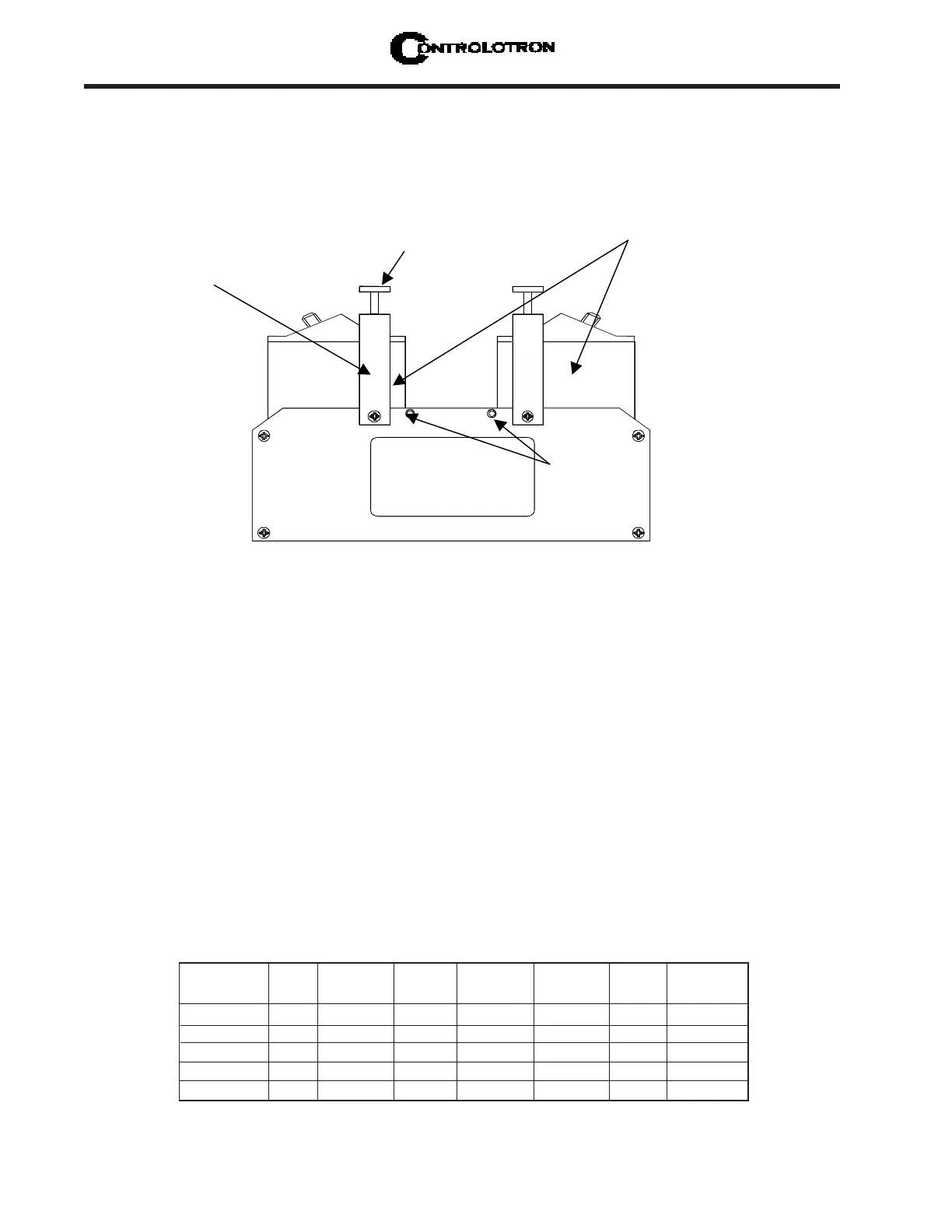
1. Using coupling compound, mount the transducers on the pipe simulator as shown above.
Slide each transducer until it presses against a pin-stop. Use the clamps to hold the trans-
ducer in place.
2. Connect cables between each transducer and the computer connectors for the channel
under test. The Up and Down orientation is not important.
3. Press <MENU> to access the Installation Menu. Select [Meter Type] [Single, Dual, or Quad
Channel] depending on meter type. Select the meter channel (1,2,3, or 4) depending on the
measurement channel you intend to test. Select [Clamp-on] and then [Channel Setup].
4. Access [Channel/Path Setup] menu. Move highlight to [Create/Name Site]. Create a new
Site Setup (e.g., TEST1). You can now enter data without altering an existing Site Setup.
5. Select the [Pipe Data] Menu. Referencing either the English or metric pipe simulator chart
below, enter the pipe parameters corresponding to the transducer size under test.
Clamping Screw
Xdcr
Clamping
Bracket
991 Transducers
Under test
Pipe Simulator
Transducer
Pinstops
2.11.10 USING THE 996PSP PIPE SIMULATOR
Using the proper coupling compound, mount the transducers on the pipe simulator as shown
below. Slide each transducer until it presses against a pin-stop. Use the clamping screws to
hold the transducers in place.
Part Xdcr Pipe Pipe Wall Mount Letter Number
Number Size OD (in) Mat’l Thk (in) Mode Index Index*
996PSP-0 0 2.420 PVC 0.076 Direct A 6
996PSP-1 1 2.481 PVC 0.077 Direct A 9
996PSP-2 2 2.743 PVC 0.136 Direct A 6
996PSP-3 3 3.758 PVC 0.344 Direct A 1
996PSP-4 4 6.500 PVC 1.000 Direct** A 0
996PSP PIPE SIMULATOR CHART (English)
* The flow computer generates the Number Index.
** See note below.



 To Next Page