2. Remove the base cover.
3. Remove the wireless card.
4. Remove the WWAN module, if available.
5. Remove the display assembly.
6. Remove the display bezel.
7. Remove the display panel.
About this task
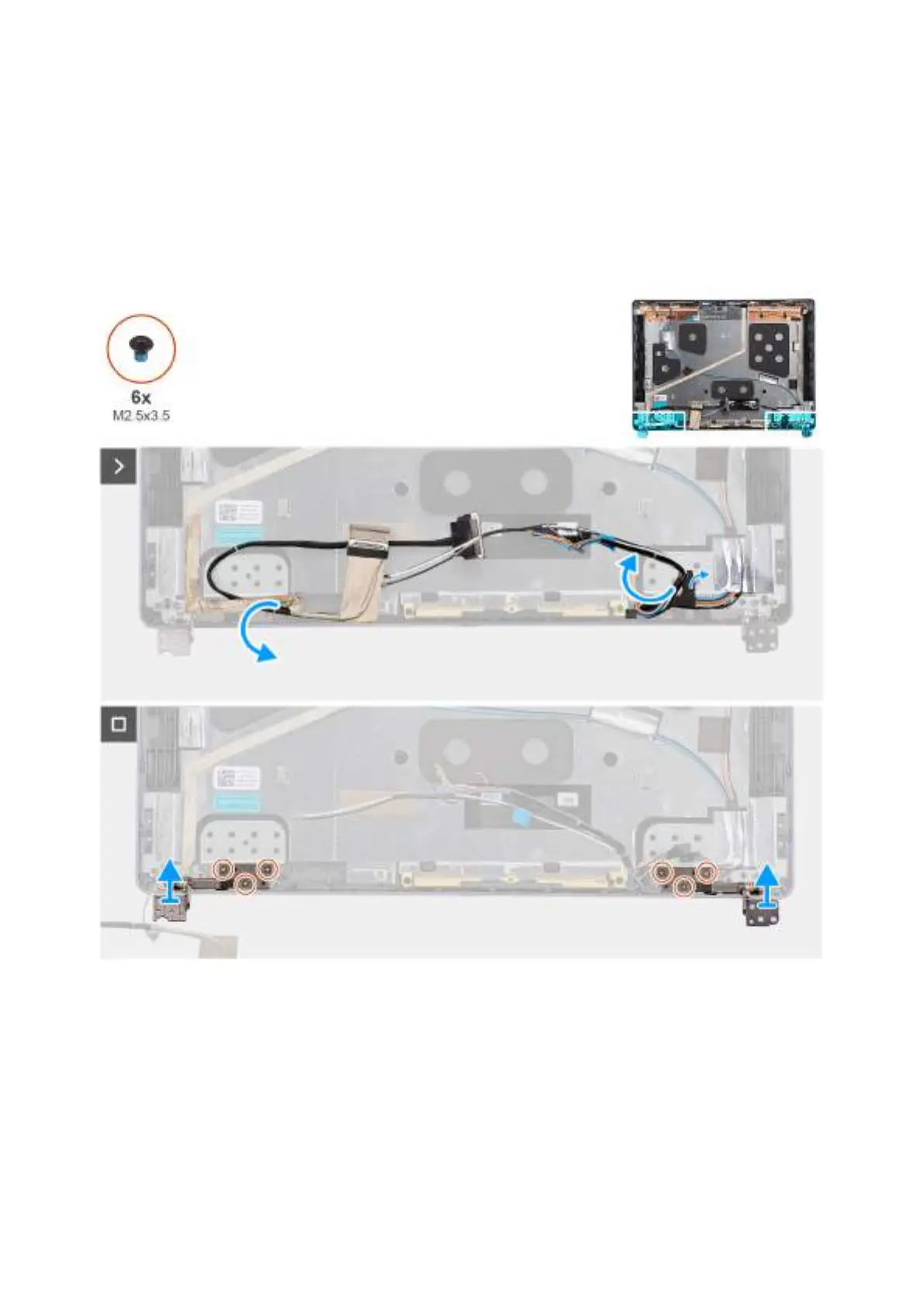
The following images indicate the location of the display hinges and provide a visual representation of the removal procedure.
Figure 70. Removing the display hinges
Steps
1. Gently peel back the display cable to access the left display hinge on the display back cover.
2. Gently peel back the tapes that secure the wireless-antenna cables and WWAN-antenna cables, if available, to the display
back cover.
3. Remove the three screws (M2.5x3.5) that secure the right display hinge to the display back cover.
4. Lift and remove the right display hinge from the display back-cover and antenna assembly.
5. Repeat steps 3 and 4 to remove the left display hinge from the display back-cover and antenna assembly.
102
Removing and installing Field Replaceable Units (FRUs)



 To Next Page