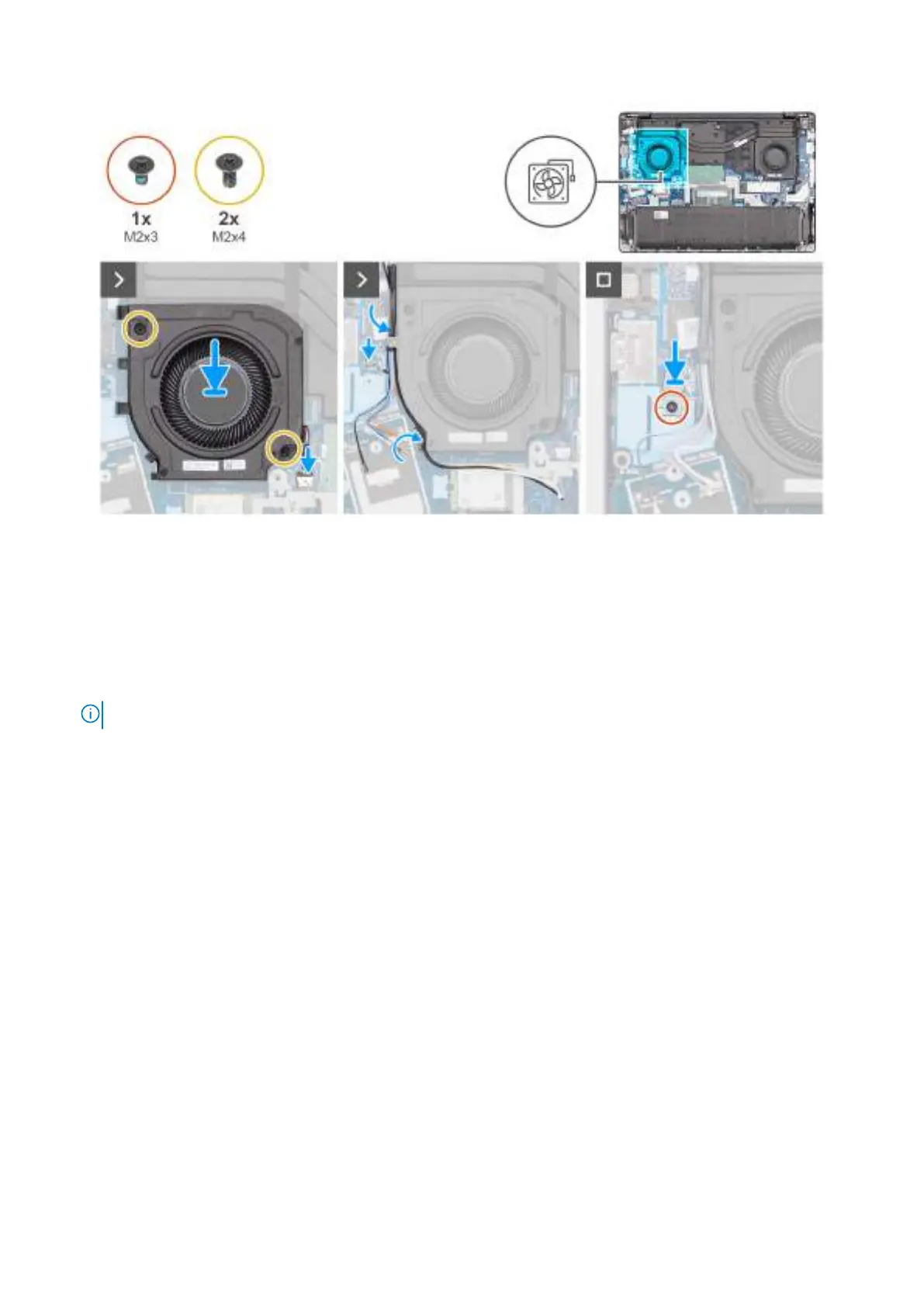
Figure 35. Installing the right/processor fan
Steps
1. Place the right/processor fan in the slot on the palm-rest assembly.
2. Align the screw holes on the fan with the screw holes on the palm-rest assembly.
3. Replace the two screws (M2x4) to secure the fan to the palm-rest assembly.
4. Connect the fan cable to the connector (FANL1) on the system board.
5. Route the wireless-antenna cables and WWAN-antenna cables, if available, through the routing guides on the fan.
6.
NOTE: Steps 6 to 8 apply only to computers shipped with a WWAN module installed.
Connect the Darwin-antenna cable to the connector (DARWIN) on the system board.
7. Align and place the Darwin-cable bracket over the Darwin-antenna cable on the system board.
8. Replace the screw (M2x3) to secure the Darwin-cable bracket to the system board.
Next steps
1. Install the WWAN module, if available.
2. Install the wireless card.
3. Install the base cover.
4. Follow the procedure in After working inside your computer.
Left/Video fan
Removing the left/video fan
Prerequisites
1. Follow the procedure in Before working inside your computer.
2. Remove the base cover.
68
Removing and installing Customer Replaceable Units (CRUs)



 To Next Page