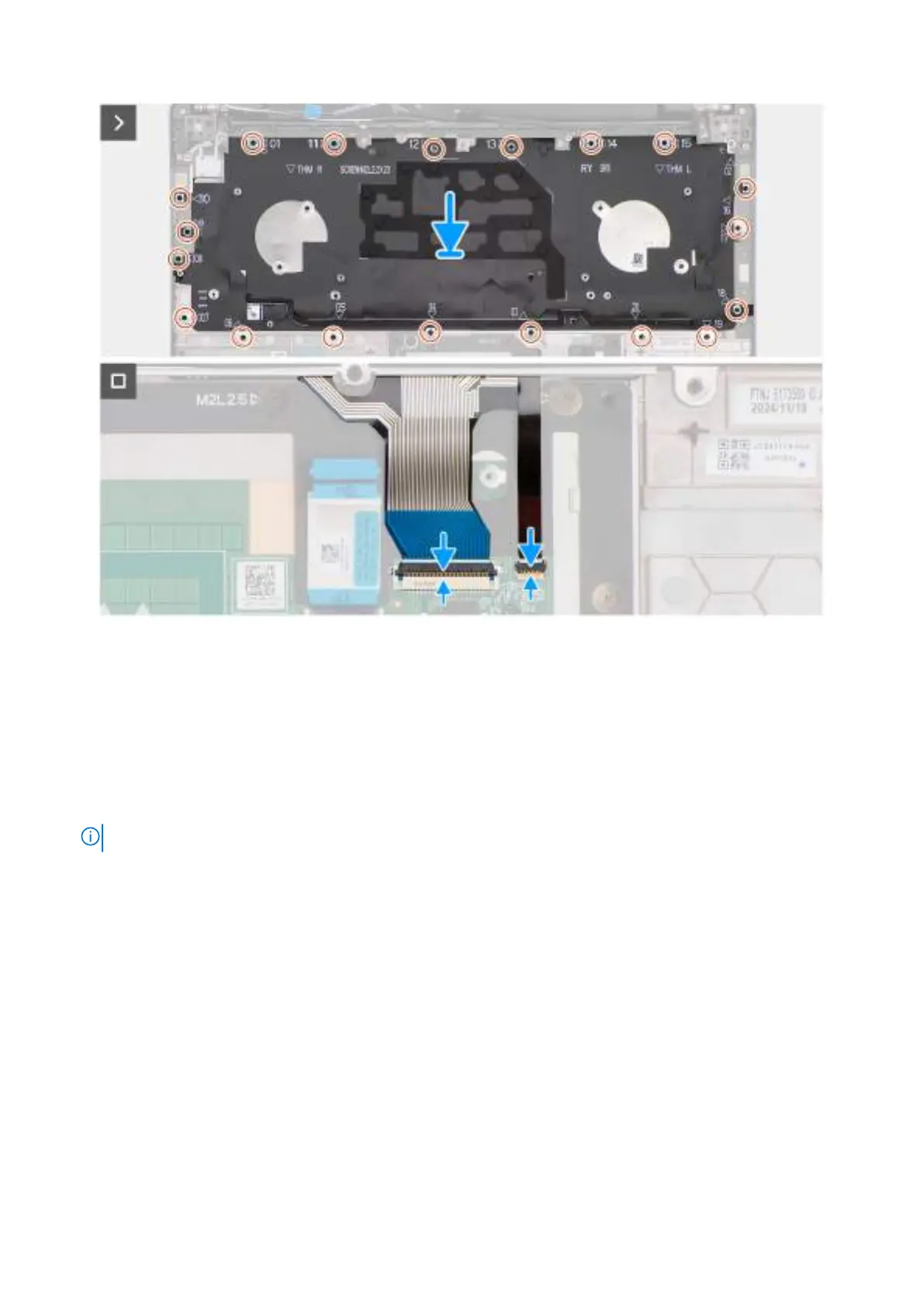
Figure 91. Installing the keyboard
Steps
1. Align and place the keyboard over the keyboard bracket.
2. Replace the nine screws (M2x2.2) to secure the keyboard to the keyboard bracket.
3. Align and place the keyboard assembly in the slot on the palm-rest assembly.
4. Replace the 20 screws (M2x2.2) to secure the keyboard assembly to the palm-rest assembly.
5. Connect the keyboard cable to the connector (KEYBOARD) on the touchpad board.
6. Connect the keyboard-backlight cable to the connector (LIGHTING) on the touchpad board.
NOTE: This step applies only to computers shipped with a backlit keyboard installed.
Next steps
1. Install the power button.
2. Install the system board.
3. Install the GPU filler.
4. Install the heat sink.
5. Install the left/video fan.
6. Install the right/processor fan.
7. Install the speakers.
8. Install the WWAN module, if available.
9. Install the wireless card.
10. Install the M.2 2230 solid-state drive or M.2 2280 solid-state drive, whichever is applicable.
11. Install the memory module.
12. Install the battery.
13. Install the base cover.
14. Follow the procedure in After working inside your computer.
Removing and installing Field Replaceable Units (FRUs)
125



 To Next Page