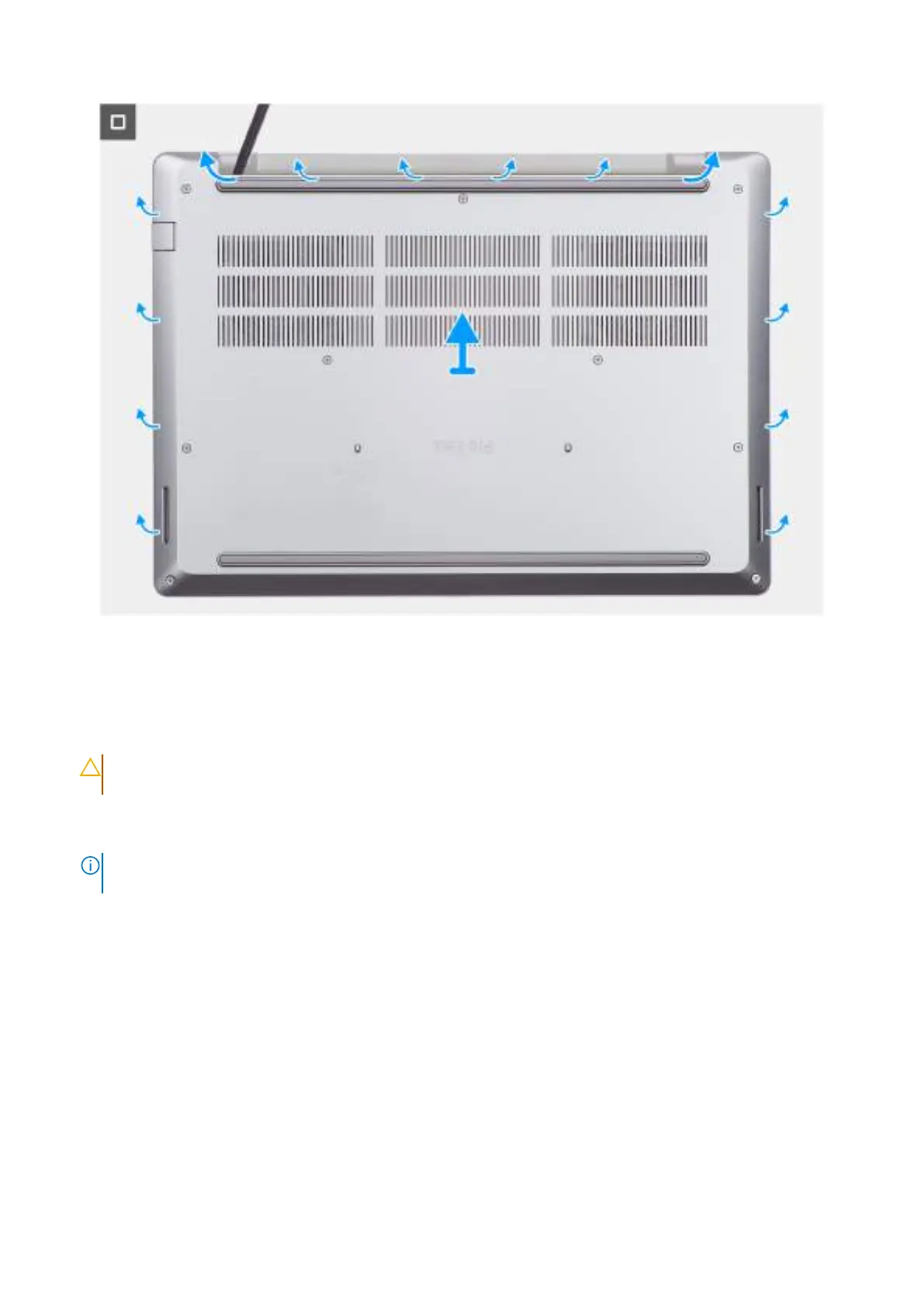
Figure 13. Removing the base cover
Steps
1. Loosen the nine captive screws that secure the base cover to the palm-rest assembly.
2. Using a plastic scribe, pry open the base cover starting from the recesses, which are located at the top edge of the base
cover, near the hinges.
CAUTION:
Do not slide the scribe along the edges of the base cover as it may damage the latches inside the
base cover. Instead, insert the scribe at regular intervals and pry open the base cover.
3. Pry open the top of the base cover followed by the left, right, and bottom to release the base cover.
4. Lift the base cover off the palm-rest assembly.
NOTE:
Ensure that your computer is in Service Mode. If your computer is unable to enter Service Mode, then
disconnect the battery cable from the system board.
5. Disconnect the battery cable from the battery cable connector (BATT1) on the system board.
46
Removing and installing Customer Replaceable Units (CRUs)



 To Next Page