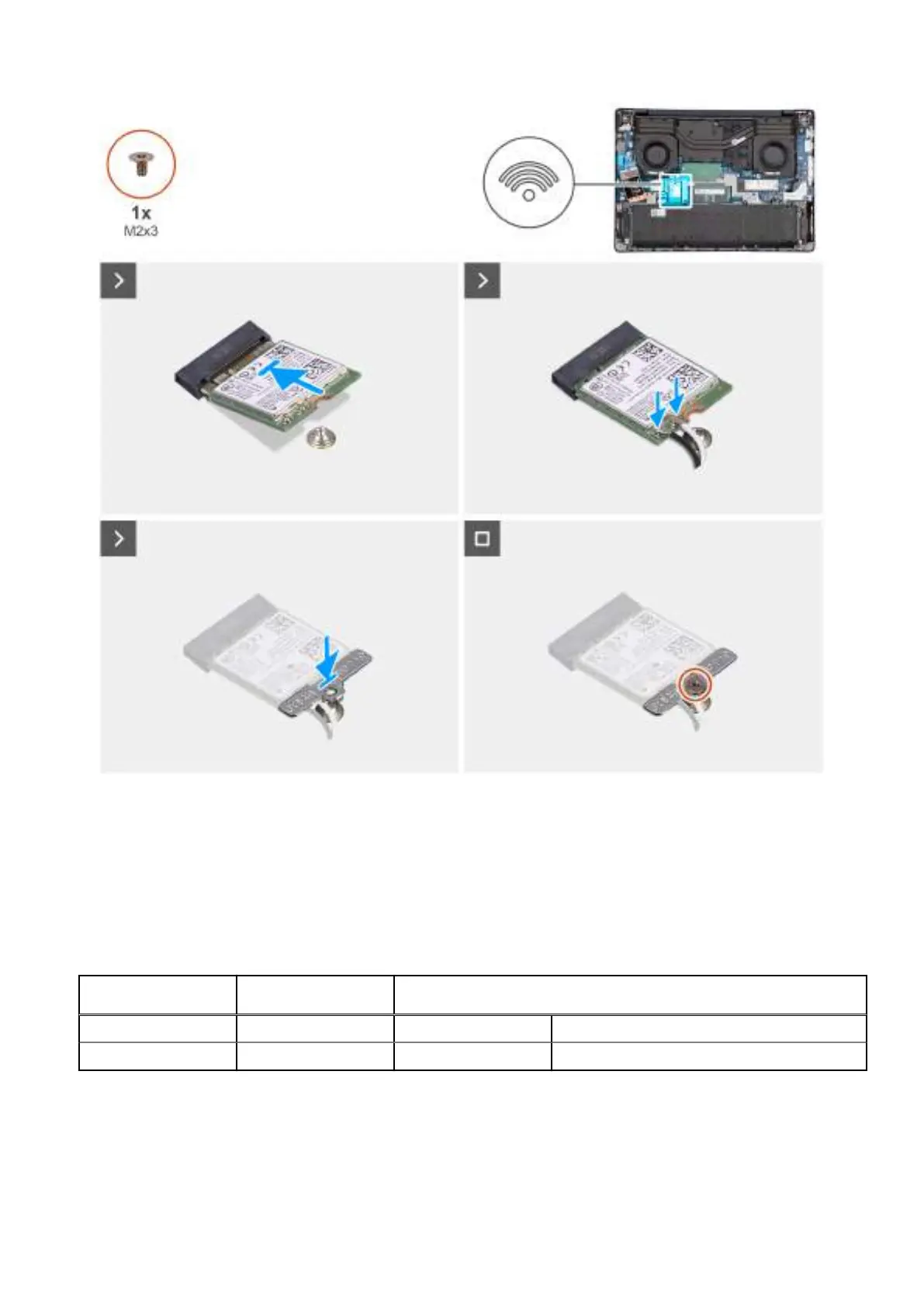
Figure 26. Installing the wireless card
Steps
1. Align the notch on the wireless card to the tab on the wireless-card slot (WLAN1) on the system board.
2. Slide the wireless card at an angle into the wireless-card slot on the system board.
3. Connect the wireless-antenna cables to the connectors on the wireless card.
The following table provides the antenna-cable color scheme for the wireless card supported by your computer.
Table 36.
Antenna-cable color scheme
Connector on the
wireless card
Antenna-cable color Silkscreen marking
Main White MAIN △ (white triangle)
Auxiliary Black AUX ▲ (black triangle)
4. Place the wireless-card bracket on the wireless card.
5. Align the screw hole on the wireless-card bracket with the screw hole on the system board.
6. Replace the screw (M2x3) to secure the wireless-card bracket and the wireless card to the system board.
Removing and installing Customer Replaceable Units (CRUs)
59



 To Next Page