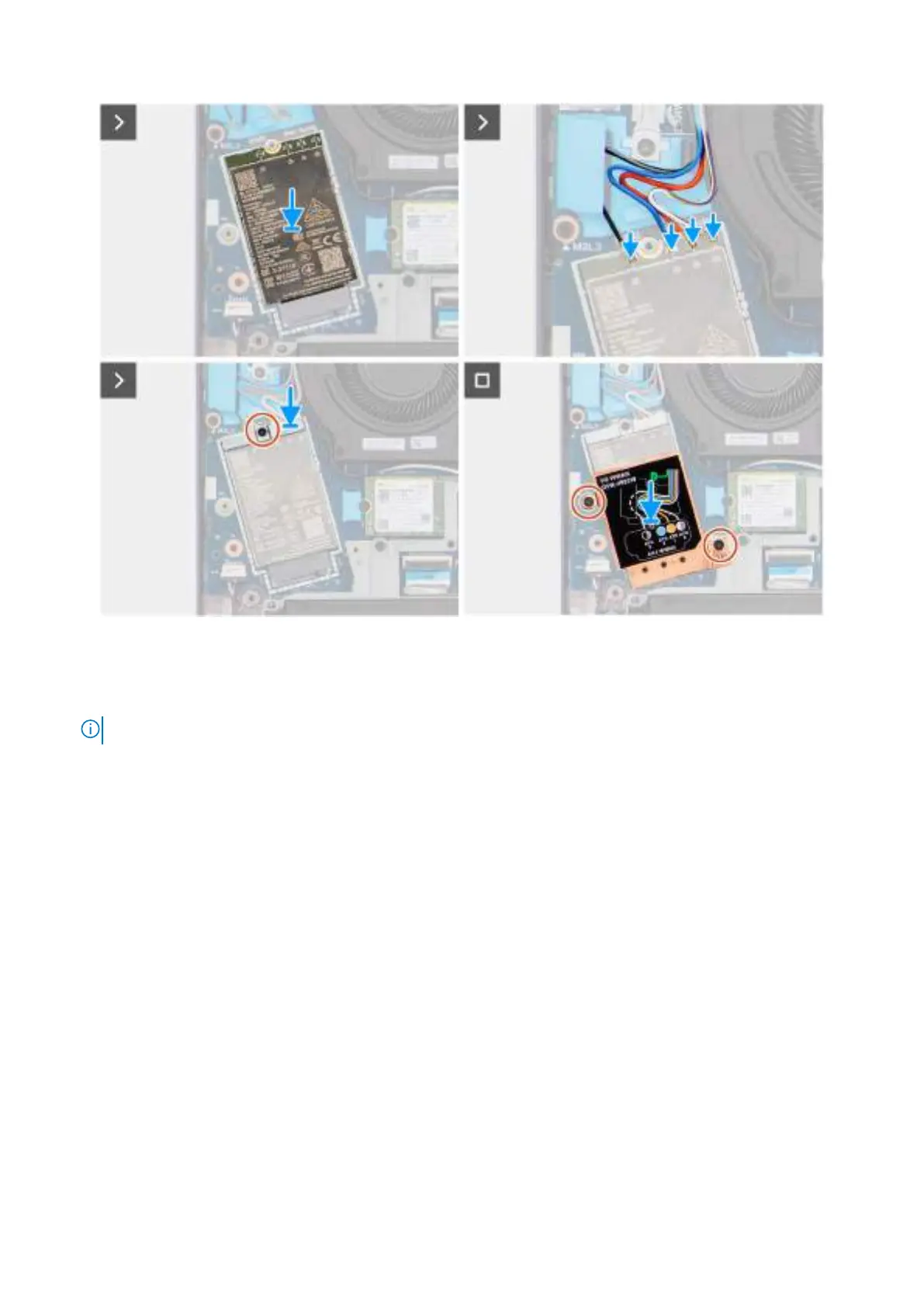
Figure 30. Installing the WWAN module
Steps
1. Ensure that the reusable Mylar sheet with thermal pads is placed beneath the WWAN module.
NOTE: When replacing the system board, this Mylar sheet should be transferred to the new replacement system board.
2. Align the notch on the WWAN module to the tab on the WWAN-module slot (WWAN1) on the system board.
3. Slide the WWAN module at an angle into the WWAN-module slot on the system board.
4. Connect the WWAN-antenna cables to the connectors on the WWAN module. For information about the cable connection,
see the information that is printed on the WWAN-module shield.
5. Place the WWAN-module bracket on the WWAN module.
6. Align the screw hole on the WWAN-module bracket with the screw hole on the system board.
7. Replace the screw (M2x3) to secure the WWAN-module bracket and the WWAN module to the system board.
8. Align and place the WWAN-module shield on the WWAN module.
9. Replace the two screws (M2x3) to secure the WWAN-module shield to the system board.
Next steps
1. Install the base cover.
2. Follow the procedure in After working inside your computer.
Removing and installing Customer Replaceable Units (CRUs)
63



 To Next Page