148
Chapter 9 Vision Manager
9.2.4 Configuring camera input
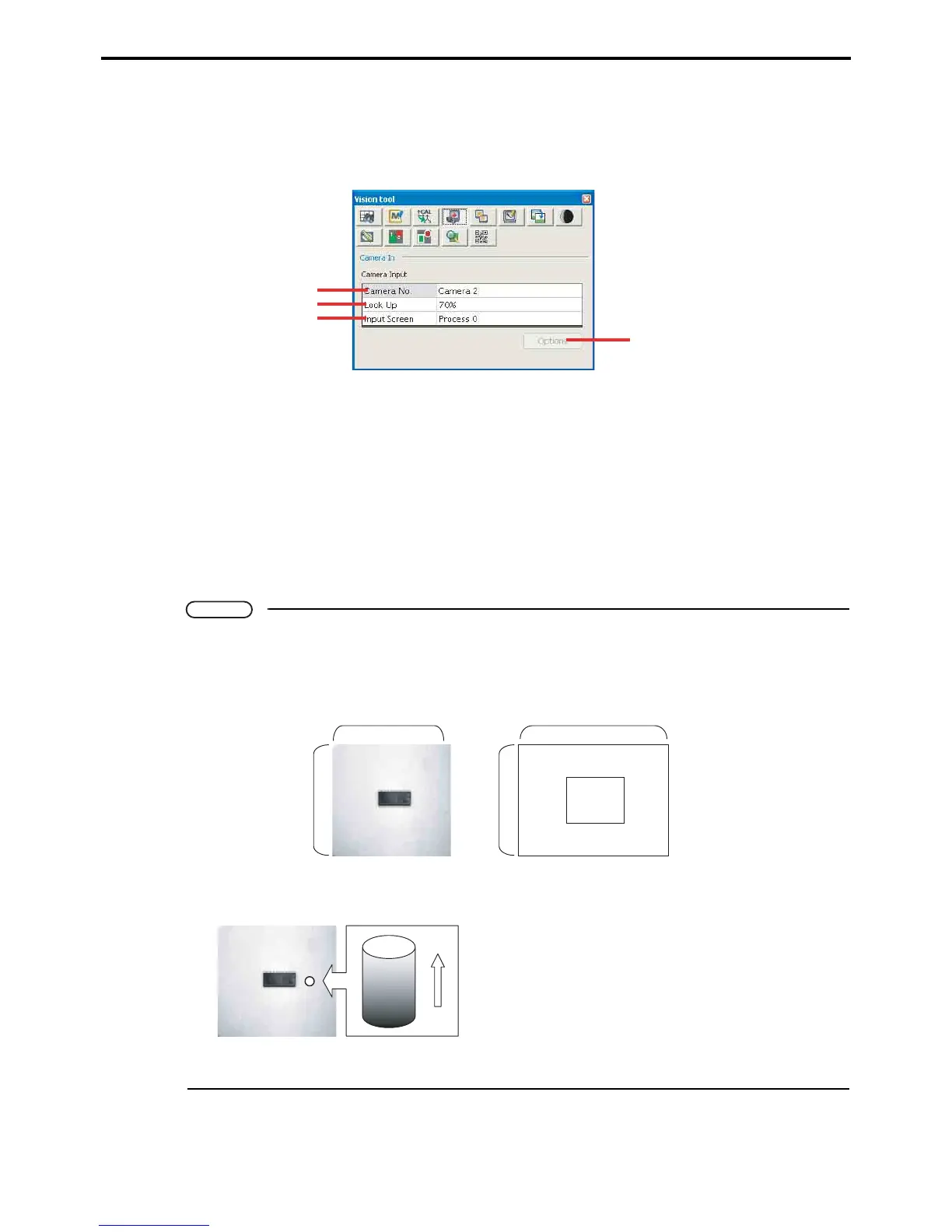
The following is the procedure for copying the camera image to an image processing screen.
The following screen controls data transfers from the camera to an image processing screen.
A: Camera number
This field specifies the image source.
B: Lookup
This field specifies the lookup table for adjusting the data.
C: Input
This field specifies the processing screen to receive the camera image.
D: Apply
This button copies the camera image to an image processing screen.
Note
What is a pixel?
The µVision board processes an image as an array of dots called picture elements or pixels. For
storage, it handles images up to 512 pixels wide and 480 pixels tall; for drawing, up to 624 by 480.
What is brightness?
Each pixel has a brightness, one of 256 numerical val-
ues between 0 and 255. The dark end of this scale is 0;
the bright end, 255.
A
D
B
C
480
512
480
624
(Image processing screen) (Draw screen)
Processing result
(Image processing screen)
0
255



 To Next Page