Chapter 4 Creating a Project
59
4.7 Link with Robot Controller
WINCAPS III supports two types of links for communicating with a robot controller:
• Ethernet connection
• Serial (RS-232C) connection
For further details, please refer to 1.5 "Connecting to Robot Controller" (P. 8) and the robot controller documen-
tation.
4.7.1 Communications settings
After connecting the link, configure it at the WINCAPS III end.
For further details on configuring the robot controller, please refer to its Setting Guide.
Operating procedure
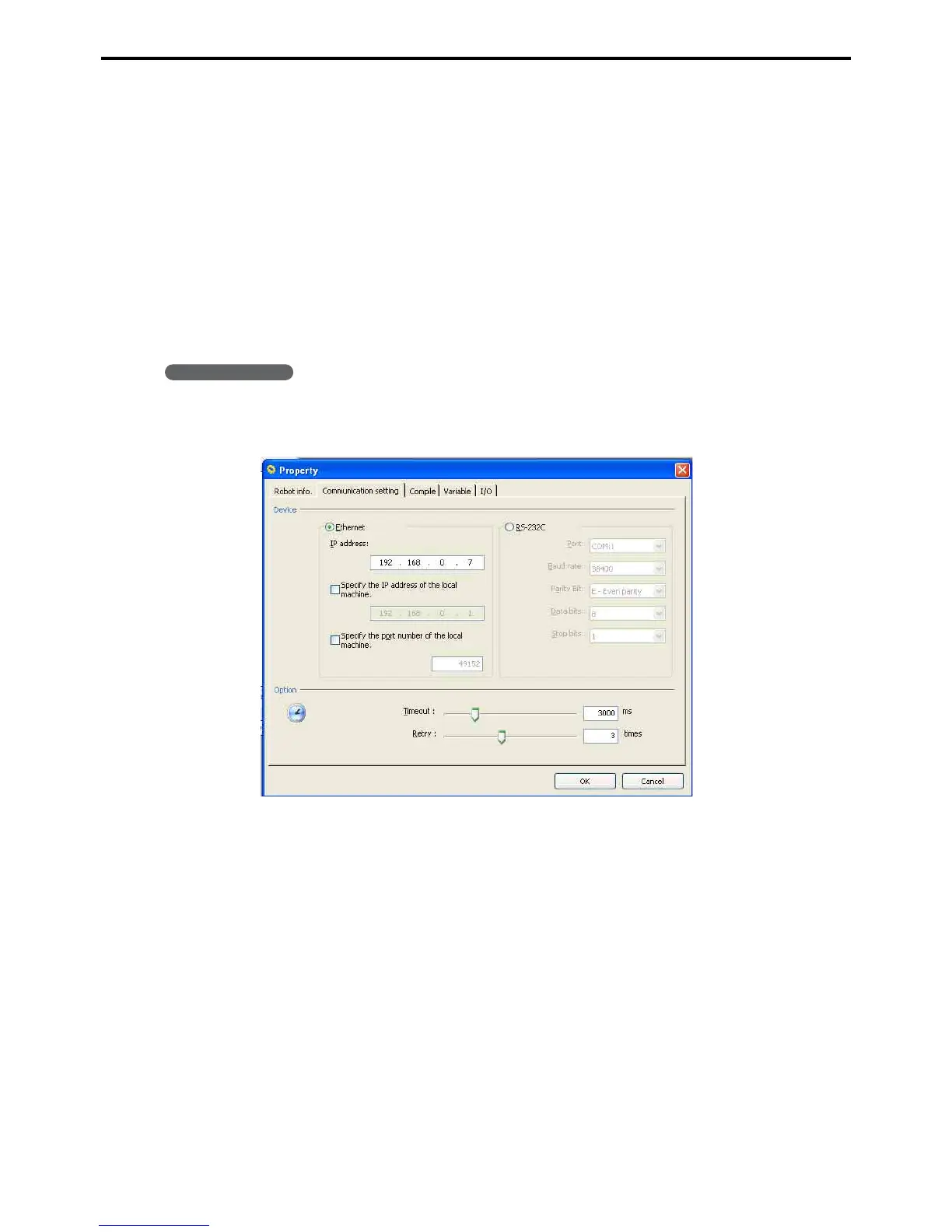
1. Choose Connect|Settings to open the Property dialog box to the Communications settings
tab.
2. Configure the link.
First specify the connection between the computer and the robot controller.
Ethernet connection
All that is needed is the robot controller's IP address.
For further details on determining this, please refer to the robot controller documentation.
Serial (RS-232C) connection
This link requires the following settings.
• Communications port
• Baud rate
• Parity bits
• Data length
• Stop bits



 To Next Page