Chapter 9 Vision Manager
157
9.2.8 Registering digitization
The following give the procedures for specifying or determining digitization thresholds.
The Register digitization settings screen offers four choices for determining the optimal thresholds: manual spec-
ification, calculation with mode method, discriminant analysis, and p-tile threshold calculation.
Radio buttons switch this screen between Histogram settings and Digitization settings.
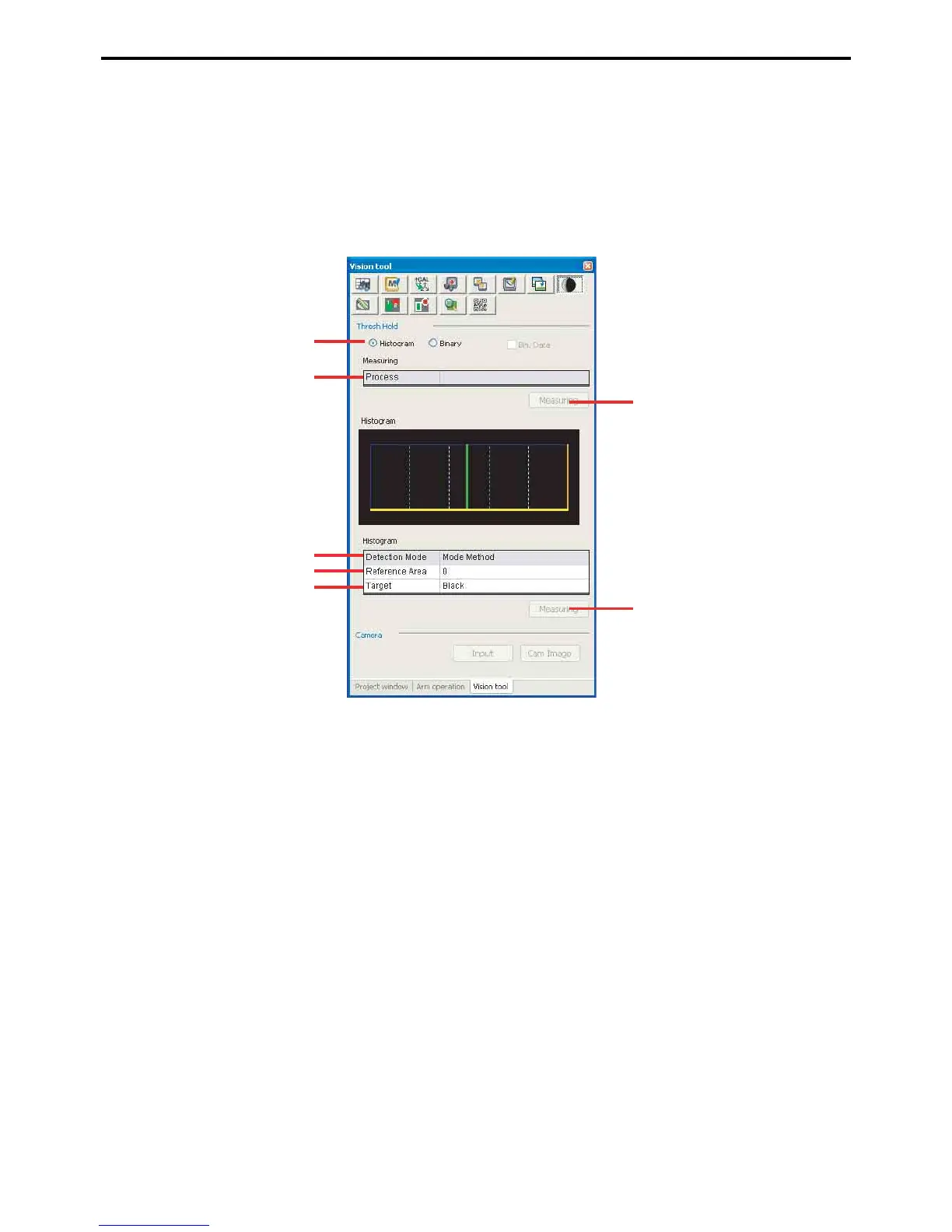
Digitization/Histogram settings screen
A: Histogram
This radio button displays the Histogram settings screen.
B: Processing window
This field specifies the processing window range.
C: Calculate histogram
This button displays the histogram.
D: Method
This field specifies the method for entering digitization thresholds.
E: Reference surface
This field specifies the reference area to use for the p-tile threshold calculation.
F: Target
This field specifies the target area to use for the p-tile threshold calculation.
G: Measure
This button is for specifying or determining the digitization thresholds for image analysis.
A
C
B
D
E
F
G



 To Next Page