Chapter 9 Vision Manager
169
9.2.11.1 Specifying measurement conditions
Level
Specify the edge detection level. The range is 0 to 255 for detection using a brightness level (absolute or rela-
tive) and 0 to 512 for detection using an area (absolute or relative).
Digitization thresholds
Detection using areas requires specifying the digitization thresholds. Pixels between the two thresholds become
white (1); everything else, black (0).
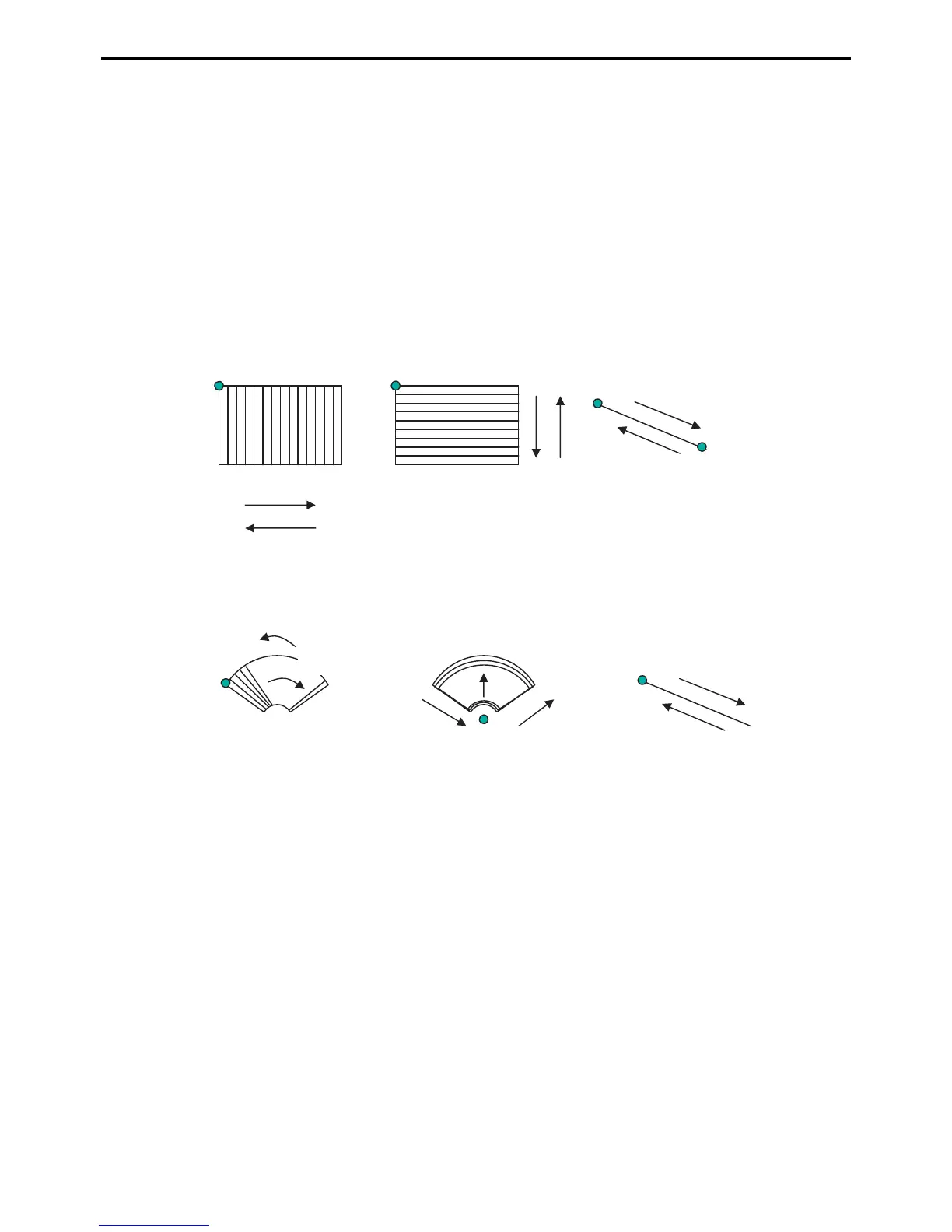
Scan direction
Specify the scan direction. The meaning of Positive and Negative depends on the window shape.
Parameter = 0 (X-axis projection)
Origin
Height
Width
Parameter = 1 (Y-axis projection)
Starting point
Ending point
Parameter = 0 (Meridional direction projection)
Starting
angle
Parameter = 1 (Circumferential projection)
Origin
Parameter = 2 (None)
Parameter = 2 (None)
Negative (-) direction
Negative (-) direction
Negative (-)
direction
Negative (-)
direction
Negative (-)
direction
Positive (+) direction
Positive (+)
direction
Positive (+)
direction
Positive (+)
direction
Negative (-) direction
Positive (+) direction
Rectangular windows Straight line (Connecting 2 points)
Straight line (length)Sector windows
Origin
Positive (+) direction


 To Next Page
 Loading...