EasyManua.ls Logo

eKey Home - Page 16

eKey Home
77 pages
Print Icon
To Next Page IconTo Next Page
To Previous Page IconTo Previous Page
Loading...
Introduction to the system en15
Button
Name
OK
Arrow
pointing to
the left
Arrow
pointing to
the right
ESC
Function
Save values,
jump to the
next menu
level.
Navigate in
the menu,
set values.
Navigate in
the menu,
set values.
Leave a
menu level,
cancel
input.
Table 7: Control panel buttons
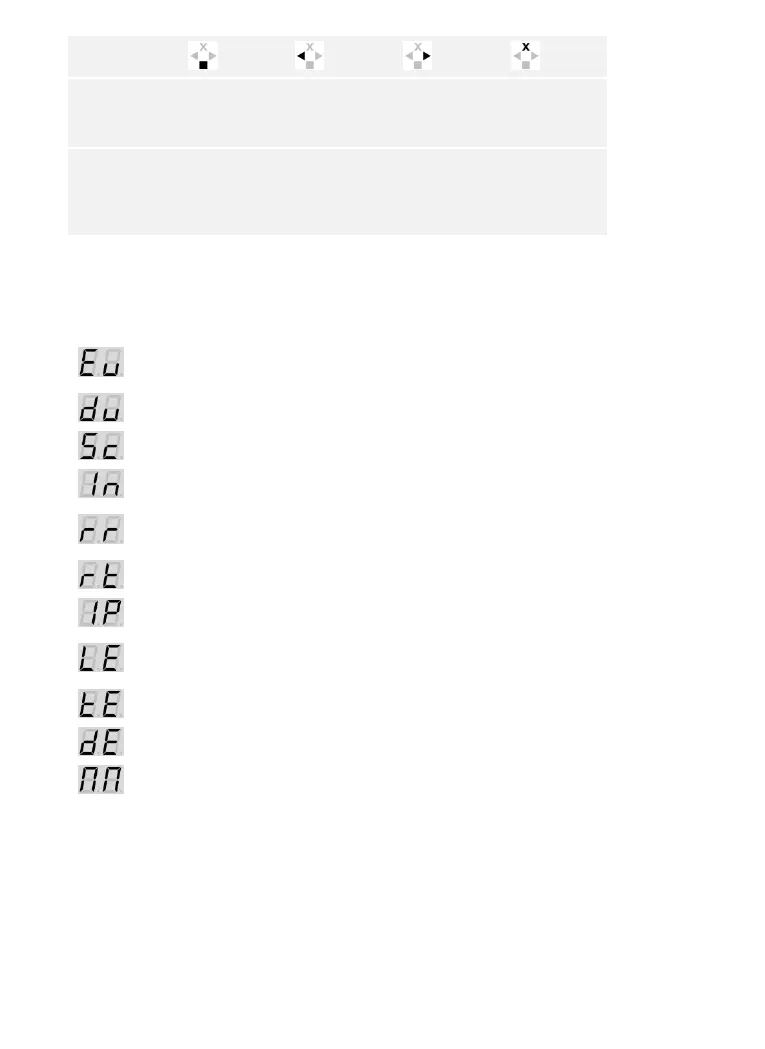
Menu items
The control panel offers various menu items:
Enroll user
Stores users and identification
methods.
Delete user
Deletes all data for a user.
Security code
Sets the security code.
Information
Calls the serial or firmware version
number.
Reset
Resets the system to default
settings.
Relay time
Sets the switching duration.
Input
Sets the digital input (only for
ekey
home control panel integra
)
LED intensity
Setting finger scanner LED
intensity
Test mode
Performing test mode
Demo mode
Performing demo mode
Fair mode
Performing fair mode

Table of Contents

Related product manuals