EasyManua.ls Logo

eKey Home - Performing Fair Mode

eKey Home
77 pages
Print Icon
To Next Page IconTo Next Page
To Previous Page IconTo Previous Page
Loading...
Usage of the code pad with shortcuts en67
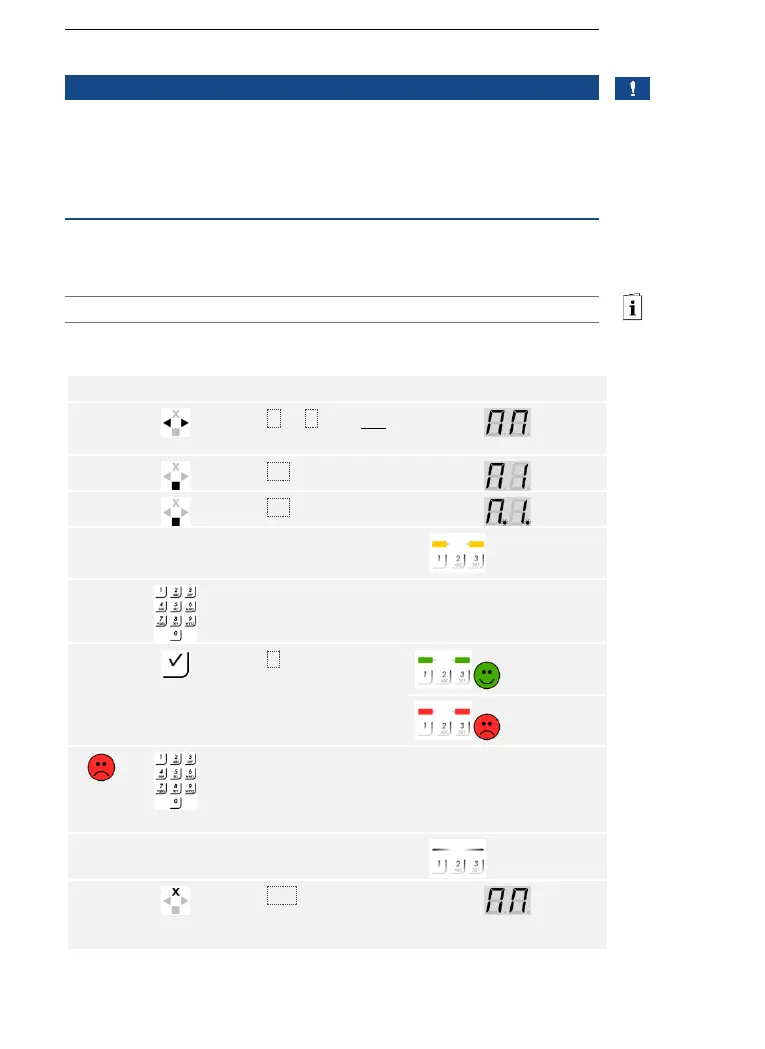
Fair mode simplifies the user storing process for demo purposes.
NOTICE
Unique features of the fair mode:
Operation is not possible once fair mode is enabled
The system automatically returns to fair mode after a power
failure
Fair mode only switches relay 1
Fair mode is executed via the main menu.
Enter the security code to access the main menu.
See Entering the security code, page 35.
The system displays the main menu.
Step
Action
Description
Display
1st
Press < or > until MM
is displayed.
2nd
Press OK.
3rd
Press OK.
4th
No action
required.
Fair mode has been
enabled.
The status
LEDs light up
yellow.
5th
Enter a 4-digit user code
on the keypad.
6th
Press .
The status
LEDs light up
green.
The status
LEDs light up
red.
The user code has been
entered incorrectly.
Repeat the procedure
beginning at step 1.
-
-
7th
No action
required.
-
The status
LEDs are off.
8th
Press ESC to terminate
fair mode and return to
the main menu.
Fair mode has been executed. The user codes stored while in fair mode
have been deleted. The system displays the main menu.

Performing
fair mode

Table of Contents

Related product manuals