Usage of the finger scanner with the control panel menu en│53
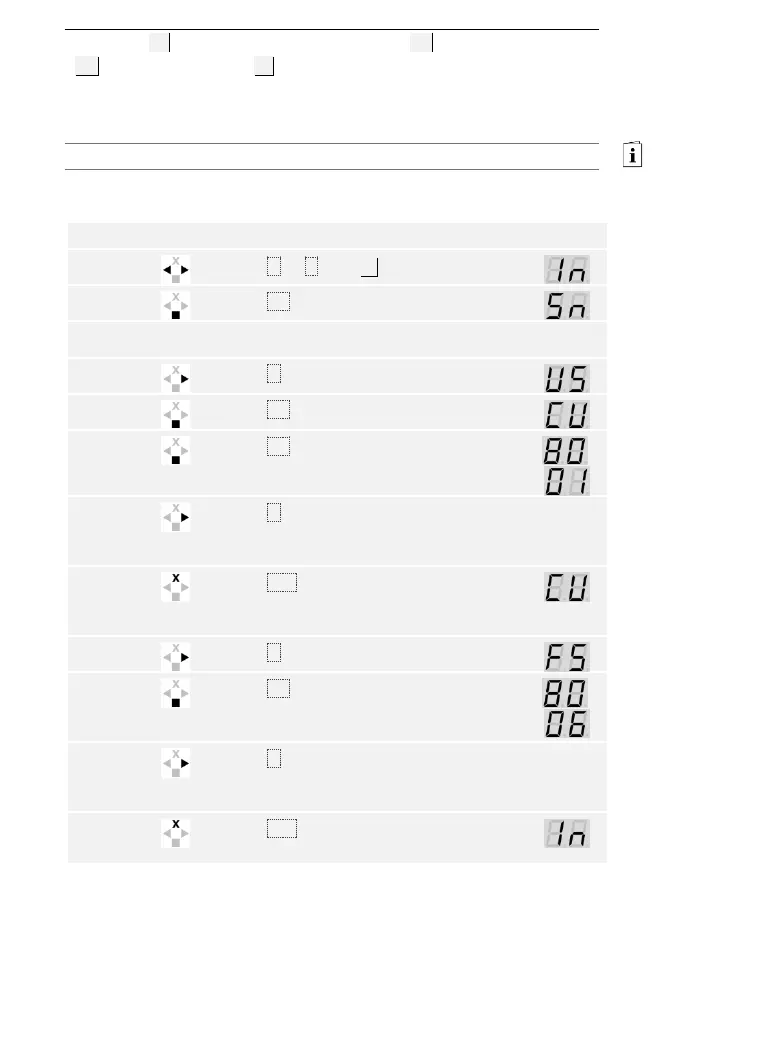
The serial (Sn) and firmware version numbers (US) of the control panel
(CU ) and finger scanner (FS ) are called via the main menu.
Enter the security code to access the main menu.
See Entering the security code, page 35.
The system displays the main menu.
Press < or > until In is displayed.
Press OK. The serial or firmware version
number of the control panel is displayed.
Press > 6 or 3 times until you have read
the entire serial or firmware version
number.
Press ESC to return to the screen for
selecting the serial or firmware version
number.
Press OK. The serial or firmware version
number of the finger scanner is
displayed.
Press > 6 or 3 times until you have read
the entire serial or firmware version
number.
Press ESC 3 times to return to the main
menu.
The serial or firmware version number has been displayed. The system
displays the main menu.
Calling the
serial and
firmware
version
number



 To Next Page