EasyManua.ls Logo

eKey Home - Setting an Acoustic Signal for Opening

eKey Home
77 pages
Print Icon
To Next Page IconTo Next Page
To Previous Page IconTo Previous Page
Loading...
Usage of the code pad with shortcuts en61
The acoustic signal for opening the door can be enabled or disabled. By
default, the acoustic signal is enabled. Enter the number of the required
status:
0 for disabled
1 for enabled
The acoustic signal for opening the door is set via the Admin menu.
Enter the admin code to access the Admin menu.
See Entering the admin code, page 54.
The system is in the Admin menu.

Step
Action
Description
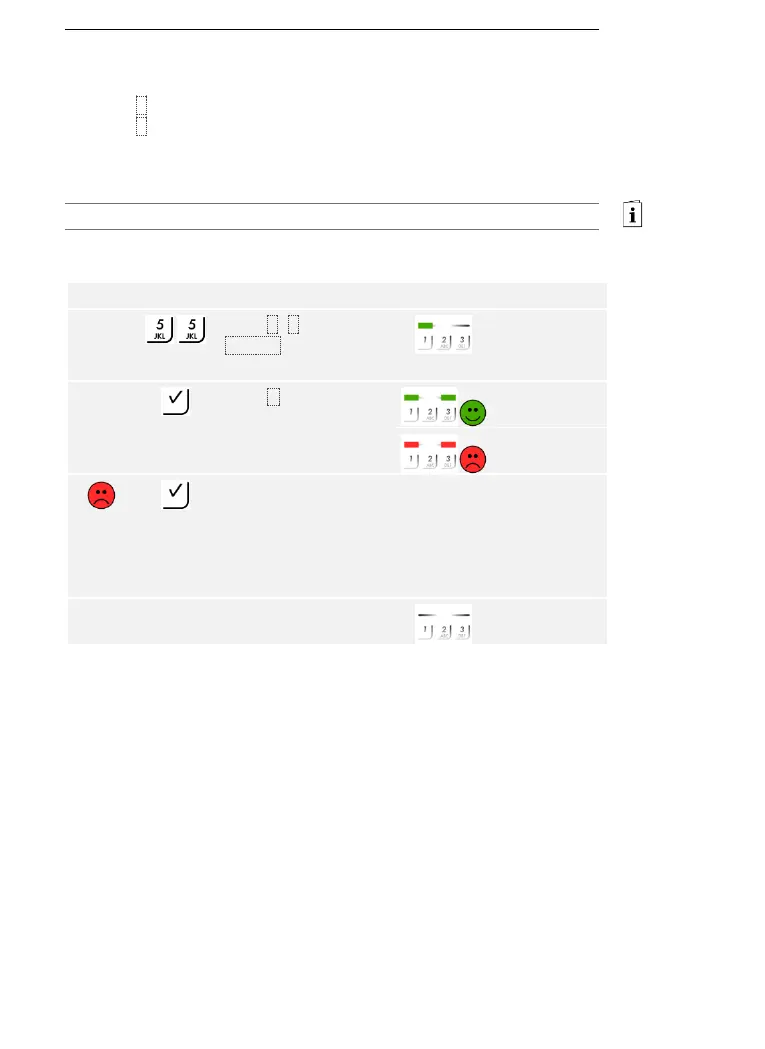
Display
1st
Press 5, 5, and the
number of the
required status.
The status LED
lights up green
on the left.
2nd
Press .
The status LEDs
light up green.
The status LEDs
light up red.
Something has been
entered incorrectly.
The signaling was not
changed. Enter the
admin code from the
beginning again.
-
-
3rd
No action
required.
-
The status LEDs
are off.
The acoustic signal for opening the door was set. The system is in normal
mode.
Setting an
acoustic signal
for opening

Table of Contents

Related product manuals