EasyManua.ls Logo

eKey Home - Changing the Admin Code

eKey Home
77 pages
Print Icon
To Next Page IconTo Next Page
To Previous Page IconTo Previous Page
Loading...
56en Usage of the code pad with shortcuts
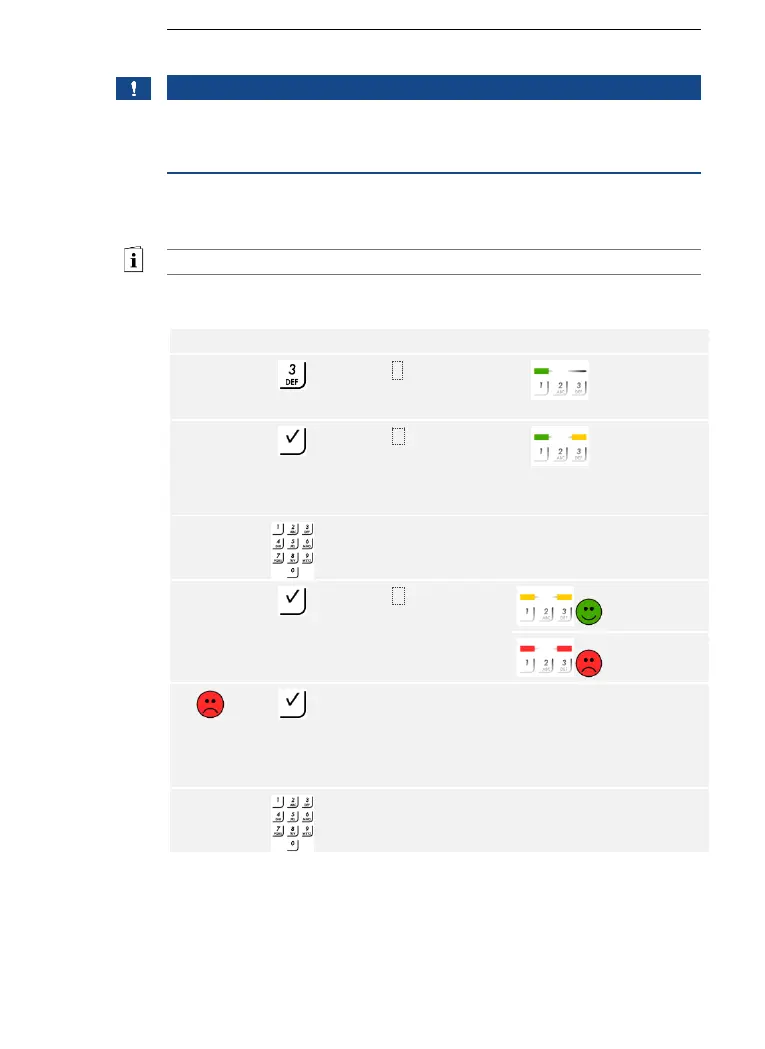
This function allows you to change the existing admin code.
NOTICE
Length of admin code: The admin code may contain between 4 and 8
digits. The digits cannot all be the same; at least one of them must be
different.
The admin code can be changed via the Admin menu.
Enter the admin code to access the Admin menu.
See Entering the admin code, page 54.
The system is in the Admin menu.

Step
Action
Description
Display
1st
Press 3.
The status
LED lights up
green on the
left.
2nd
Press .
The status
LEDs light up
green on the
left and
yellow on the
right.
3rd
Enter the old admin
code on the keypad.
-
-
4th
Press .
The status
LEDs light up
yellow.
The status
LEDs light up
red.
The old admin code
was not recognized.
Enter the admin code
from the beginning
again.
-
-
5th
Enter the new admin
code on the keypad.
-
-
Changing the
admin code

Table of Contents

Related product manuals