EasyManua.ls Logo

eKey Home - Commissioning; Commissioning the System

eKey Home
77 pages
Print Icon
To Next Page IconTo Next Page
To Previous Page IconTo Previous Page
Loading...
Commissioning en19
Commissioning
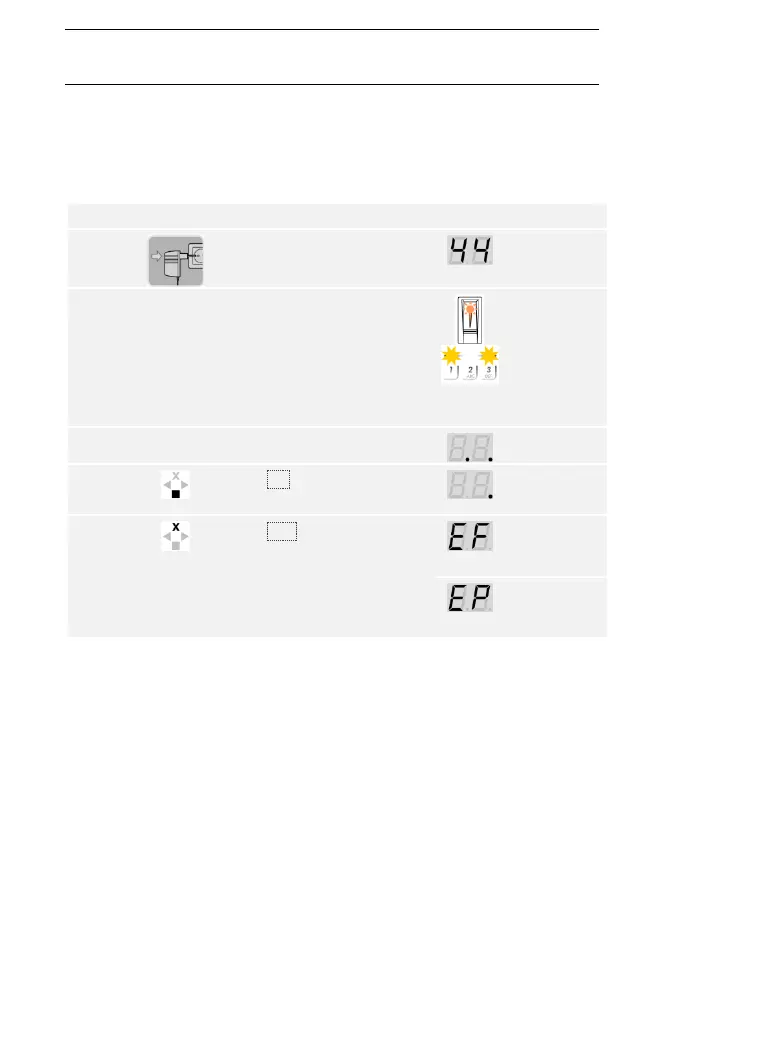
You must commission the devices in order to operate your system. The
system is operated using the ekey home app, the control panel menu, or
admin codes.
Commissioning the system couples the control panel and registration unit
with one another.
Step
Action
Description
Display
1st
Connect the power supply to
the mains.
The control
panel counts
backwards.
2nd
No action
required.
Default setting.
The status LED
of the finger
scanner
flashes orange
and the status
LEDs of the
code pad flash
yellow
alternately.
3rd
No action
required.
Default setting.
2 points light
up.
4th
Press OK.
1 point lights
up on the
right.
5th
Press ESC. The control panel
is ready to store an
identification method.
For a finger
scanner.
For a code
pad.
Commission-
ing the system

Table of Contents

Related product manuals