EasyManua.ls Logo

eKey Home - Page 37

eKey Home
77 pages
Print Icon
To Next Page IconTo Next Page
To Previous Page IconTo Previous Page
Loading...
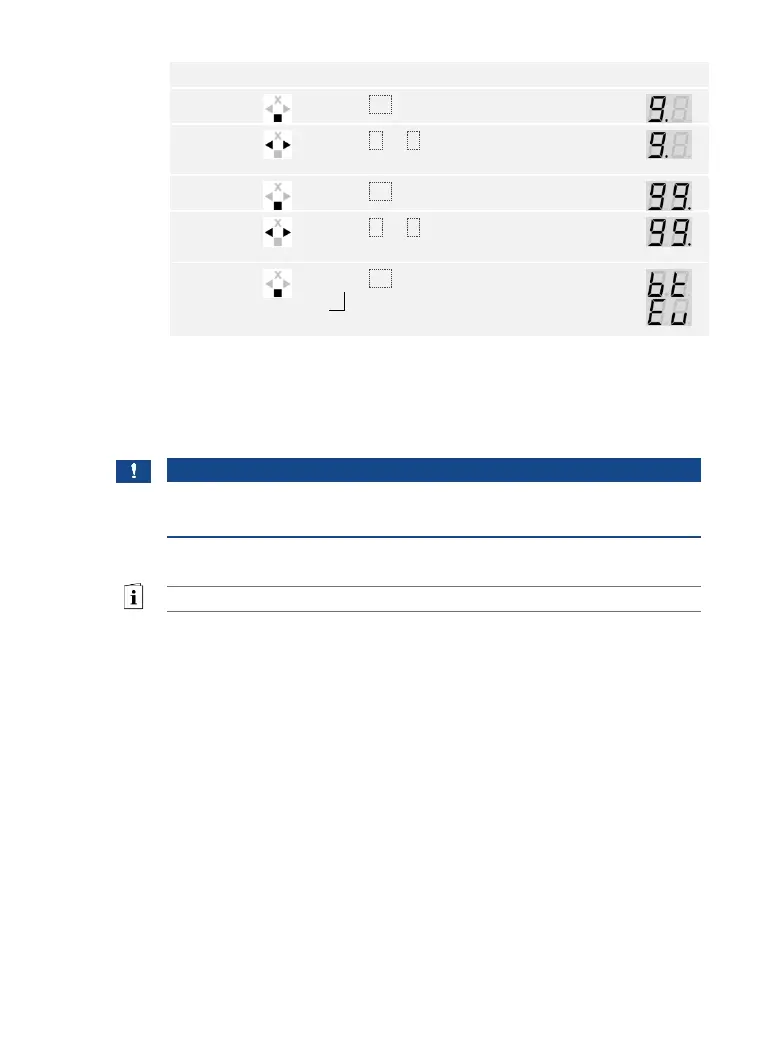
36en Usage of the finger scanner with the control panel menu
The system is in normal mode.
Step
Action
Description
Display
1st
Press OK.
2nd
Press < or > to select the first digit of
the security code.
3rd
Press OK.
4th
Press < or > to select the second digit of
the security code.
5th
Press OK.
bt will only be displayed if your finger
scanner is a Bluetooth finger scanner.
You have entered the correct security code. The system displays the main
menu.
The system automatically switches back to normal mode if you do not
press a button within 90 s.
NOTICE
Select an operating concept: If your finger scanner is a Bluetooth
finger scanner, you can now choose a particular operating concept.
See Operating concept, page 24.


Table of Contents

Related product manuals