Technical Support - MDM
102/104
599 77 39-16 Rev. 00
15.7
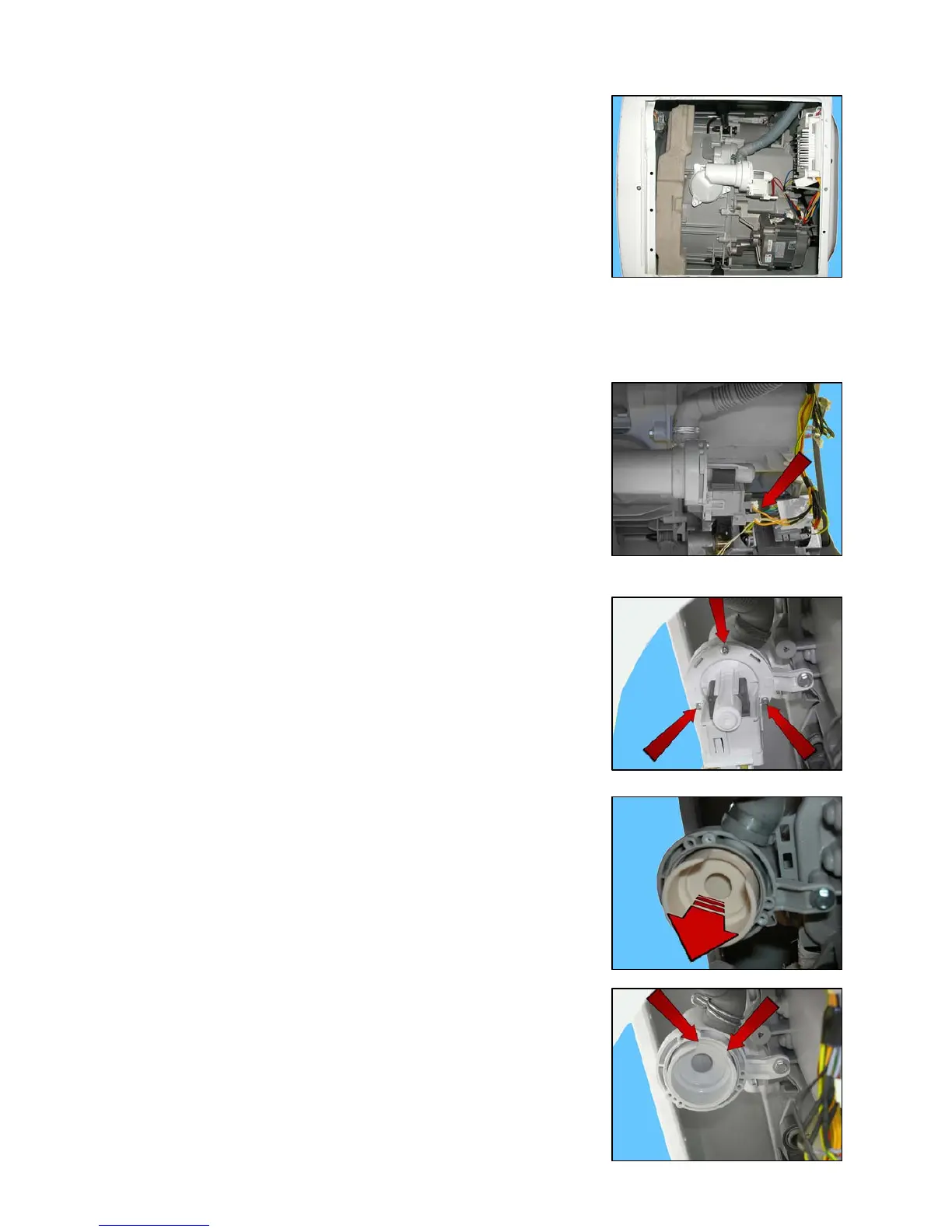
From the base of the appliance, you can access
Drain water circuit
Pressure chamber
Shock absorbers
15.7.1 Drain water circuit
15.7.1.1 Drainage pump
Remove the back panel to make certain operations easier.
Empty the drain circuit.
Lay the appliance onto its left side (the side where the detergent dispenser is).
Disconnect the connectors.
Before removing the pump, make sure the drain circuit is empty.
Place a protection over the motor to avoid any water drops from falling into it.
Loosen the three screws which secure it to the new drain circuit (IDB).
When reassembling:
Tighten the screws at a torque of 1.5 Nm.
15.7.1.2 Drainage filter
Remove the back panel to make certain operations easier.
Empty the drain circuit.
Lay the appliance onto its left side (the side where the detergent dispenser is).
Remove the pump (see relevant paragraph).
Take the filter out of its seat (IDB).
When inserting the filter in its seat, make sure the indented part (shown
by the arrows) is facing towards the drain pipe.
If inserted incorrectly, it will be difficult to insert the filter completely in
its seat.
If the filter has not been inserted or if it has been positioned incorrectly,
the appliance will report the alarm E21.
1
2
3
3




 To Next Page