Technical Support - MDM
12/104
599 77 39-16 Rev. 00
3.3.2 Control panel configuration
The washing programmes and the functions and the various touch sensors vary according to the model,
since these are determined by the configuration of the appliance.
3.3.2.1 Programme configuration
The table below lists the parameters that can be used to define the washing programmes.
Types of fabric
Cotton/linen, Synthetic fabrics, Delicates, Wool, Hand-wash,
Shoes, Jeans, Duvet, Silk.
Special programmes
Cotton/linen + pre-wash, Soak, Miniprogramme, Easy-Iron,
Conditioner, Rinse, Drain, Spin, Economy.
Temperature
Normal, Minimum, Maximum: the initial temperature is the one
proposed for the washing programme.
Spin
Normal, Minimum, Maximum.
Options (Normal/Possible)
Rinse Hold, Pre-wash, Extra rinse, Easy-Iron, Economy (energy
label), Normal, Super quick, Reduced spin speed, No spin.
Programme phases
Pre-wash, Wash, Rinses, Spin, Delayed start.
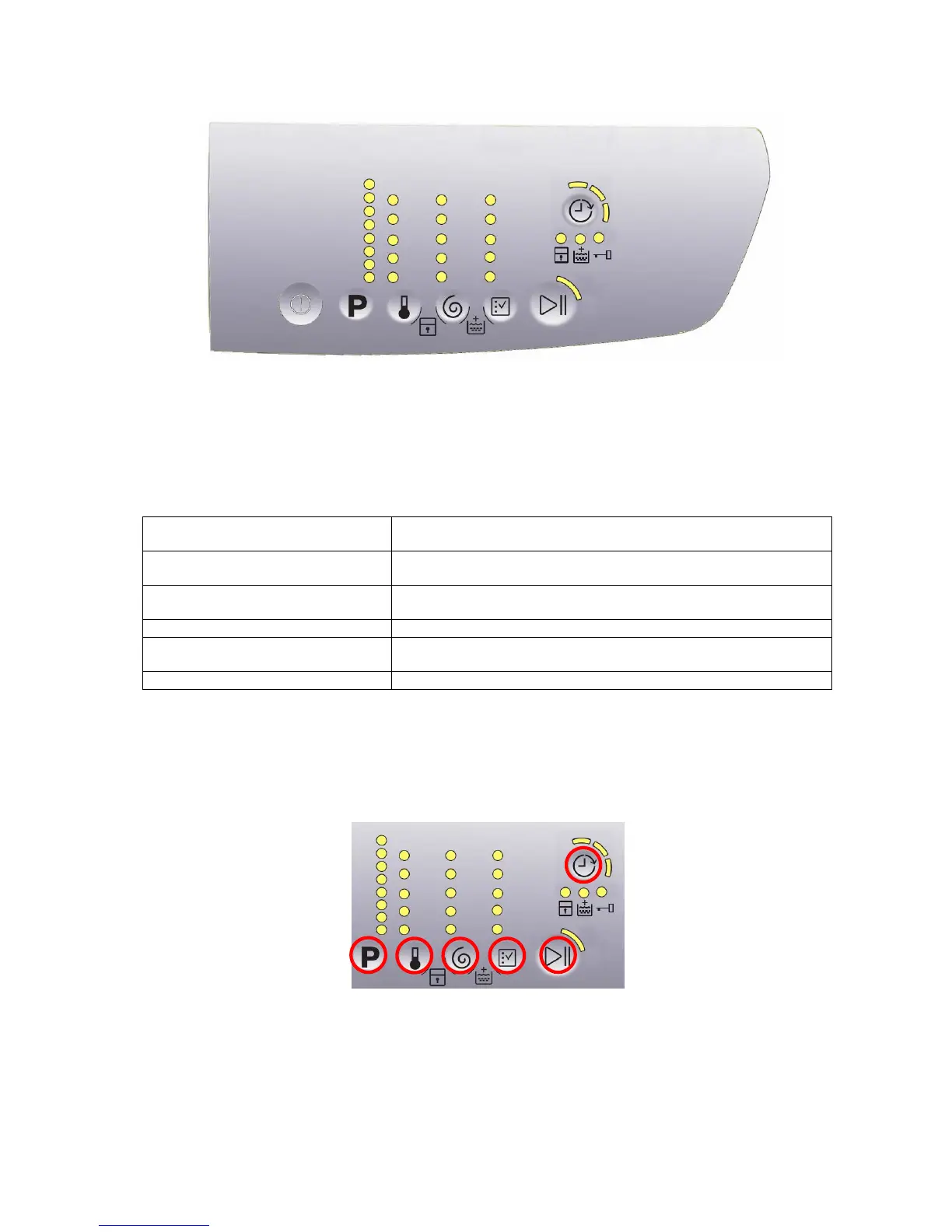
3.3.2.2 Sensors – LEDs
The function of each touch sensor is defined via the configuration of the appliance (the data and images are for
guidance only).
The touch sensors are positioned under the silk-screen printed symbols on the control panel (circled here in red).
A light touch on the centre of the symbol is enough to activate/deactivate the function linked to the sensor with
the switching on/off of the relative Led confirming that the enabling/disabling has taken place.
At the same time as the enabling/disabling of options, the cycle duration time is updated via the digits (styling
P3.0 only).
You need to keep your finger pressed down for a longer period of time with the Start/Pause sensor to confirm
both the cycle’s start and pause, in order to avoid unwanted starts or accidental pauses.
S1
S2 S3
S4
S5
S7
P1
L1
L2
L3
L4
L5
L6
L7
L8
L9
L10
L11
L12
L13
L14
L17
L16
L15
L18
L19
L20
L21
L22
L23
L24
L25
L26
L27
L28 L29
L30




 To Next Page