EW50 Industrial LTE Cellular Gateway
168
1. Required setting
2. v1 is selected by
default
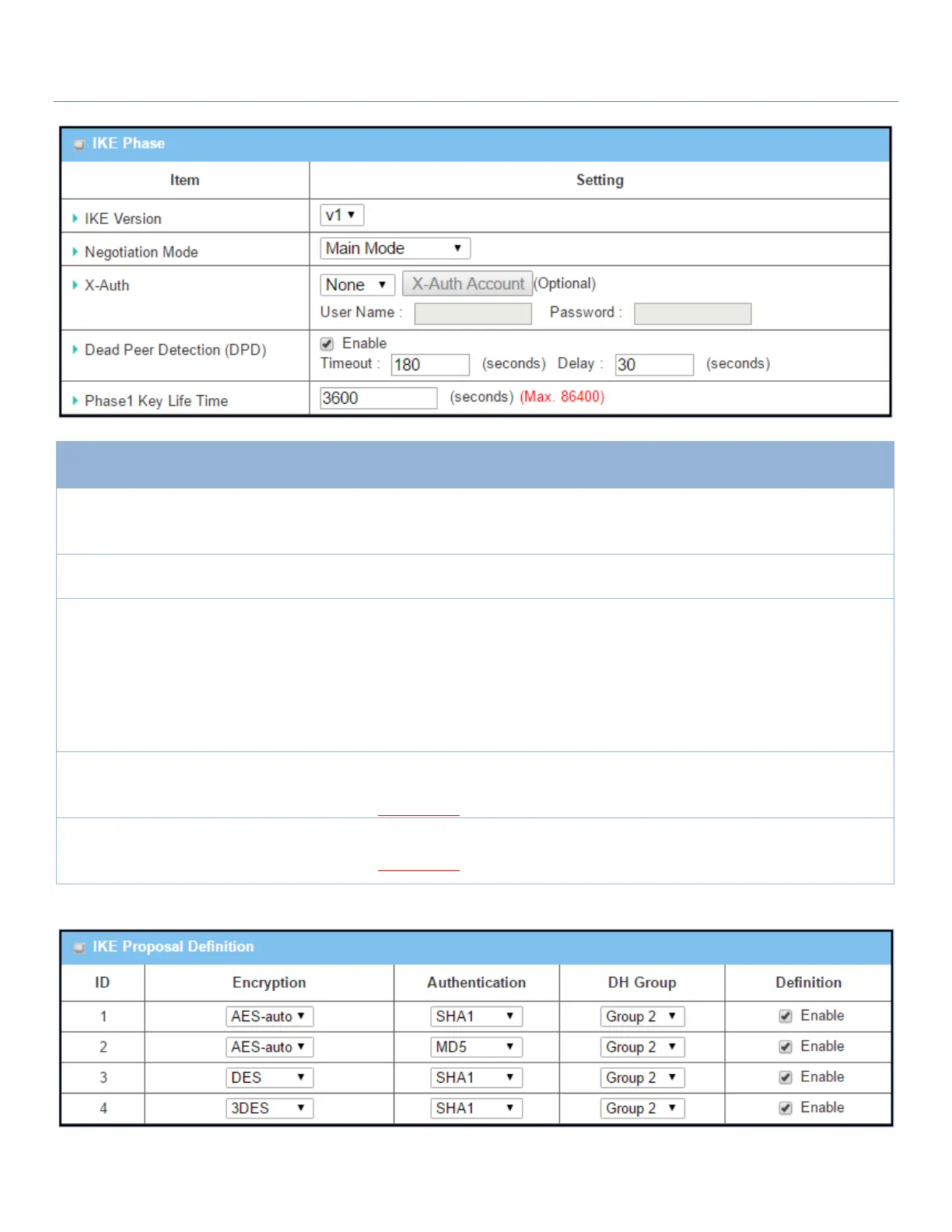
Specify the IKE version for this IPsec tunnel. Select v1 or v2
Note: IKE versions will not be available when Dynamic VPN option in Tunnel
Scenario is selected, or AH option in Encapsulation Protocol is selected.
Main Mode is set by
default
Specify the Negotiation Mode for this IPsec tunnel. Select Main Mode or
Aggressive Mode.
None is selected by
default
Specify the X-Auth role for this IPsec tunnel. Select Server, Client, or None.
Selected Server for this gateway will be an X-Auth server. Click on the X-Auth
Account button to create a remote X-Auth client account.
Selected Client for this gateway will be an X-Auth client. Enter User name and
Password to be authenticated by the X-Auth server gateway.
Note: X-Auth Client will not be available for Dynamic VPN option selected in
Tunnel Scenario.
Dead Peer Detection
(DPD)
1. Checked by default
2. Default Timeout
180s and Delay 30s
Click Enable box to enable DPD function. Specify the Timeout and Delay time in
seconds.
Value Range: 0 ~ 999 seconds for Timeout and Delay.
1. Required setting
2. Default 3600s
3. Max. 86400s
Specify the Phase1 Key Life Time.
Value Range: 30 ~ 86400.



 To Next Page