05-2019 0073 00 75
REMOVING THE PRODUCT
CONTAINERS
absence of the containers to the con-
trol electronics.
If the sensor does not detect the con-
tainers, the grinders are disabled.
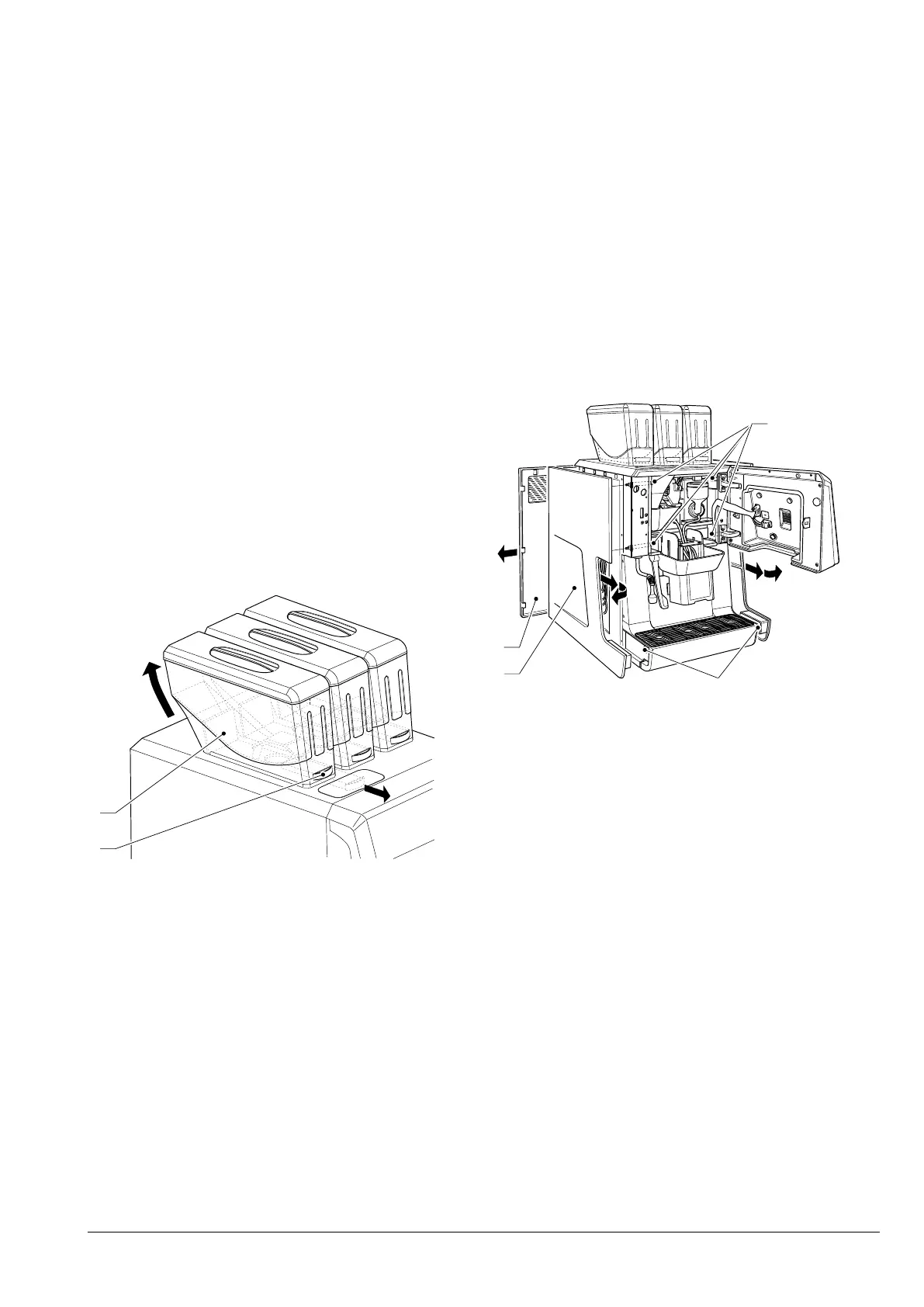
To remove the product containers (coee
beans or instant products) simply remove
the handle and then lift the container from
behind.
Always lift the container from behind
so that the grinders are disabled;
non-compliance with this procedure
can be a source of injury to people (ac-
When the handle of the container is pulled,
it closes the shutter and simultaneously
releases a container from the appliance.
When reassembling, reposition the contain-
er and push the handle inside the container.
Make sure that the container is properly
secured to the appliance.
Fig. 54
1. Handle
2. Magnet
REMOVING THE SIDE AND REAR
PANELS
To gain access to the internal components,
the panels must be removed.
1. Remove the liquid residue tray.
2. Remove the fixing screws of the side
panels.
3. Remove the fixing knurls on the side
panels.
4. Slide the side panels forward to release
them.
5. To remove the rear panel, slide it to the
left.
To reassemble the panels, repeat the pro-
cess in reverse order.
1
2
3
4
Fig. 55
1. Side panel fixing knurls
2. Rear panel
3. Side panel
4. Side panel fixing screws


 To Next Page