Chapter 8 Options
PAGE 8-8
8-1-7 Formatting the CF Memory Card
All data stored in the memory card can be erased by re-formatting.
●CF Memory Card Formatting Procedure
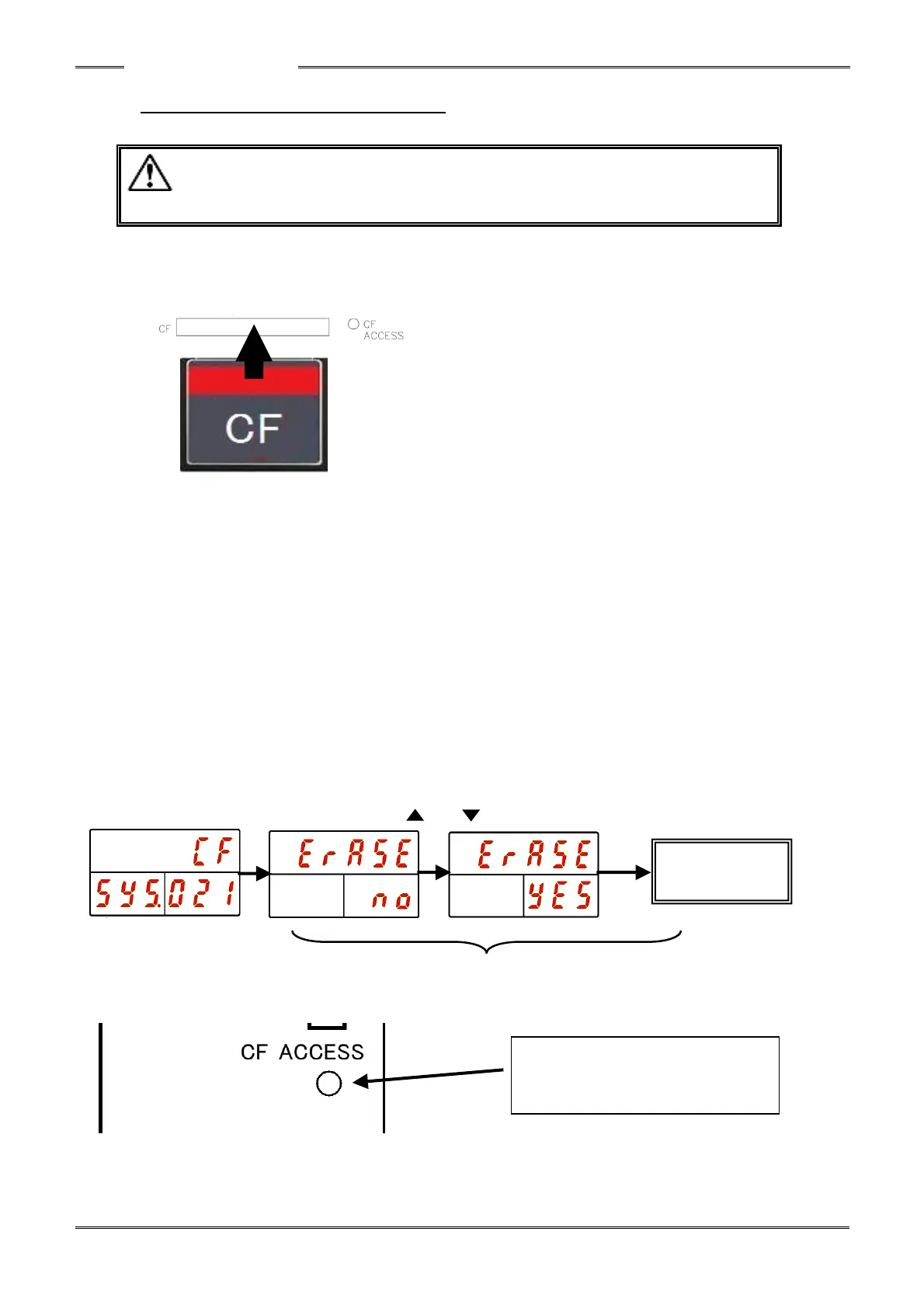
Procedure 1. Insert the memory card in the CF Card slot of the controller with the controller power
OFF.
Procedure 2. Use the “◄” and “►” buttons on the controller display until the System Setting Mode is
indicated as [SYS]. Use the “▲” and “▼” buttons on the controller until “021” is
indicated at the COUNT/D-No. Display
Procedure 3. Hold the PROGRAM button on the controller Front Panel (to put the controller in the
BYPASS mode) and then press the [SET] button.
Procedure 4. Press the “▲” or “▼” buttons to select “CF” in the upper part of the display as the type
of data to be erased and then press the [SET] button.
Procedure 5. Within 2 seconds, press the“▲” and “▼” buttons to change “Erase NO” to “Erase YES”
and within 2 seconds thereafter, press the [SET] button.
Procedure 6. When the formatting is started, “Erase” at the upper part of the display flashes and the
ACCESS LED lights green. If the formatting fails, the ACCESS LED lights red.



 To Next Page