Chapter 8 Options
PAGE 8-5
8-1-5 Data Storage Flow
The fastening results and the fastening curves are stored in the memory card.
The fastening results are stored according to date in the TSV format and can be displayed in
Microsoft® Excel®.
In regard to the fastening curves, the torque vs. angle (180deg) curve of is stored in the “nracd”
format, which is dedicated for use with the HFC3000 User Console.
The fastening curve displayed on the “Curve Monitor” of the HFC3000 User Console can be stored
in a TSV format.
Please refer the <<HFC3000 User Console Instruction Manual>> concerning curve display using
the HFC software.
● Fastening Results
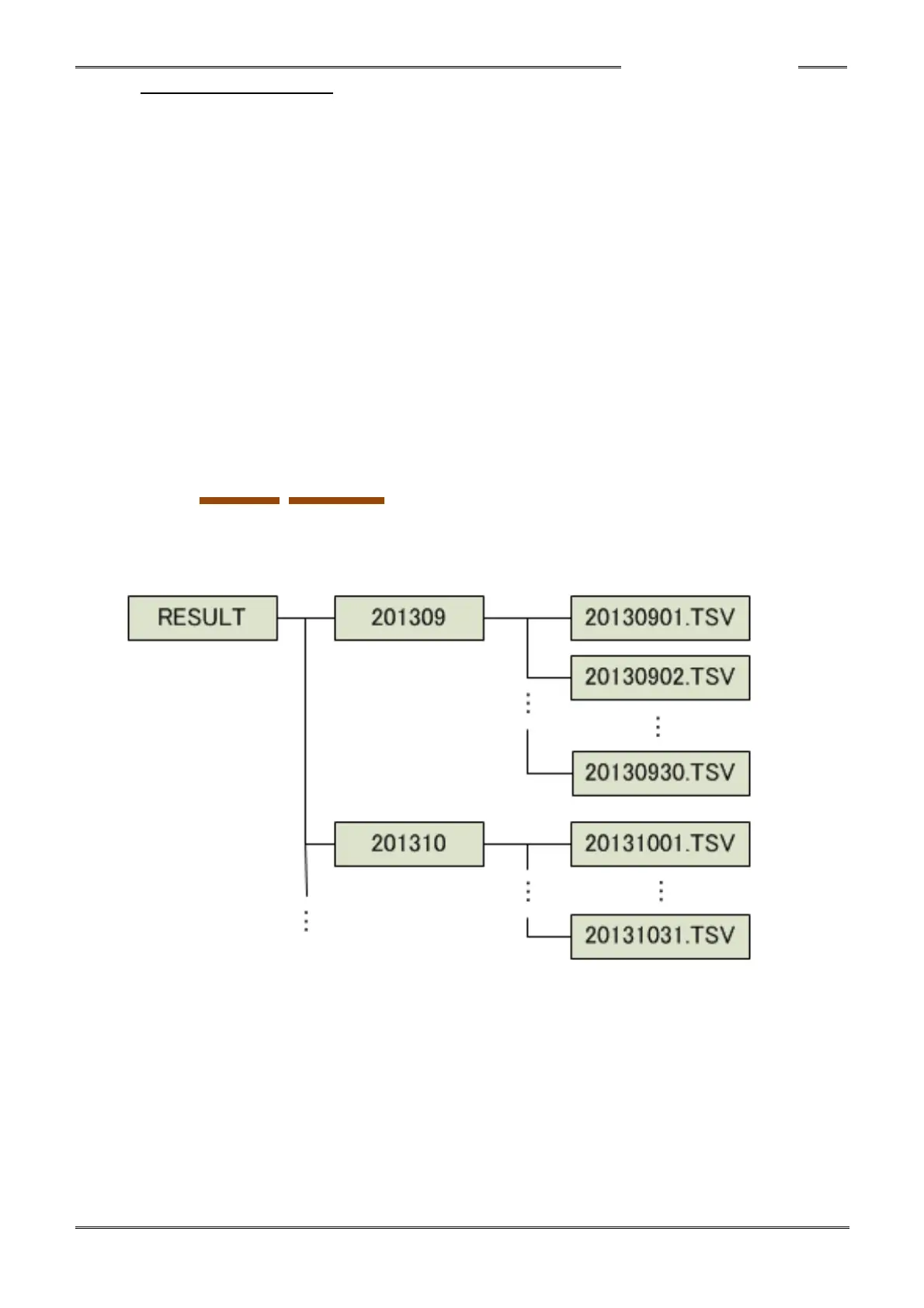
The fastening results are stored in the “RESULT” folder, which is generated automatically. Inside
the “RESULT” folder, folders, each with a name expressing the year and month, such as “201309,”
are generated automatically and a folder is automatically generated in the manner of “201310,”
“201311,” “201312,” etc., at each turn of the month or year.
Inside the “201309” folder, the following file is stored at the end of the fastening operation.
RESULT/YYYYMM/YYYYMMDD.TSV (TSV format file)
Year/Month Year/Month/Day
The fastening results for a single day are stored in each file. When the date changes, a new file is
automatically generated in the same folder.



 To Next Page