Chapter 9 Fieldbus I/O Interfaces
PAGE 9-34
Fieldbus Message Setting (PLC → HFC Controller)
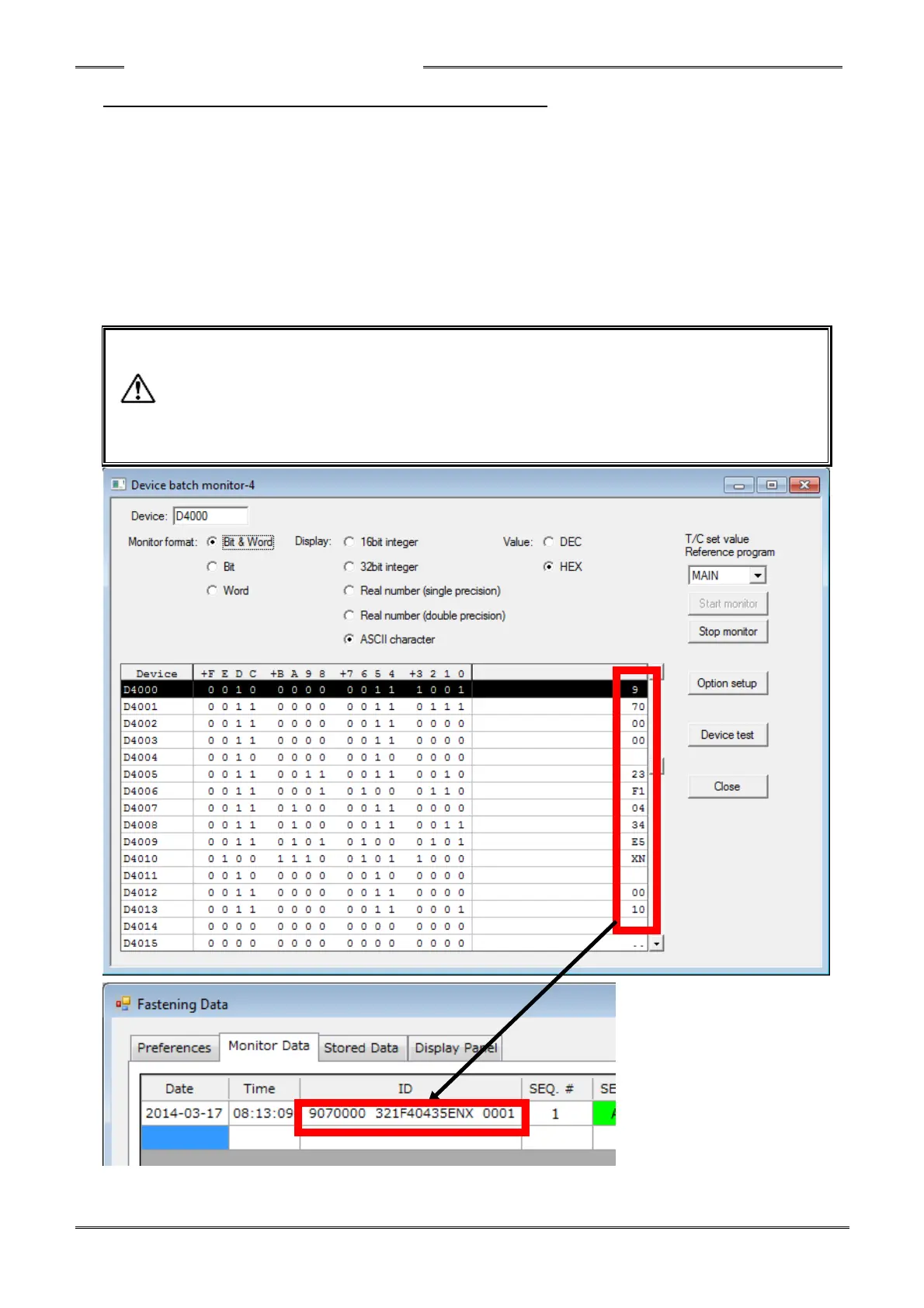
1. Contents of Sent Data: ASCII Data
(Refer to 3 below regarding the actual sent data results.)
2. Max. message length: 16words/32 bytes
(As configured in HFC3000 Software)
3. Input Example
Select ASCII letters to send message information from the PLC to the HFC Controller for PC communication
and I/O (PLC) control. (Only ASCII Data can be recognized by FEC controller)
The message information sent from the PLC to the HFC Controller will be reflected in the part ID data in the
HFC3000 User Console and the RS232C Data port output.
- The standard set value for the ID input data is 32 bytes (16 words). Be careful because
even when a value beyond this is set, only the first 32 bytes are saved in the fastening
result memory storage of the Controller.
- Do not use the following characters.
“∖”: backslash (yen mark), “/”: slash,
“:”: colon, “*”: asterisk, “?”: question mark,
“””: double quotation, “<” “>”: inequality signs, “|”: pipe sign



 To Next Page