FT-70 Fill Level Inspector Service Manual
6-30
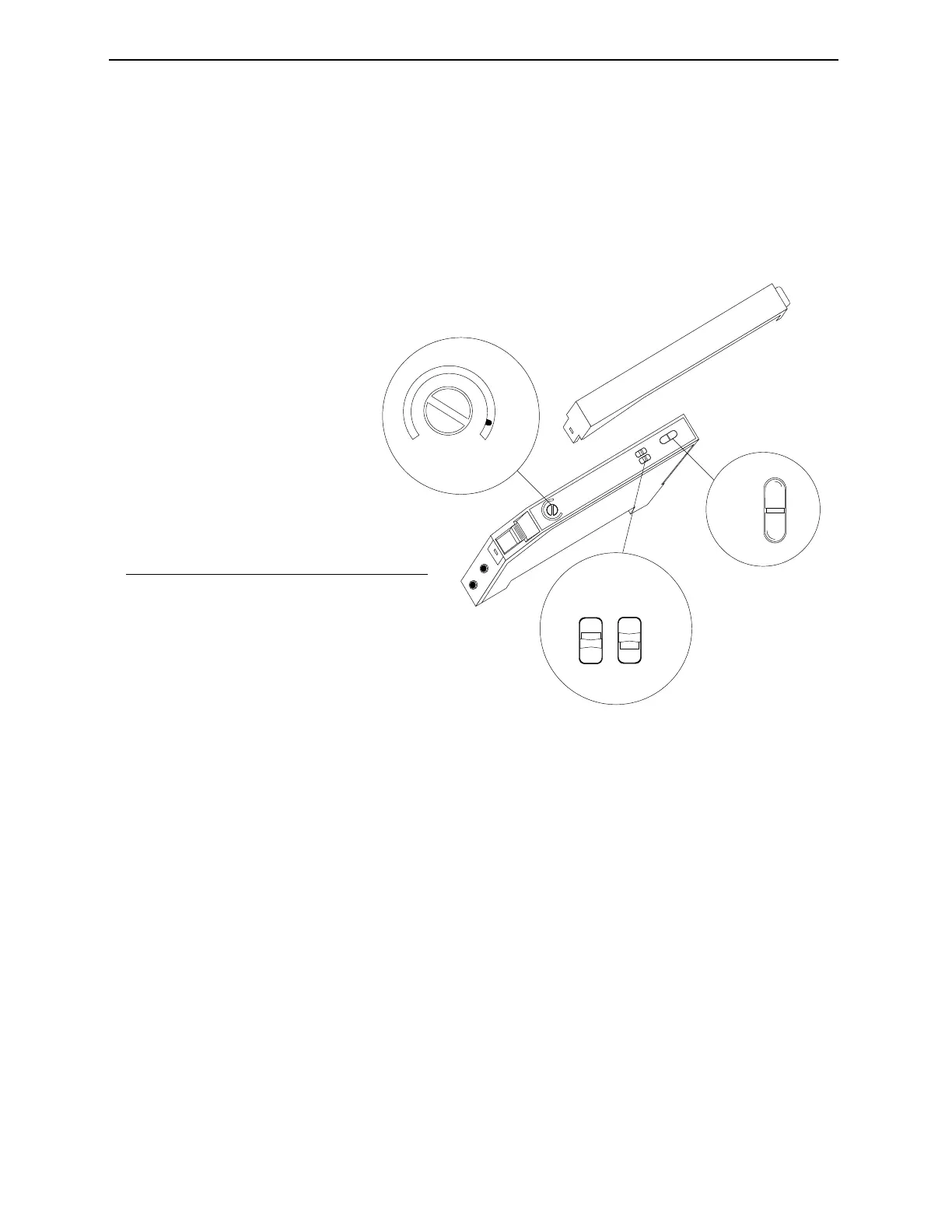
Calibrating the Upstream Inspection Trigger
1. Clear the Upstream Inspection Trigger beam of any containers
so that it is not blocked.
2. Remove the amplifier cover and set the Operation Mode
Selector to Dark (D).
Figure 6-2. Calibrating the Upstream Inspection Trigger Amplifier.
3. Set the Sensitivity Adjustment to minimum by turning it
counterclockwise until it stops. Notice the gauge needle moves
to reflect setting level and the red Operation Indicator LED is
on.
4. Slowly turn the Sensitivity Adjustment clockwise until the red
Operation Indicator LED is off. You want the sensitivity
adjustment to be on the edge of when the Operation Indicator
LED turns off. This establishes the minimum sensitivity point.
5. Verify the setting by using a production container to block the
beam and then remove it. The Operation Indicator should be
off when the container is blocking the beam and on when the
beam is not blocked.
6. Replace the amplifier cover.
MAX
SENS
STB
OUT
MODE TIMER
L
D
NON
OFD
1
2
3
4
No. Description
1 Sensitivity Adjustment
2 Operation Mode Selector = D
Timer Operation Selector = NON
3 Stable Operation Indicator LED (green)
Operation Indicator (red)
4Cover
Industrial Dynamics Company, Ltd. © 40256-0600



 To Next Page