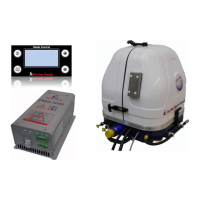
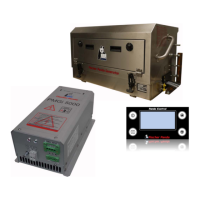
Remote control panel Panda iControl
Panel_iControl_eng_modi.fm Kapitel 9: Remote control panel Panda iControl - Seite 117
Fischer Panda Datenblatt / Datasheet
9.5.4 Start of the generator
1. Open the fuel valve (if necessary)
2. Close the battery switch (if necessary)
3. Push "on/off" button (turn iControl on).
Panel comes up with „Welcome“ screen
4. Push the „start/stop“ button to switch from „Welcome“ to the „Main“ screen
Screen switch to „Main“ screen
5. Push „start/stop“ button
The Engine pre-glow and start. It is not allowed to run the starter motor for more than 10 sec. If the generator
does not start within this time, the start is blocked for 20 sec.
Please check if the fuel is present at the generator, before you try to start the generator again. (and if the fuel is
siutable for the temperature range)
6. Switch on the load when the nominal output of 230V / 50Hz is reached at the PMGi. See “Automatic start” on
page 117.
ATTENTION:
If there is difficulty in starting - close the seacock ( Panda
Marine Generators only)
If the generator engine does not start immediately and further start attempts are necessary, then the seacock MUST
be closed (i.e. for ventilating the fuel lines etc.) The cooling water impeller pump turns automatically and draws coo-
ling water as long as the motor is turning. If the diesel motor is running, the cooling water is blown out by the exhaust
system gases. The cooling water cannot be pressed through the exhaust as long as the diesel motor does not run at
sufficient speed. This leads to severe motor damage.
Open the seavalve as soon as the generator is started.
9.5.5 Stop of the generator
1. At higher temperatures (over 25°C) the generator should run 5 min. after the load has been switched off in order
to cool down)
2. Push the „start/stop“ button to switch off the generator.
3. Close additional switches (battry, fuel ect.).
4. Push the „on/off“ button to turn off the iControl“.
9.5.6 Automatic start
The iControl has an „automatic start“ option at clamp RZL and Gnd. Close the connection of these clamps to start
the generator. Open it to stop the generator.
If you use this option make sure that the load is connected to the PMGi after the output has reached the nominal
230V / 50Hz and not to overload the PMGi (some electronic devices - such like air conditions - need an higher star-
ting current. You may use a relay which connects the load at 230V.
To activate the automatic start:
1. Turn the panel on („on/off“ button)
2. Switch to „Main“ screen („start/stop“ button)



 To Next Page