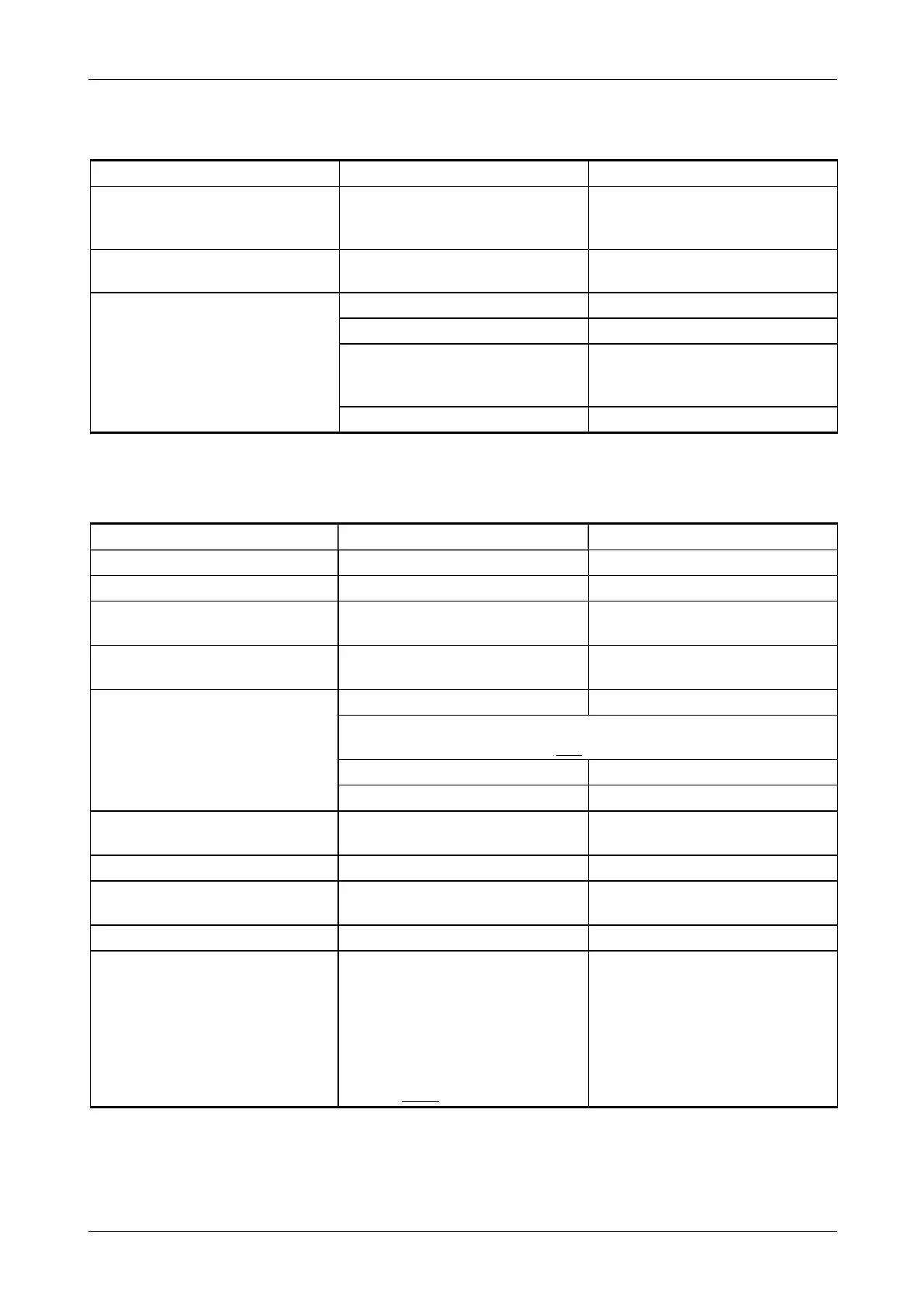
6.3 THE DISPLAY SCREEN IS BLANK
Possible cause Check Corrective action
Loose CAN cable
(communication cable
between screen and controller)
Check both ends of cable for
security
Tighten if loose
Blown fuses Check fuses Replace if blown
Check fuse security
Battery Check battery terminals Tighten if loose
Check battery is charged Charge if flat
Check red and black battery
cables at the engine
connection
Tighten if loose
Check battery condition Replace if damaged
6.4 THE FEED ROLLERS ARE NOT TURNING
Possible cause Check Corrective action
Lack of hydraulic oil Check hydraulic oil level Top up if required
Loose belts Check belt tension Tension correctly
Low RPM Check throttle Ensure throttle is in the max
position.
Damaged shaft or coupling at
feed rollers
Check feed roller shaft and
coupling
If faulty, contact repair agent
Speed sensor Check sensor for damage Replace if damaged
When the ignition is on and there is metal in front of the sensor,
the orange indicator light is ON
Check sensor gap Adjust to approx. 3 to 4 mm
Check plug security Refit or replace as required
Valve block solenoid plugs Check for function, security
and condition
Refit or repair
Flow control valve Check valve is free to rotate Set the dial to 5
Damaged shaft or coupling at
hydraulic pump
Check hydraulic pump
Check coupling
If faulty, contact repair agent
E-stop button depressed Check E-stop button Reset E-stop button
Faulty stop bar or hopper tray
sensor
Check stop bar sensor
Check hopper tray sensor
Perform a function check.
When the ignition is on and
there is metal in front of the
sensor, the orange indicator
light is OFF
Replace sensor if damaged or
not working
Chapter 6: Troubleshooting
Redwood Global Ltd - ST6P
Operator and Maintenance Manual
111 12-00-001 v4.0



 To Next Page