222
Playback and the Playback Menu
7
The Playback Display
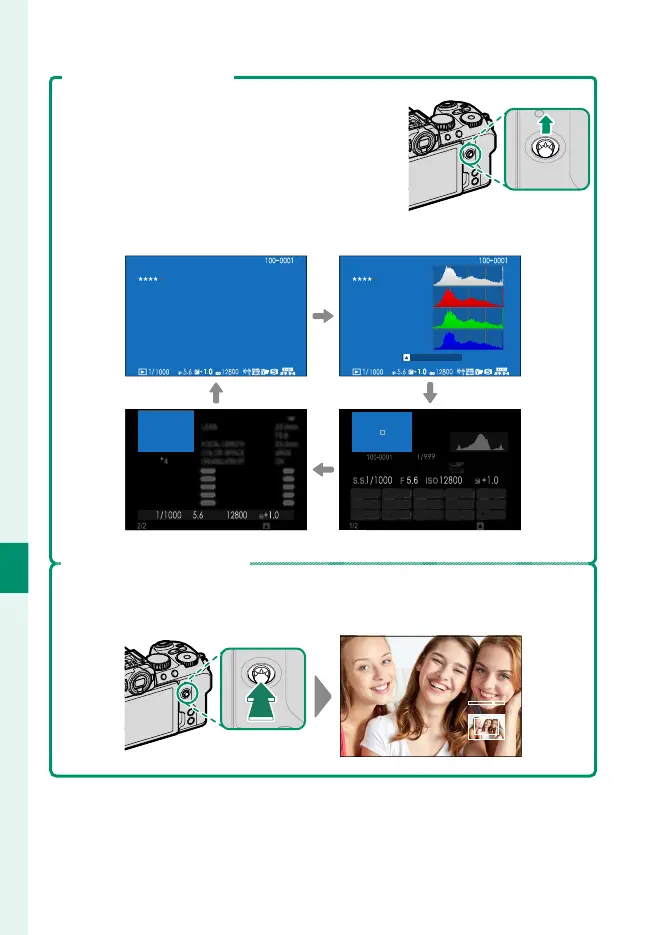
Viewing Photo Information
The photo information display changes each
time the focus stick (focus lever) is pressed up.
Basic data Info display 1
1/99912/31/2023 1/99912/31/2023
NEXT
LENS
23.0
mm
F
5.6
FOCAL LENGTH
23.0
mm
COLOR SPACE sRGB
LENS MODULATION OPT.
ON
S.S
F ISO
BACK
NEXT
12/31/2023 12:10 AM
Info display 3 Info display 2
Zooming in on the Focus Point
Press the center of the focus stick (focus lever) to zoom in on the focus
point. Press again to return to full-frame playback.













 To Next Page