334
Peripherals and Optional Accessories
11
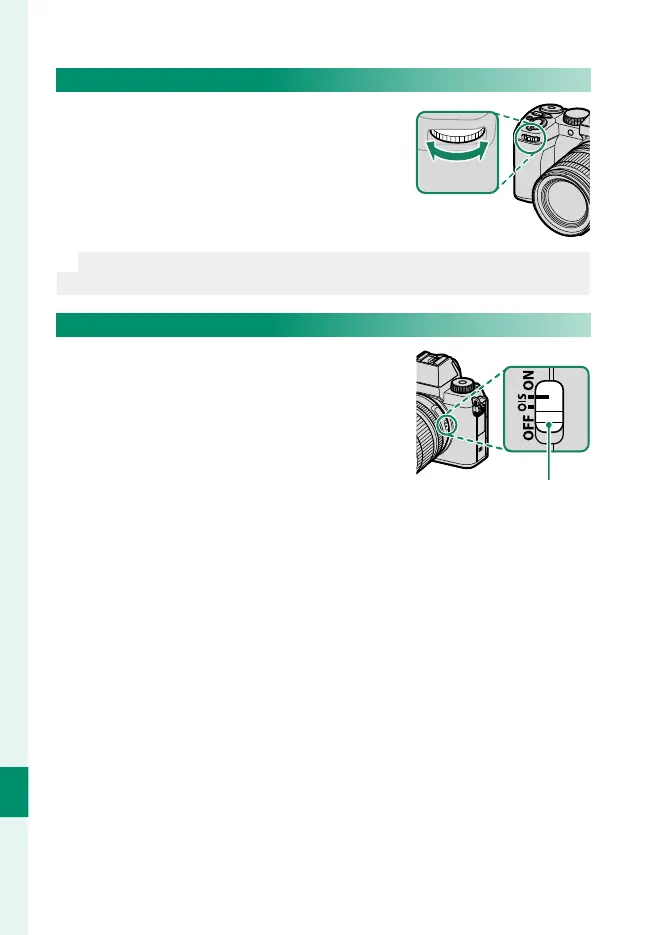
Lenses with No Aperture Rings
Aperture can be adjusted using the front
command dial in modes A (aperture-pri-
ority AE) and M (manual).
N
Aperture control can be reassigned to the rear command dial using
D BUTTON/DIAL SETTING> COMMAND DIAL SETTING.
Lenses with O.I.S. Switches
If the lens supports optical image sta-
bilization (O.I.S.), the image stabiliza-
tion mode can be chosen in the camera
menus. To activate image stabilization,
slide the O.I.S. switch to ON.
O.I.S. switch













 To Next Page